For digital professionals, sustained success is inextricably linked to physical stamina. While high-volume, high-intensity work is often rewarded, the physical demands of typing all day levy a hidden tax on the body, manifesting acutely as wrist and back pain.
This discomfort, rooted in poor posture and repetitive strain, directly threatens focus and productivity, impacting the complex musculoskeletal structures of the upper extremities and spine. Mastering prevention is not merely a comfort issue; it is a calculated risk management strategy essential for maintaining peak professional output and ensuring career longevity.
Contents
Why Your Body is Your Most Valuable Asset
1. The Critical Threat: Understanding Repetitive Strain Injury (RSI)
The scale of occupational injury related to continuous computing is staggering. According to Texas Department of Insurance, repetitive Strain Injuries (RSI), often broadly categorized as cumulative trauma disorders, present a monumental financial burden, resulting in an estimated $100 billion lost annually in productivity and indirect expenses across the United States.
For the high-volume digital professional, this economic toll underscores that physical health directly determines sustained earning potential and career stability.
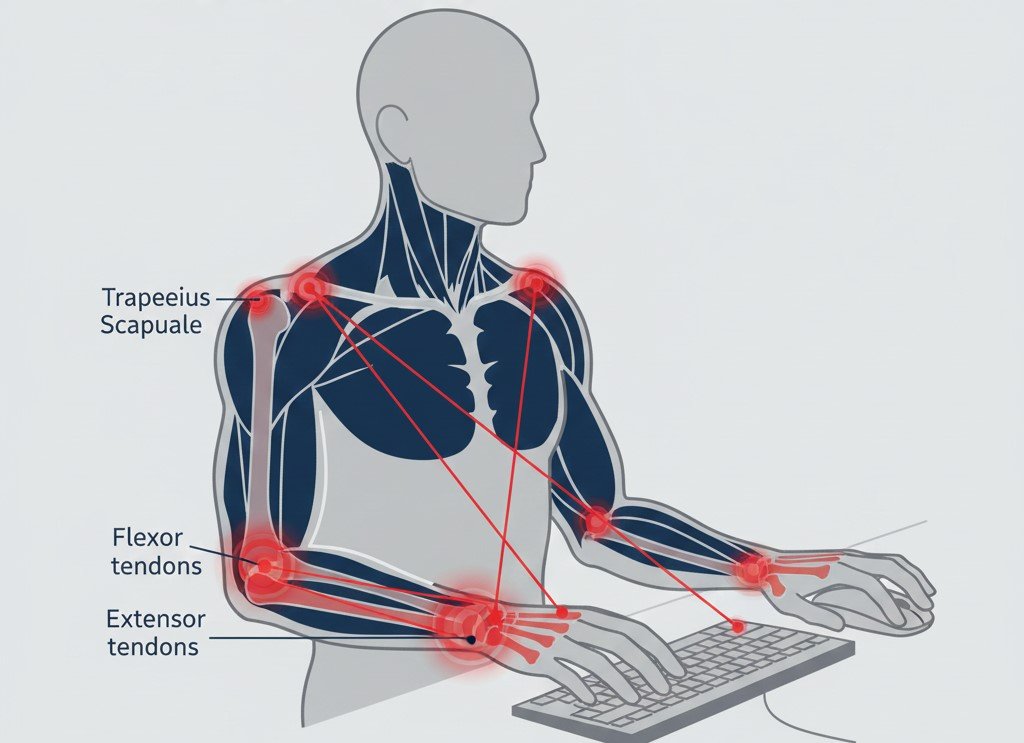
RSI is defined as an injury resulting from repeating the same motion or physical activity over an extended period, which ultimately places undue strain on muscles, ligaments, and tendons. Although often associated with the hands, RSI encompasses injuries affecting various areas, including the fingers, wrists, elbows, arms, shoulders, upper back, and neck.
The professional work environment—specifically prolonged computer use—is characterized by high exposure to the five primary factors that quantify musculoskeletal physical stress: intensity of exertion, hand/wrist posture, duration per exertion, frequency of exertion, and the total duration of the task per day.
Since the core professional workload often demands high frequency and high intensity (measured in keystrokes per minute), controlling the remaining variables—optimizing posture and minimizing continuous exertion duration—becomes the mandatory path to reducing the overall “dose of daily exposure”.
To effectively manage and prevent these issues, it is essential to distinguish between the most prevalent conditions that threaten professional function:
- Tendonitis (Tenopathy): This condition involves inflammation and localized pain, typically occurring in the elbow, forearm, wrist, or hand. It results from the overuse and micro-trauma incurred by muscle-tendon units during prolonged or strenuous activity.
- Carpal Tunnel Syndrome (CTS): CTS represents a specific nerve compression syndrome where the median nerve, passing through the narrow carpal tunnel in the wrist, becomes compressed. Symptoms classically manifest as numbness and tingling in the thumb, index finger, middle finger, and the thumb side of the ring finger. Pain in the hand and fingers is also common, frequently worsening at night. Ignoring CTS can lead to long-term consequences, including nerve damage, weakness, and eventual muscle atrophy at the base of the thumb.
- Upper Trapezius Myalgia: This manifests as chronic pain and tension in the neck and shoulders. It is often triggered by poor postural habits, such as slouching or hunching over a desk, and is significantly exacerbated by psychological and occupational stress. These factors create muscle imbalances that lead to the formation of painful trigger points.
2. Biomechanics of Prevention: Why Neutrality is Non-Negotiable
The fundamental principle governing all typing pain prevention strategies is achieving and maintaining the neutral position. The body’s structures, including tendons, muscle sheaths, and nerves, function optimally when the joints are kept in alignment, minimizing compressive and tensile forces. This means the fingers, wrists, arms, and shoulders must be positioned as neutrally and relaxed as possible.
Neutral wrist posture—according to Cleveland Clinic—is defined as keeping the wrist straight, avoiding excessive bending upward (extension) or downward (flexion), and reducing awkward twisting (ulnar/radial deviation or forearm pronation).
When the wrist is bent upward, the angle of bend increases the contact stress and irritation on tendons and their sheaths, which is particularly damaging during high-repetition keying tasks. Furthermore, research has consistently shown that addressing pain in the extremities necessitates a holistic view of the body.
Professionals who receive comprehensive care addressing their overall posture and body tension, such as through specialized treatments, often report decreased hand and wrist pain, improved grip strength, and enhanced productivity. Therefore, optimal typing posture must begin with the entire body, not just the hands.
ALSO READ: How to reduce low back pain at work.
Phase 1: Engineer Your Environment – The Gold Standard Ergonomic Setup
A high-achieving professional must recognize that the workspace itself is infrastructure, requiring engineering precision to support long-term output. The goal of ergonomic setup is to create an environment that minimizes the physical effort required to maintain a neutral, comfortable posture.
1. The 90-90-90 Postural Mandate: A Body-Wide System
The foundation of effective ergonomic setup is the 90/90/90 rule, a standard framework that dictates the ideal neutral position across the major joints to minimize strain. Adherence to this framework ensures proper spine alignment and minimizes strain on supporting muscles.
- Trunk Upright, Hips at 90°: The professional should sit with an upright trunk, avoiding slouching or excessive leaning, so that the hips form a 90-degree angle with the torso. Utilizing an ergonomic chair with robust lumbar support promotes healthy spinal curves, which mitigates long-term back pain that often stems from years of faulty posture.
- Knees at 90° and Feet Flat: The knees must be bent at approximately 90 degrees. Crucially, the feet should rest flat on the floor or a dedicated footrest. This promotes proper weight distribution, relieving undue pressure on the legs and lower back.
- Elbows at 90°: The upper arms should be positioned comfortably at the sides, with the elbows forming a 90-degree angle, or a slight range between 90 and 110 degrees. The forearms must remain parallel to the floor, establishing the required height for the desk surface or keyboard tray.
Once the core body is correctly positioned, attention must turn to the cervical spine, which is highly susceptible to strain. The monitor must be positioned so that the top of the screen is at or slightly below eye level.

Furthermore, the screen should be placed roughly an arm’s length away from the body. This seemingly minor adjustment is vital; it ensures the maintenance of a neutral head posture, effectively countering the forward head carriage that drives chronic upper trapezius and neck pain.
2. Quantitative Adjustments: Calculating Your Optimal Height
Since ergonomic needs vary drastically based on individual physiology and work requirements, relying on generalized desk heights is inadequate. The professional must customize the workspace based on their specific body measurements, even accounting for the height added by the footwear worn during the workday.
The ideal desk height is calculated to ensure the elbows maintain the required 90 to 110-degree angle when your hands are on the keyboard.
Calculating Optimal Desk Height:
For seated work, formulas can be used as a starting point. For instance, the minimum sitting desk height (in inches) can be calculated using the formula: Based on OminCalcuator, the minimum sitting desk height is calculated using the formula 0.4739 × height − 6.678 (height in inches), and the maximum sitting desk height is determined using the formula 0.5538 × height − 9.4270 (height in inches).
For professionals utilizing adjustable standing desks, the standing height also follows the 90-degree elbow rule. According to Logic Fox, a standing desk is typically positioned between 35 and 47 inches, depending on the user’s height. It is important to alternate frequently between sitting and standing, and when standing, the knees should remain slightly bent in a relaxed stance, avoiding leaning or locking the joints.
The table below illustrates reference points derived from these quantitative methods for various heights:
Table 1: Ideal Workstation Setup Dimensions (Calculated for Neutral Posture)
| User Height (ft/in) | Height in Inches (Approx.) | Ideal Sitting Desk Height Range (in) | Ideal Standing Desk Height Range (in) | Monitor Top Edge Height (in) |
| 5′ 0″ | 60 | 22.1 – 24.3 | 36.6 – 38.6 | 39 – 41 |
| 5′ 7″ | 67 | 25.4 – 27.6 | 40.5 – 43.5 | 43 – 45 |
| 6′ 2″ | 74 | 28.7 – 30.9 | 44.5 – 48.4 | 47 – 50 |
Note: Calculated ranges ensure elbows rest at 90-110°. Always fine-tune to maintain a neutral (straight) wrist posture while typing.
3. The Wrist Rest Paradox: Maintaining Active Neutrality
The wrist rest is perhaps the most misunderstood piece of ergonomic equipment. When actively typing, your arms should float comfortably, and the hands should move freely, elevated above any surface.
The practice of constantly resting the wrists on a hard desk edge or a wrist rest while performing high-repetition tasks is counterproductive. Resting the wrists during active typing can potentially increase the angle of upward bend, thereby increasing the contact stress and irritation applied to the underlying tendons and nerve structures.
The consensus among occupational health experts is that wrist rests should be used only for brief rests or breaks between typing tasks, not as continuous support during input. If a rest is used, it should be integrated into an ergonomically coordinated workstation, matching the width and slope of the keyboard, and providing a soft, rounded surface to minimize pressure on the wrist. Ultimately, based on CCOHS, the primary mechanism for supporting the wrist in a neutral line is adjusting the height of the desk and keyboard itself.
Phase 2: Strategic Investment – Ergonomic Hardware for High-Volume Typing
For the ambitious professional, ergonomic hardware is not merely an accessory; it is a critical investment that yields a quantifiable Return on Investment (ROI) by maximizing sustained performance and minimizing downtime.
Research demonstrates that ergonomic products, by reducing physical discomfort, pressure, strain, and twisting, lead to higher efficiency, better quality work, and fewer sick days. This realization—that ergonomics is fundamentally good economics—should drive hardware decisions.
1. Keyboards Engineered for Natural Biology
High-volume typists benefit significantly from equipment designed to accommodate human anatomy rather than forcing the body to adapt to a standard, rectangular device.
- Split Keyframes and Natural Posture: Ergonomic keyboards often feature a curved, split keyframe that separates the keys, positioning the hands, wrists, and forearms in a more natural, relaxed posture. This design reduces the need for awkward wrist deviation and pronation, quantifiable reducing muscle activity in the upper body. For those who experience discomfort or who work long hours, switching to these devices can help manage symptoms and promote better long-term comfort.
- Proactive Prevention: Professionals engaged in intensive typing should adopt ergonomic keyboards preemptively, viewing them as proactive career insurance rather than a reactive treatment for existing injury. Mitigating strain across thousands of daily keystrokes accrues substantial long-term health benefits.
- Transitioning: If an individual transitions to a split keyboard with adjustable tenting (incline) or separation, it is recommended to start with the lowest inclination and minimal separation. Proficiency and comfort should be built up slowly before increasing the tilt or split. Furthermore, adopting touch typing and focusing on light keystrokes using all fingers further enhances efficiency while reducing repetitive strain.
2. Mousing Solutions: Eliminating Pronation and Reach
The standard mouse forces the hand and forearm into pronation (a twisting movement), which contributes significantly to strain and discomfort. Alternative input devices are essential for achieving continuous neutrality.
Vertical Mice and Trackballs:
Vertical mice are designed with a classic “handshake” grip, immediately placing the forearm in a more neutral resting posture and reducing the twisting inherent in traditional mousing. Similarly, trackballs, often integrated directly into advanced split keyboards, completely replace the need for wide, repetitive arm movements. Positioning the mouse at the same level as the keyboard and close to the body prevents overreaching and minimizes extraneous wrist motion, further reducing strain.
The Laptop Workflow Fix:
For professionals who utilize a laptop as their primary computer, the conventional setup presents fundamental ergonomic challenges, as noted by GoldTouch. The integrated keyboard and trackpad force the user to hunch over to view the screen, leading to forward head posture and chronic neck strain. Full-time users must implement a multi-component solution:
- Place the laptop on a stand or docking station to elevate the screen until the top is at eye level.
- Utilize a separate, external keyboard and cursor positioning device (mouse or trackball).
- Follow the general postural guidelines for working at a computer workstation, ensuring the separate keyboard is placed at elbow level.
Phase 3: The Movement Mandate – Active Prevention and Corrective Action
Even the most meticulously engineered workstation is insufficient if the professional remains seated in a static position for prolonged periods. Sustained physical efforts, even seemingly minor ones, cause strain. Movement is the body’s necessary intervention to restore blood flow, flush metabolic waste, and relieve static muscle tension.
1. The Science of the Micro-Break: Interrupting Static Posture
To effectively counter the chronic strain of continuous typing, the professional must actively disrupt static posture and repetitive tasks. This requires implementing frequent, brief micro-breaks, as outlined by Stanford Environmental Health & Safety.
The established frequency rule mandates taking a micro-break, lasting between 30 and 60 seconds, every 20 minutes. These short, mandatory breaks prevent sustained muscular engagement, which is critical for minimizing the risk of cumulative injury. During these breaks, you should perform light stretching at the desk or actively seek movement.
Simultaneously, ocular health must be prioritized. According to Uncaged Ergonomics, staring at a screen for hours causes eye fatigue and strain. The 20-20-20 rule should be rigorously applied: Every 20 minutes, look 20 feet away for at least 20 seconds.
Furthermore, professionals should strategically integrate movement into their workflow: rotating tasks throughout the day, standing up during phone calls, visiting a colleague instead of emailing, or positioning office equipment (like a printer) away from the immediate desk area to necessitate a short walk.
2. Targeted Flexibility Routines (Stretching)
Based on Fort HealthCare, stretching routines are designed to reduce stiffness, promote blood flow, and restore flexibility to the tight flexor and extensor muscles of the forearms. These movements should be gentle and performed hourly to achieve the best results.
Ceiling Wrist Stretch (Flexor Relief):
Extend one arm straight forward, ensuring the palm faces the ceiling. Bend the wrist downward so the fingertips point toward the floor. Use the opposite hand to gently pull the fingers toward the body until a stretch is perceived in the underside of the wrist and forearm. Hold for a few seconds and repeat on the other arm.
Palm-to-Floor Stretch (Extensor Relief):
Extend the arm straight forward with the palm facing the floor. Bend the wrist so the fingertips point toward the floor. Use the opposing hand to gently pull the fingers toward the body until the stretch is felt along the top of the wrist and forearm.
Prayer Position Wrist Stretch:
Bring the palms together in front of the chest in a prayer position. While keeping the palms in contact, gently lower the hands toward the belly button until a stretch is felt in the wrists.
Dynamic Movements:
Perform wrist circles, rotating in both directions several times. Alternate this with the hand open-and-close exercise: making a fist and holding for a few seconds, then spreading the fingers wide and holding for a few seconds.
3. Building Muscular Armor (Strengthening for Endurance)
Shoulder and neck pain are frequently rooted in weakness among the stabilizing muscles of the upper back and rotator cuff, which struggle to maintain the head and shoulders in the optimal neutral position against gravity for long periods.
Strengthening these stabilizing muscles is crucial for countering poor posture and enhancing muscular endurance.
Scapular Retraction (The Pencil Squeeze):
This is one of the most effective exercises for improving postural endurance among desk workers. The individual stands or sits upright without leaning against the chair back. Gently pull the shoulder blades (scapulae) back and down, as if attempting to squeeze a pencil between them.
The movement should be gentle and controlled. Maintain the squeeze for 5 to 10 seconds, feeling the tension between the shoulder blades. Repeat for 10 to 15 repetitions, completing 2 to 3 sets. This action directly strengthens the muscles that pull the shoulders back, opposing the common forward-slouch posture.
Isometric Shoulder Extension:
Stand with the back flat against a wall. Bend the elbow of the working arm to 90 degrees, keeping the hand straight ahead. Press the elbow backward into the wall using about half of the maximum strength, ensuring the body does not move forward. Hold for approximately 6 seconds. Repeat 8 to 12 times on each side to build rotator cuff strength and endurance.
Wall Push-Ups:
Stand facing a wall, placing the hands at shoulder height and slightly wider than the shoulders, about 12 to 24 inches from the wall. Slowly bend the elbows and bring the face toward the wall, keeping the shoulders and hips aligned. Push smoothly back to the starting position. Repeat 8 to 12 times.

An integrated approach combining these actions throughout the workday provides a complete physical defense system:
Table 2: Integrated Movement and Strengthening Schedule
| Frequency | Routine Focus | Actionable Exercise Examples | Goal |
| Every 20 Minutes | Micro-Break (30-60 seconds) | Hand Open-and-Close, Quick Eye Focus (20-20-20 Rule), Stand up/Walk | Interrupts static strain and promotes rapid blood circulation. |
| Every Hour | Movement Break (3 minutes) | Prayer Stretch, Ceiling Stretch (15s holds), Scapular Retractions (10 reps, 5s hold) | Actively relieves forearm and wrist tension; re-engages postural muscles. |
| Twice Daily | Dedicated Strengthening | Wall Push-ups, Wrist Flexion/Extension, Scapular Retractions (2-3 sets of 10-15 reps) | Builds endurance in the shoulder and forearm muscles to maintain neutral posture for longer periods. |
Phase 4: Beyond the Desk – Holistic Resilience and Pain Management
Prevention is not solely mechanical; it must incorporate systemic lifestyle factors that dictate the body’s ability to recover, including stress management, sleep quality, and hydration status. These components are crucial for managing inflammation and enhancing tissue repair.
1. The Psychological Component: Taming Chronic Stress
Workplace stressors, such as high demands, intense mental processing, and time pressure, are well-documented risk factors for chronic neck and upper extremity pain in computer workers. The physiological mechanism linking psychological stress to musculoskeletal pain is compelling.
When an individual experiences chronic stress, the long-term activation of the stress response system leads to excessive exposure to stress hormones like cortisol, writes Mayo Clinic. This sustained arousal causes muscles, particularly the large stabilizers in the neck and shoulders (the trapezius), to remain in a state of chronic tension. This chronic tension—according to Alleviate Pain Clinic—drives the formation and exacerbation of painful trigger points in the trapezius.
Micro-trauma to the tendons and muscles from typing is an unavoidable consequence of high-volume work. In a healthy state, the body uses downtime to repair this damage. However, when the system is saturated by chronic stress, the associated persistent muscle tension and inflammation inhibit the normal repair process, transforming acute, recoverable mechanical strain into debilitating, chronic musculoskeletal pain.
Therefore, professionals must view stress reduction—through techniques such as mindfulness, deep breathing, or regular physical exercise—as a fundamental and non-negotiable component of their physical injury prevention strategy.
2. Sleep and Recovery: The Body’s Healing Window
Quality sleep is listed among the five major lifestyle factors that significantly perpetuate and worsen chronic pain, writes PubMed Central. The restorative period of sleep is essential for general health, tissue repair, and effective pain management.
For professionals struggling with Carpal Tunnel Syndrome, symptoms are frequently most troublesome at night, often waking the individual because they bend their wrists involuntarily during sleep. A simple, non-invasive intervention is wearing a wrist splint at night. This practice prevents the awkward wrist flexion that compresses the median nerve, improving the quality of nocturnal rest and facilitating recovery.
Furthermore, optimizing sleep habits—maintaining consistent bedtimes, avoiding screens before rest, and ensuring a dark, quiet environment—supports the body’s overall capacity for repair.
Proper sleep relies, in part, on maintaining hydration. According to Sleep Foundation, dehydration can severely impact the sleep-wake cycle, making it harder to fall asleep and resulting in greater fatigue upon waking. Therefore, ensuring adequate fluid intake throughout the day supports both overall recovery and sleep quality.
3. Hydration
Proper hydration is foundational for muscle function, flexibility, and the effective reduction of pain. Water constitutes a significant portion of muscle and nerve tissue and plays a crucial role in maintaining fluid balance necessary for joint lubrication.
Dehydration has several negative effects directly relevant to typing-related pain. It contributes to increased generalized inflammation, including in the joints. Furthermore, inadequate fluid levels can cause muscles to become tense and highly prone to spasms. This muscle tension contributes to localized musculoskeletal pain, including headaches, neck pain, and back pain, often compounding the strain caused by typing posture.
In severe cases, dehydration can impair the proper functioning of the nervous system, potentially exacerbating nerve-related conditions such as neuropathic pain. Professionals must prioritize consistent water intake throughout the day to ensure optimal physiological resilience.
Conclusion on How to Prevent Wrist and Shoulder Pain
The high-performer recognizes that their physical body is the ultimate infrastructure supporting all professional endeavors. Failure to protect this asset results in a quantifiable loss of performance, focus, and longevity.
The proactive prevention of wrist and shoulder pain must be treated as a crucial Key Performance Indicator (KPI) for sustainable career excellence.
Success demands immediate, sustained action across four integrated phases:
- Engineer Your Environment: Use the 90-90-90 rule and height calculation formulas to establish a quantitatively precise workstation setup. Ensure the monitor is at eye level to protect the cervical spine, and keep the keyboard and mouse positioned for pure wrist neutrality.
- Strategic Investment in Hardware: Acquire ergonomic tools, such as split keyboards and vertical mice, recognizing that this hardware is an essential economic investment in avoiding lost productivity (estimated at $100 billion annually).
- Implement the Movement Mandate: Strictly adhere to the 30- to 60-second micro-break every 20 minutes, interrupting static posture and promoting essential blood flow. Dedicate time twice daily to strengthening exercises, particularly scapular retractions, to build the muscular endurance needed to maintain optimal posture.
- Master Holistic Resilience: Actively manage and reduce chronic stress to prevent muscles from remaining tense and inhibiting tissue repair. Prioritize quality sleep and maintain consistent hydration, as these systemic factors determine the body’s ability to recover from daily mechanical micro-trauma.
You should always maintain an objective awareness of your pain levels. If pain is severe, if it interferes with daily activities, or if symptoms persist or worsen over time, immediate consultation with a physical therapist or healthcare provider is essential.
Pain intensity levels exceeding 5 (on a 0-10 scale) mandate intervention. Experts can provide individualized ergonomic assessments, manual therapy, and specialized strengthening routines necessary to restore function and ensure that a long, productive career remains viable. Protect your body; it is the most critical infrastructure supporting your ascension.
Take Action
Evaluate your typing habit against the findings in this research and see how you can adjust to avoid wrist and shoulder pain.
Join the Career Intelligence Community
Get exclusive data insights, downloadable tools, and mindful career strategies delivered monthly — no fluff, no spam.