Low Back Pain (LBP) has evolved from a common nuisance to a public health epidemic of staggering proportions, particularly affecting sedentary workers who spend prolonged hours at a desk. This condition often becomes chronic, significantly compromising health and reducing productivity.
To effectively combat back pain at work, professionals must move beyond simple, generalized advice and implement targeted, evidence-based ergonomic strategies—or “hacks”—that integrate engineering solutions with behavioral and physiological protocols.
In Summary
Contents
Introduction: The Global Crisis of Workplace Back Pain
1. Quantifying the Epidemic: The Financial and Human Cost of LBP
The global prevalence of LBP reached an estimated 629 million cases in 2021, reports Frontiersin. This staggering figure represents an increase of 20.04% since 2010, confirming that despite modern advances, LBP remains a rising health concern. Low back pain is globally recognized as the leading cause of disability.
The economic consequences of this epidemic are immense, extending far beyond routine treatment costs. According to PubMed, occupational ergonomic factors (OEF) alone contributed to $216.1 billion of economic losses worldwide. Notably, high-income countries absorb over 70% of this global economic burden.
When examining workplace injuries in the United States, musculoskeletal disorders (MSDs) are identified as the principal source of compensable injuries, resulting in massive operational disruptions. These injuries—according to WorkCare—result in significant downtime, with incident rates leading to 502,380 days away from work in U.S. private industries. The median time lost due to these claims is substantial, requiring 14 median days off work.
The true financial pressure, however, often lies in the hidden costs of LBP. The indirect cost of a single work-related strain injury—stemming from personnel reallocation, training, and productivity loss—is estimated at $35,225. This figure is slightly higher than the direct costs, which include medical treatment and workers’ compensation, estimated at $32,023.
For an organization, mitigating these losses requires an aggressive strategic investment: a company operating on a modest three percent profit margin would need to increase sales by over $1.1 million just to cover the indirect costs of one such injury.
The climbing prevalence of LBP, despite widespread public education, demonstrates a critical disconnect. Simply telling workers to adopt better postures (an administrative control) proves insufficient when addressing the root causes. The significant financial consequences driven by productivity losses necessitate prioritizing engineering controls—physically changing the work environment—as the foundation of any effective solution.
2. The Ergo-Hacks Promise: Defining Evidence-Based Intervention
Medical consensus strongly advocates for non-drug, non-surgical approaches, specifically promoting physical and psychological therapies, as the first-line treatment for LBP. This report frames comprehensive ergonomic adjustment not as a luxury or a minor wellness benefit, but as a mandatory physical therapy intervention integrated directly into the work setting.
The most effective approach, according to occupational safety hierarchies, involves implementing Engineering Controls. An ergonomic chair or a sit-stand desk physically changes the work environment to mitigate risk, making it inherently more powerful than relying solely on administrative controls (like mandated breaks) or behavioral controls (like simple posture correction). The hacks presented here combine these powerful engineering controls with necessary behavioral shifts to create a resilient, pain-free working structure.
Biomechanical Roots: Dissecting the Anatomy of Desk-Related Pain
Effectively reducing workplace back pain begins with accurately identifying the mechanical and biological mechanisms that cause it. The problem is complex, stemming from a combination of static loading, muscle atrophy, and psycho-physiological stress responses.
1. Static Posture: The True Antagonist to Spinal Health
The narrative that sitting inherently causes LBP is overly simplistic. Research suggests that sitting by itself does not necessarily increase the risk of low back pain. The true antagonist is the combination of factors: sitting for more than half a workday combined with awkward postures. This combination significantly increases the likelihood of developing LBP or sciatica, as noted by F1000Research.

Awkward posture refers not only to slouching but also to maintaining continuous, inflexible positions for extended periods. This includes static sitting, prolonged stooping, bending, twisting, or reaching while seated. When the body is held in a singular, non-neutral position, the musculoskeletal system experiences “static load,” which leads to muscle fatigue, ligament creep, and eventual discomfort.
Intradiscal Pressure (IDP) Clarified
The conventional understanding often held that sitting uniformly increases intradiscal pressure (IDP) relative to standing. While some analysis indicates sitting does induce a significantly higher IDP on the lumbar spine than standing in healthy discs, more recent studies offer a nuanced perspective. They indicate that IDP in sitting is often similar to standing, particularly in subjects with pre-existing degenerated discs.
This complexity reveals an important mechanical principle: if IDP itself is not the uniform driver of pain, the problem must be the static endurance failure of the surrounding muscles and connective tissue.
The constant, unchanging compression and shear forces experienced during prolonged static sitting cause the spinal support structures to fatigue and lose stability, leading to pain and discomfort. Therefore, the focus must shift from merely avoiding sitting to ensuring postural variability and mechanical support that minimizes this static loading.
ALSO READ: How to prevent wrist and shoulder pain when typing
2. The Desk-Worker’s Musculoskeletal Syndrome: Hip-Spine Disconnection
Prolonged sitting creates a cascade of musculoskeletal imbalances that directly translate into low back pain. These imbalances are focused on the core stabilizing structures—the hips and glutes.
Tight Hip Flexors
According to Orthopedic One, spending hours in a seated position maintains the hip flexor muscles in a constantly shortened state. Over time, this results in chronic tightness. This tightness restricts the pelvis’s normal range of motion and forces the lumbar spine to overcompensate for any movement, creating instability and transferring strain to the lower back.
Gluteal Amnesia (Dead Butt Syndrome)
Simultaneously, the gluteal muscles (gluteus maximus and medius), which are essential for stabilizing the pelvis and supporting the lumbar spine, weaken or “forget” how to activate. This condition, colloquially termed “dead butt syndrome,” as reported by Michigan Medicine causes functional instability and requires the surrounding muscles in the lower back and hamstrings to take on extra load.
This compensatory straining is a primary cause of non-specific LBP. Interestingly, this functional weakness can impact even physically fit individuals who exercise regularly but fail to incorporate proper body mechanics that activate the glutes.
3. The Psychological Amplifier: Chronic Stress and Muscle Guardedness
Physical mechanisms are insufficient to explain the full spectrum of chronic LBP. The role of psychological factors, particularly chronic occupational stress, acts as a powerful amplifier of physical discomfort.
When the body experiences long-term stress, according to the American Psychological Association, the sympathetic nervous system triggers a persistent state of muscular guardedness—a reflex intended to protect the body against injury. While acute stress leads to temporary tension and subsequent release, chronic stress maintains the muscles in a constant, taut state. This ongoing tension often localizes in vulnerable areas like the shoulders, neck, and lower back. This muscle tautness can directly induce spasms and increase the incidence of LBP, particularly when combined with the sedentary nature of office work.
Therefore, any comprehensive strategy for managing LBP must simultaneously address the physical environment and the psychological well-being of the individual.
Hack 1: Engineering the Optimized Workstation (Static Ergonomics)
The most foundational ergonomic hack involves implementing engineering controls: physically configuring the workstation to achieve a neutral and mechanically supported posture. This process begins with the chair and extends outward to the monitor and peripherals.
1. Chair Calibration: Achieving the 105°–120° Spinal Sweet Spot
An ergonomic chair serves as a primary tool for eliminating the hazard of awkward posture. The goal is not rigid military posture but relaxed, supported neutrality.
The Recline Principle and Spinal Support
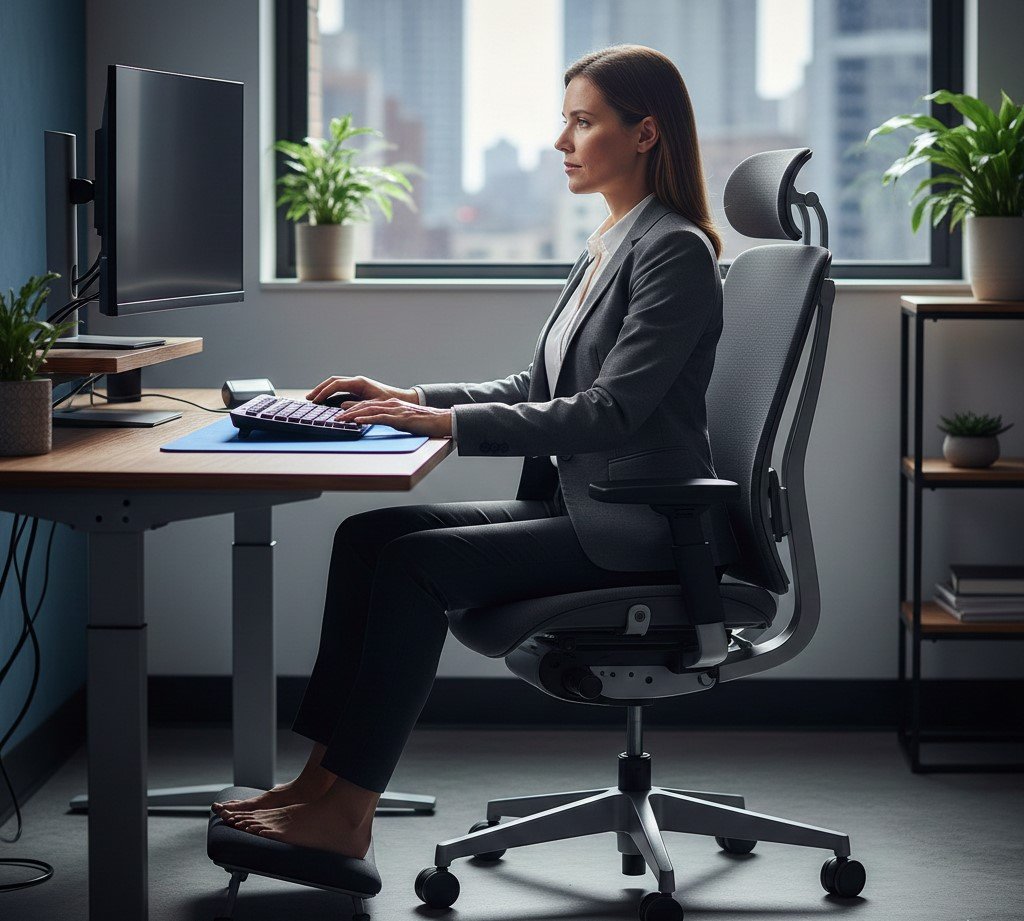
Contrary to popular belief, the optimal sitting posture is not an upright 90-degree angle. Evidence confirms that a slight recline, between 105° and 120°, reduces pressure on the spinal discs more effectively than sitting perfectly straight. This slightly laid-back position encourages the natural curve of the spine while distributing body weight more evenly across the chair.
The quality of lumbar support is critical. Proper lumbar support is designed to maintain the spine’s natural inward curve (lordosis), preventing the pelvis from tilting backward and forcing the lower back into a slumped, strained posture. This maintenance of the neutral curve crucially reduces muscular strain and minimizes compressive forces on the spinal discs.
The Necessity of Adjustability
Because every human spine has a unique curvature, lumbar support must be highly adjustable—both vertically and in depth. Based on BodyBilt publication, adjustable supports allow users to customize the fit, positioning the support exactly where the natural curve of their lower back resides, thereby achieving maximum comfort and minimizing localized strain.
Foot Support and Pelvic Stability
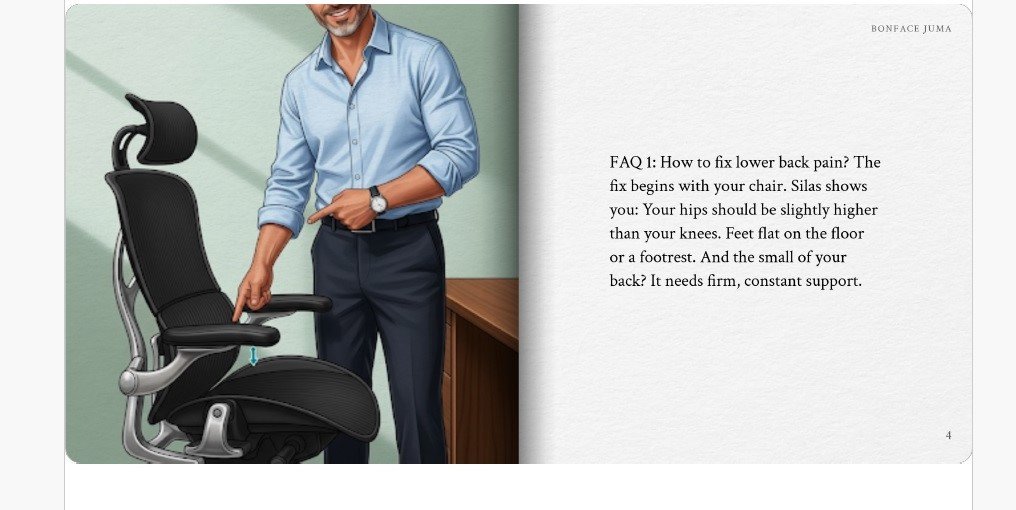
Achieving pelvic stability is essential for low back health. For optimal posture, the feet must rest flat on the floor or be fully supported by a footrest, ensuring the thighs remain parallel to the floor. Using a footrest promotes better spinal alignment by encouraging the worker to engage the chair’s backrest more completely, thereby distributing body weight and easing strain on the lower back. When adjusting the footrest, the knees should form approximately 90-degree angles, and the feet should rest naturally slightly forward from the knees.
2. Monitor Placement: Eliminating Neck and Upper Back Strain
Poor monitor placement forces the head and neck into awkward positions, transferring strain down the kinetic chain to the thoracic and lumbar spine. Proper configuration eliminates this strain source.
The monitor must be placed directly in front of the user and centered to prevent the body or neck from twisting when viewing the screen. According to Mayo Clinic, the ideal viewing distance falls between 20 and 40 inches from the eye to the screen surface—roughly an arm’s length away. Achieving this distance requires adequate desk depth, with ergonomists recommending at least 30 inches of usable surface depth.
For height, position the monitor so the top line of the screen is at or slightly below eye level. This adjustment prevents the neck from tilting up (extension) or bending down (flexion), maintaining the head in a level, forward-facing, and balanced position. If an individual primarily works from printed materials, they should place the monitor slightly to the side but keep the printed materials directly in front and as close to the monitor as possible to minimize head movement.
ALSO READ:
Top in-demand digital skills for teachers.
3. Precision for Peripherals: The Neutral Posture Zone
Keyboard and mouse positioning dictates shoulder and wrist posture, which in turn affects the neck and upper back. To minimize musculoskeletal stress, the Occupational Safety and Health Administration – OSHA insists the operator must maintain neutral postures.
Hands, wrists, and forearms should remain straight, in-line, and roughly parallel to the floor. Shoulders must stay relaxed, hanging normally at the side of the body, with elbows close to the body and bent between 90° and 120°. The work surface or chair height requires adjustment to ensure the keyboard is aligned with the elbows.
In some cases, specific peripheral adjustments are required. If the chair cannot be properly adjusted, a keyboard tray may be necessary to position the keyboard at the correct height. Furthermore, to achieve neutral wrist posture, operators may need to slightly elevate the front or back of the keyboard depending on their sitting height relative to the work surface.
For input devices, moderate evidence supports using alternative mouse designs, such as vertical, slanted, or roller bar devices, to reduce discomfort and decrease unnecessary muscle activation associated with prolonged standard mouse use.
However, professionals conclude that mouse selection must remain an individualized process based on the user’s specific needs and work demands, as there is no universal model that works for everyone.
Ergonomic Workstation Quick Reference Guide: Fixed Settings
| Component | Optimal Measurement/Setting | Back Pain Benefit |
| Chair Recline Angle | 105°–120° recline (slightly laid back). | Maximizes comfort and minimizes pressure on spinal discs compared to 90° sitting. |
| Lumbar Support | Positioned snugly into the natural curve of the lower back (must be adjustable). | Maintains neutral spinal curve (lordosis), critically reducing muscular strain. |
| Monitor Height | Top line of screen at or just below eye level. | Eliminates neck flexion/extension, preventing strain transfer to the thoracic and lumbar spine. |
| Monitor Distance | 20 to 40 inches (approx. arm’s length). | Ensures visual comfort without forward head posture or leaning. |
| Elbow Angle | 90°–120° (shoulders fully relaxed). | Prevents chronic shoulder shrugging and forearm tension. |
| Foot Placement | Flat on the floor, or fully supported by an angled footrest (90° knee angle). | Stabilizes the pelvis, ensures thighs are parallel, and encourages use of the chair’s backrest. |
Hack 2: Implementing Postural Variability (Dynamic Ergonomics)
While Hack 1 focuses on achieving the optimal static position, Hack 2 addresses the fundamental cause of strain: the lack of movement. Dynamic ergonomics involves establishing mandatory schedules to interrupt static posture and enforce postural variability, which is crucial for preventing MSD development.
1. The Sit-Stand Strategy: Enforcing Movement
Sit-stand workstations are powerful tools designed to facilitate movement, which may reduce low back pain among otherwise sedentary workers. The benefit of these desks does not stem from standing being inherently superior to sitting, but from the ability to frequently change between positions.
Because static posture—whether sitting or standing—for extended durations causes discomfort, the implementation of a strict rotation schedule is paramount. According to the Centre of Research Expertise for the Prevention of Musculoskeletal Disorders (CRE-MSD) | University of Waterloo, workers should avoid remaining in a single position, sitting or standing, for longer than 30–40 minutes at a given time.
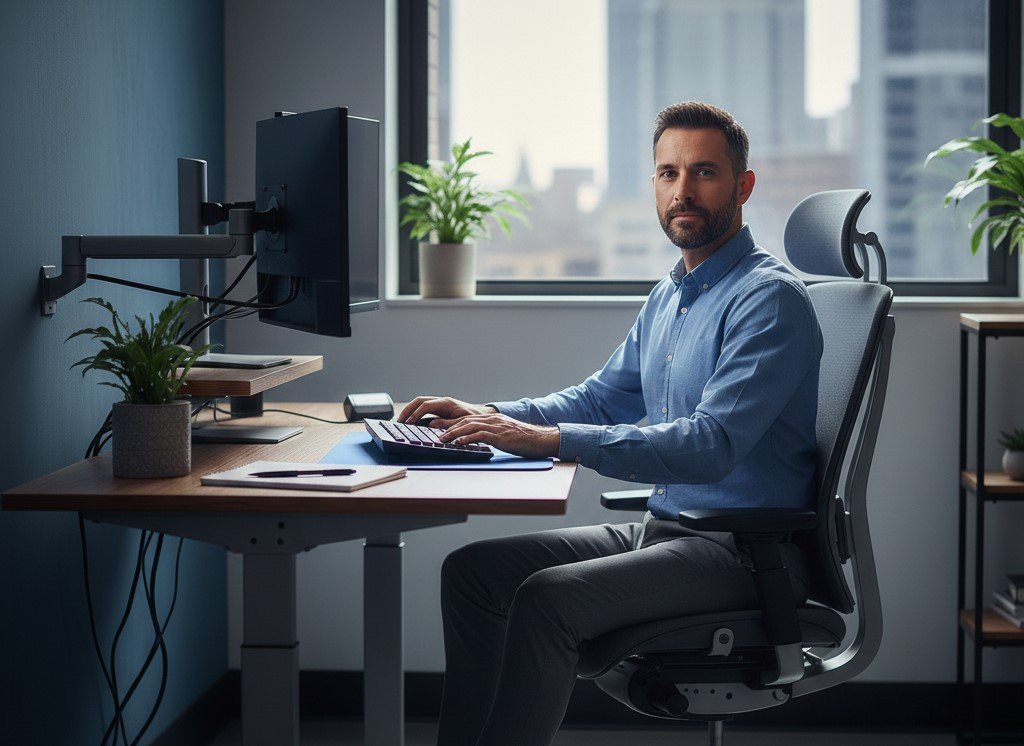
Recommended Rotation Ratios
While movement is the primary goal, a clear structure aids adoption. A 1:1 sit-to-stand ratio is a suggested starting target, meaning equal time spent sitting and standing throughout the workday.
Workers can then progress to a 2:1 ratio (40 minutes sitting, 20 minutes standing) for building endurance, or a 1:2 ratio (20 minutes sitting, 40 minutes standing) for more experienced users comfortable with standing longer. The key decision is to prioritize and adhere to the schedule rather than relying solely on the equipment being available.
Standing Posture Perfected
Standing requires its own set of ergonomic adjustments. The goal is to keep the legs, torso, neck, and head approximately in-line and vertical. When standing for more than a few minutes, workers should subtly elevate one foot by resting it on a small stool, box, or footrest. This subtle shift in weight distribution reduces pressure on the lower lumbar region. This elevated position—as advised by Cleveland Clinic— should be alternated every 5 to 15 minutes to maintain dynamic movement and prevent localized fatigue.
2. Micro-Break Mastery: The Habit of Interruption
Frequent short breaks are necessary to prevent the continuous mechanical stress associated with long task durations. These breaks interrupt the repetitive muscle activity and guarded tension that accumulates during focused work.
The 20-Minute Trigger
Implement microbreaks of approximately 30 seconds to 1 minute every 20 minutes. These microbreaks are specifically designed to refresh the eyes, upper extremities, neck, and back. By frequently resting these upstream areas, workers prevent tension in the shoulders and neck, which often transfers strain down to the lower back, exacerbating LBP.
In addition to microbreaks, schedule longer, mandatory movement breaks (1–2 minutes) every 60 minutes. Utilize this time to stand, stretch lightly, or walk a short distance to relieve physical tension and reset focus. Automated tools, such as timer apps or break reminder software, prove highly effective in prompting these necessary interruptions, ensuring that vital movement protocols are not neglected during high-intensity work periods.
3. Discrediting Fads: The Stability Ball Warning
While innovation in workplace design is encouraged, workers must exercise caution regarding unproven ergonomic fads. One common, yet misguided, trend involves replacing standard office chairs with stability balls.
Research overwhelmingly concludes that sitting on a stability ball for prolonged periods offers no ergonomic benefit over a standard chair. Studies indicate that stability balls often replicate a poor sitting position, encouraging a kyphosed (rounded) and slumped posture. Healthcare professionals should caution against stability balls as a replacement desk chair, as they fail to provide the structural support and customizable alignment needed for sustained spinal health.
Hack 3: Targeted Desk Movement and Corrective Exercise Protocols
Addressing back pain at the desk requires correcting the functional weaknesses—specifically tight hip flexors and weak glutes—that prolonged sitting creates. These hacks use targeted movement and exercise protocols to restore muscular balance and core stability. Systematic reviews confirm that general exercise alone reduces the risk of LBP by a significant 33%.
1. Mobilizing the Spine and Hips at Your Desk
Movement protocols performed directly at the workstation prevent accumulated stiffness and counteract the effects of static posture.
The Seated Cat-Cow Flow
This dynamic mobilization exercise helps increase flexibility and mobility in the thoracic and lumbar spine. Sitting upright with feet flat, inhale while arching the back, lifting the chest, and tilting the head back (Cow Pose). Then, exhale while rounding the back, tucking the chin, and pulling the belly button in (Cat Pose). Repeat this smooth, breath-synchronized flow 5–10 times to prevent stiffness and release tension.
Releasing Tight Hip Flexors
Since tight hip flexors are a major contributor to LBP, stretching these muscles must be a priority. Perform a Standing Lunge or a Kneeling Hip Flexor Stretch. Place one foot forward and gently push the hips forward while maintaining an upright back. Hold this stretch for 20–30 seconds per side. This action reverses the chronic shortening caused by sitting and reduces compensatory strain on the lower back.
Activating Glutes (Seated Figure-Four)
To address underlying gluteal tightness and prepare the hips for activation, utilize the Seated Figure-Four Stretch. Sit with feet flat, cross one ankle over the opposite knee, and gently lean forward. This stretch opens the hip joint and is a practical intervention for desk workers.
2. Restoring Deep Core Stability: Reversing Functional Weakness
Correcting Gluteal Amnesia requires specific strengthening exercises to rebuild the necessary stabilizing musculature.
The Bridge Exercise
The Bridge Exercise is essential for activating the gluteal muscles and restoring crucial core support. Lie on your back with knees bent and feet flat on the floor. While keeping the shoulders and head relaxed, tighten the abdominal and buttock muscles, then raise the hips until a straight line forms from the knees to the shoulders. Individuals should start with five repetitions per session and systematically work up to 30 repetitions to establish sustained pelvic and core stability, recommends Mayo Clinic.
3. The Underrated Power of General Preventative Fitness
While targeted stretches address immediate symptoms, general physical fitness provides long-term resilience against LBP.
Systematic reviews and meta-analyses confirm that general physical exercise is an overwhelmingly powerful preventative strategy. Exercise alone reduces the risk of developing LBP by a remarkable 33%. To achieve sustained prevention of LBP and associated disability, experts reasonably recommend a regimen combining strengthening with stretching or aerobic exercises, performed 2–3 times per week.
Corrective Movement Protocol for Desk Workers
| Exercise Type | Target Area | Actionable Protocol | Benefit/Rationale |
| Spinal Mobility | Thoracic/Lumbar Spine | Seated Cat-Cow Flow (5-10 repetitions, synchronized with breath). | Dynamic mobility; prevents static load accumulation and stiffness. |
| Hip Flexibility | Hip Flexors | Standing Lunge or Kneeling Hip Flexor Stretch (Hold 20-30 seconds per side). | Reverses the shortening of hip flexors caused by prolonged sitting, reducing low back strain. |
| Gluteal Activation | Glutes/Core | Bridge Exercise (Start 5 reps, build to 30). | Corrects Gluteal Amnesia; builds necessary pelvic and spinal stabilizers. |
| General Prevention | Whole Body | Strengthening, stretching, or aerobic exercise (2-3 times per week). | Reduces the overall risk and severity of LBP by a significant margin. |
Hack 4: The Holistic Wellness Protocol (Psychosocial and Non-Ergonomic Factors)
Advanced ergonomic solutions recognize that reducing back pain demands attention to non-equipment factors, including chronic stress, nutrition, and daily manual handling tasks.
1. Managing the Mind-Body Connection: Diaphragmatic Breathing
Chronic work stress is a significant, yet often overlooked, physical burden because it causes persistent muscle tension and guardedness, exacerbating musculoskeletal pain. Addressing this requires interventions that manage the nervous system response.
Harnessing the Diaphragm
Diaphragmatic (abdominal) breathing is a simple, profound technique for controlling the stress response, writes Better Health Chanel. Shallow, upper chest breathing is characteristic of stress, but conscious use of the diaphragm encourages physical relaxation.
To execute the technique, sit comfortably and place one hand on the abdomen. Breathe gently and regularly in through the nose and out through the mouth, allowing the breath to flow deep into the belly. The abdomen should move with the breath, while the upper chest remains still. Maintain this slow, rhythmic breathing pattern for at least 5 minutes. Studies leveraging biofeedback—often focused on breathing techniques and mindfulness—confirm their effectiveness in improving mental well-being and reducing associated musculoskeletal discomfort in occupational settings.
2. Nutrition as an Anti-inflammatory Tool
Chronic inflammation is an underlying driver of many painful conditions, including LBP. Therefore, dietary habits represent a powerful, accessible ergonomic “hack.”
Evidence suggests that workers who consume diets rich in anti-inflammatory components experience improved outcomes and reduced incidence of LBP. An anti-inflammatory diet, closely resembling the Mediterranean diet, emphasizes whole grains, copious amounts of fruits, and vegetables. Incorporating these nutritional choices helps mitigate the systemic inflammation that contributes to chronic pain cycles.
3. Office Safety: Protecting the Spine During Manual Tasks
While much focus is placed on the desk setup, manual materials handling (MMH)—the simple acts of lifting, pushing, or carrying objects—remains the principal source of compensable lower back injuries in the workforce. Preventing these acute injuries is crucial, as they can instantly negate the benefits of months of careful ergonomic diligence.
The Safe Lifting Protocol
When lifting any object, even a ream of paper or a small box, adherence to strict biomechanical principles is mandatory. Never twist the torso while lifting, moving, or setting down a load, warns OSHA. Instead, the worker must stand as close to the load as possible, planting the feet shoulder-width apart. They should squat down by bending only at the hips and knees, keeping the back straight or slightly arched.
The load must be secured and held as close to the body as possible, level with the belly button. The lifting force must come primarily from the legs, engaging the core muscles while pushing against the ground and straightening the knees and hips. If turning, the worker must use their feet to step and change direction, ensuring the trunk remains aligned (keeping the “nose between your toes”). Setting the load down involves reversing this squatting process, maintaining the load close to the body until it reaches the destination.
Ergonomic Carrying Hacks (Briefcases and Laptops)
The way a worker carries materials, especially laptops and heavy documents, contributes directly to spinal misalignment and muscle imbalance. Single-strap bags, briefcases, or totes should be avoided, but if used—recommends Isis Chiropractic Centres, the strap must be placed over the head and across the shoulder to distribute the load more evenly across the back.
The most ergonomic choice is a backpack with wide, padded, and adjustable shoulder straps, which ensure the weight is distributed symmetrically across the back, preventing pressure on one side of the body. Workers can further reduce strain by regularly switching hands if using a single-strap bag. Crucially, reducing the overall weight is essential. Professionals should purchase extra charging accessories to leave at the office and routinely remove unnecessary items from the bag.
Conclusion: Sustaining a Pain-Free, High-Performance Career
Reducing back pain at work demands a disciplined, multi-layered approach that acknowledges the complex interplay between physical engineering, dynamic movement, functional strength, and psychological resilience. The evidence is unequivocal: Low Back Pain is a mounting global public health crisis that requires urgent, targeted prevention strategies.
Success rests on rejecting oversimplified remedies and adopting a four-tiered system:
- Engineering the Environment (Hack 1): Establish static support using an adjustable chair, utilizing the 105°–120° recline and depth-adjustable lumbar support to maintain the spine’s natural curve. Position the monitor precisely—top line at eye level—to eliminate upstream neck strain.
- Enforcing Postural Variability (Hack 2): Break the cycle of static loading by implementing movement protocols. Do not remain in any single position for more than 30–40 minutes. Utilize sit-stand desks with a recommended 1:1 rotation schedule, and integrate 30-second microbreaks every 20 minutes.
- Correcting Functional Weakness (Hack 3): Systematically reverse the muscular imbalances caused by prolonged sitting. Consistently practice hip flexor stretches and incorporate core strengthening exercises, such as the Bridge, to address gluteal amnesia.17 General preventative exercise reduces LBP risk by one-third.
- Mitigating Psychosocial Factors (Hack 4): Acknowledge and actively manage chronic work stress, which causes debilitating muscle guardedness. Implement five minutes of diaphragmatic breathing daily, and adhere to strict, no-twist protocols for all manual materials handling to prevent acute injury.
The ultimate strategy for maintaining a pain-free, high-performance career is to take an active role in self-management. Medical science overwhelmingly supports non-surgical and non-drug physical therapies as the foundational treatment for LBP. By diligently applying these evidence-based ergonomic hacks, workers shift control from external factors to internal resilience, securing long-term health and productivity.
FAQs
Find answers to some common questions.
Do you want to read more articles like this one?
Find more resources on work ergonomics, workplace safety, and more.
EXPLORE MOREJoin the Career Intelligence Community
Get exclusive data insights, downloadable tools, and mindful career strategies delivered monthly — no fluff, no spam.