

A hiring manager in Nairobi might be onboarding a team across three time zones. A restaurant operator in Ohio might just be trying to stop shift no-shows. These two people have almost nothing in common.
Except one thing. Both are now expected to run “people operations” through software, not spreadsheets.
That shift happened fast. Hybrid work stopped being a pandemic workaround. It became a permanent part of how business works. Compliance rules multiplied across states and countries. And employees started judging employers by how competent the tools around them feel.
Employee management software is the category that grew to meet that pressure. It’s also one of the most confusing corners of business software to shop for. The term covers everything from a $2-per-user scheduling app to a $500+-per-employee global employment platform. Two products can both be called “employee management software” and share almost no features.
This guide evaluates ten platforms worth a shortlist spot in 2026. Not the ten most-advertised HR brands. A deliberately varied set spanning small-business HR administration, performance management, deskless workforce scheduling, employee experience, and global remote-team management.
Each review is built from current vendor pricing pages, third-party pricing trackers, and independent product research. Not recycled marketing copy. Each one names real limitations, not just selling points.
Two things worth knowing before you read on. First, pricing in this category is rarely one clean number. Most vendors quote per employee, per month. The “starting price” you see advertised is almost never what a fully configured account costs. We flag that explicitly wherever it applies, and we never invent a number that isn’t publicly documented.
Second, more monitoring isn’t automatically better management. A platform that tracks every click isn’t inherently more useful than one that doesn’t. It may just create the appearance of productivity, while employees learn to optimize for what’s visible. We call that out throughout this guide.
Contents
Quick Comparison of the Best Employee Management Software
Here is a quick comparison of the best employee management software.
Last reviewed: August 2026. We regularly review software pricing, features, integrations, and product positioning because employee management platforms change frequently. Pricing shown in this guide reflects publicly available information checked during the latest review.
| Software | Best for | Starting price | Score |
|---|---|---|---|
| Rippling | Best overall / unified HR-IT-finance | ~$8/employee/mo (core) + modules | 4.9/5 |
| Deel | Global & remote teams | $14/employee/mo (payroll); $49/contractor/mo; $125per US PEO employee per month | 4.6/5 |
| Lattice | Performance management & employee experience | Starts at $13 seat/month | 4.5/5 |
| BambooHR | Small & mid-size business HR admin | ~$10USD/employee/mo (Core), $17USD* per employee/month (Pro), $25USD* per employee/month (Elite) | 4.5/5 |
| HiBob (Bob) | Employee experience & culture | Quote-based (~$5–25/employee/mo reported) | 4.4/5 |
| Connecteam | Deskless & frontline teams | Free ≤10 users; from $29 /mo For the first 30 users (Basic), $49 /mo For the first 30 users (Advanced), $99 /mo For the first 30 users (Expert), and Enterprise | 4.4/5 |
| Gusto | Small-business payroll + HR | $49/mo + $6/mo per person (Simple), $80/mo + $12/mo per person (Plus), and $180/mo + $22/mo per person (Premium) | 4.2/5 |
| 15Five | Continuous performance management | $4/user/mo (Engage), $11 per user per month (Perform), $16 per user per month (Total Platform) | 4.1/5 |
| Zoho People | Budget-conscious growing teams | Free ≤5 users; from ~$1.25/user/mo | 4.0/5 |
| When I Work | Hourly-workforce scheduling | $2.50/user/mo single location/schedule, $5.0/user/mo multiple location/schedule | 3.7/5 |
Prices shown are starting points based on publicly available vendor information. Final pricing can vary by plan, employee count, modules, billing cycle, location, and contract terms.
Software pricing changes frequently. The prices shown in this guide reflect publicly available pricing information checked during our latest review. Some providers use custom quotes, annual contracts, minimum commitments, usage-based pricing, or modular pricing, so your actual cost may differ.
Our Final Picks
Best overall: Rippling
Best for global teams: Deel
Best for performance management: Lattice
Best for core HR: BambooHR
Best for deskless teams: Connecteam
Best for small-business payroll and HR: Gusto
Best for performance and manager effectiveness: 15Five
Best affordable HR platform: Zoho People
Best for employee scheduling: When I Work
The right choice depends on your workforce model, budget, and operational priorities. Use the rankings as a starting point, then compare the specific features and pricing that matter most to your organization.
What Is Employee Management Software?
Employee management software is an umbrella category rather than a single type of HR platform. Some tools focus on core HR and payroll, while others specialize in performance management, employee engagement, global workforce management, or employee scheduling.
That distinction matters when comparing the best employee management software. A global company may need Rippling or Deel, while a performance-focused organization may get more value from Lattice. A deskless workforce may be better served by Connecteam, while a small business may prefer Gusto or When I Work.
Think of it as an umbrella term, not one single product. Several distinct functions sit under that umbrella:
- Employee records and organizational data
- Onboarding and offboarding workflows
- Performance management (goals, reviews, feedback)
- Time, attendance, and scheduling
- Learning and skills development
- Employee engagement and communication
- Workforce analytics and reporting
The goal is not to find one platform that does everything. It is to find the software that best matches your workforce, operating model, budget, and management priorities.
No platform in this guide does all of these equally well. A payroll-first tool like Gusto handles records and compliance capably. But it treats performance management as an afterthought. A performance-first tool like 15Five barely touches scheduling. Knowing which slice of “employee management” you actually need is the most useful step before comparing vendors.
What Does Employee Management Software Do?
Stripped of marketing language, most platforms in this category do some combination of the following.
Employee information management. A central directory of roles, compensation history, documents, and org structure. It replaces scattered spreadsheets.
Onboarding. Digital paperwork, task checklists, equipment provisioning, and structured first-week workflows for new hires.
Performance management. Goal-setting, often OKRs. Scheduled check-ins. 360-degree feedback. Formal review cycles.
Time tracking and scheduling. Clock-ins, shift scheduling, overtime calculation, and timesheet approval. Especially important for hourly and shift-based teams.
Training and development. Assigning courses, tracking certifications, and mapping skills against roles or career paths.
Employee engagement. Pulse surveys, recognition tools, and sentiment tracking. Meant to surface morale problems before they show up in turnover data.
Communication. Company-wide announcements, team chat, and mobile access for employees who don’t sit at a desk.
Reporting and automation. Dashboards, compliance alerts, and rules-based workflows. For example, auto-routing a PTO request to the right approver.
10 Best Employee Management Software Solutions
1. Rippling
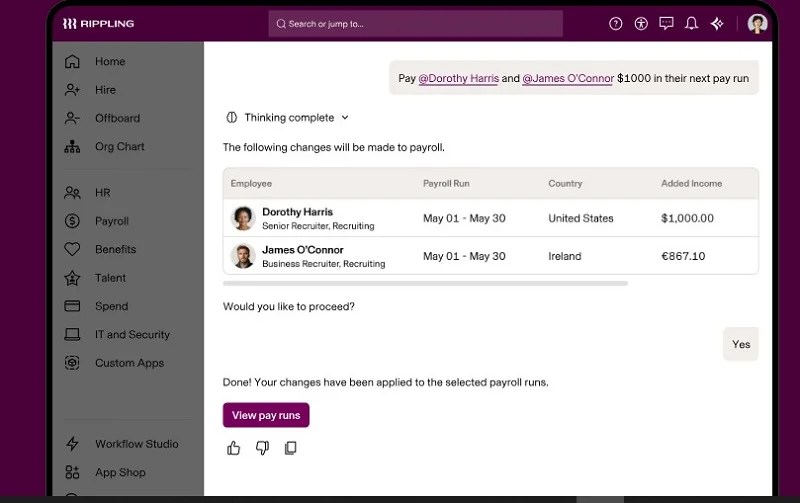
Rippling built its reputation on one idea. HR, IT, and finance should share one employee record, not three disconnected systems.
Change someone’s job title in Rippling. Their software access, approval chains, and even laptop provisioning can update automatically. For companies drowning in point solutions, that’s the pitch.
Rippling’s contractor management spans over 185 countries, its Employer of Record (EOR) service operates in 80 countries, fully localized HRIS covers 85+ countries, and native global payroll is available in 10 countries.
Best for: Fast-growing, tech-forward companies. Especially distributed teams that want to consolidate HR, device management, and spend control into one system instead of five vendors.
Key features:
- Unified employee record across HR, IT, and finance
- Global payroll and hiring in 185+ countries
- Automated device and app provisioning
- Custom workflow builder (“if this, then that” automation)
- Expense management and corporate cards (Spend module)
Employee management capabilities: Rippling’s core strength is administrative. Org charts, compliance tracking, document management, and workflow automation remove manual HR busywork. It’s less built for day-to-day performance coaching.
Performance management: Available as an add-on module. Not a native strength. Many teams pair Rippling with a specialist tool like Lattice or 15Five.
Time and productivity: Time tracking, PTO, and scheduling are available as modules. Geofencing and approval automation suit mixed office and field workforces.
Training and development: Limited compared to dedicated learning platforms. Course assignment exists but isn’t a differentiator.
Employee experience: Solid self-service tools for pay stubs, benefits, and time-off requests. Engagement and culture features are thinner than HiBob’s.
Remote-work capabilities: This is where Rippling separates itself. Global payroll, device management for remote laptops, and compliance across dozens of countries.
AI and automation: AI-assisted policy recommendations and automated compliance alerts exist. Treat these as useful accelerants for admin work, not autonomous decision-makers.
Integrations: Broad native ecosystem. Slack, Google Workspace, Microsoft 365, and hundreds of SaaS apps for provisioning, plus an open API.
Pricing:
Rippling uses a modular pricing model, so the final cost depends on the HR, payroll, benefits, IT, finance, and workforce-management products you select. Public pricing information has historically shown the core platform starting around $8 per employee per month, but businesses should not treat that figure as the expected total cost of a full Rippling implementation.
For larger or more complex organizations, the practical cost can be substantially higher once additional modules and services are included. That makes Rippling less attractive for companies looking only for basic employee records or payroll, but potentially more valuable for organizations that want several workforce functions connected through one platform. See Rippling pricing plans.
Pros:
- Genuinely unified data model reduces duplicate work across HR, IT, and finance
- Strong global payroll and device-management footprint for distributed teams
- Deep automation reduces manual admin at scale
- Broad integration ecosystem
Cons:
- Modular pricing makes true total cost hard to estimate upfront
- Performance management and L&D are add-ons, not native strengths
- Complexity can be overkill for small, simple teams
- Requires a quote — no transparent self-serve rate card
AscendurePro verdict: Rippling earns “best overall” for one reason. It solves fragmented employee data better than anything else here. Its remote and global capabilities are unusually strong. The trade-off is pricing opacity. Budget conservatively. Get a written quote with every module itemized.
Overall score: 4.9/5
2. Deel
Deel solves a different problem than the rest of this list. Not “manage the people we’ve already hired.” Instead: “let us hire, manage, equip, and pay people anywhere, legally, without opening a foreign entity.”
For a company hiring across borders, that’s a category unto itself. That includes a growing number of employers building remote teams with talent in Africa, Latin America, and Southeast Asia.

Best for: Companies hiring internationally without local entities. Any organization needing Employer of Record (EOR), global payroll, or compliant contractor payments across multiple countries.
Key features:
- Employer of Record in 130+ countries
- Contractor payments and compliant contracts in 200+ countries
- Global payroll for companies with existing local entities
- Deel HR — a free core HRIS layer
- Deel Engage — performance and learning add-on
Employee management capabilities: Deel HR, the free HRIS tier, covers the basics. Employee directory, org chart, time-off tracking. It’s intentionally lighter than a dedicated HRIS like BambooHR or HiBob.
Performance management: Deel Engage adds goal-setting, reviews, and learning tools. This is a newer, add-on layer, not the product’s core strength.
Time and productivity: Basic time tracking exists. Not built for complex shift scheduling the way Connecteam or When I Work are.
Training and development: Limited. Deel Engage includes some learning functionality, but Deel isn’t positioned as an L&D platform.
Employee experience: Functional, not culture-forward. The platform optimizes for compliant employment, not workplace community.
Remote-work capabilities: This is Deel’s entire reason for existing, and it shows. Same-week international hiring. Localized contracts. Multi-currency payments. In-house legal infrastructure in most covered countries.
AI and automation: Contract generation and compliance-flagging use automation to reduce legal risk. Practical risk-reduction, not headline AI functionality.
Integrations: Connects with common accounting, payroll, and HRIS tools. API access for custom workflows.
Pricing:
Deel pricing is modular, clearly tiered by service. Contractor management starts at $49 per contractor per month. Global payroll, for companies with an existing local entity, starts at $14 per employee per month. Employer of Record starts at $599 per employee per month. That’s a platform fee on top of the employee’s actual salary and statutory costs, not instead of them. Deel HR is free for core people-management functions. Model EOR costs against your real per-country salary base, not just the platform fee.
Deel’s headline pricing should be interpreted by employment type. Contractor management, EOR employment, payroll, and other workforce products have different pricing structures, so a company should first determine whether it needs contractors, employees, EOR services, or a combination of these options.
Pros:
- Fastest, most compliant path to hiring internationally without entities
- Wide country coverage for both EOR and contractor payments
- Free core HRIS tier is genuinely usable for small teams
- Strong compliance infrastructure reduces misclassification risk
Cons:
- EOR pricing gets expensive at scale compared to opening local entities
- Performance management and L&D are still maturing relative to specialist tools
- Not a strong fit if your workforce is entirely single-country and office-based
- Total employment cost through EOR can run well above the advertised platform fee
AscendurePro verdict: For any organization building a genuinely distributed team, Deel solves a problem most “employee management” platforms don’t attempt. Legal, compliant global employment, without months of entity setup. It’s not trying to be your performance-management system, and buyers shouldn’t expect that.
Overall score: 4.6/5
3. Lattice
Lattice stands out for organizations that want to connect performance management, goals, employee engagement, career development, and compensation in one people-management platform.
Its strength is still performance and talent management. Lattice supports performance reviews, goals and OKRs, 1:1s, feedback, engagement surveys, succession planning, compensation, career development, analytics, and AI-powered tools.
Lattice has also expanded beyond its traditional performance-management role with HRIS capabilities covering employee data, onboarding, workflows, time off, reporting, documents, and related workforce administration. It can also integrate with external HR systems such as Workday, ADP, BambooHR, Gusto, UKG, Personio, HiBob, and Rippling.
That makes Lattice more versatile than a pure performance-management tool. However, buyers should still evaluate the exact HRIS, payroll, and workforce capabilities they need because Lattice’s product structure is modular and varies by package.
Best for: Companies prioritizing performance, engagement, employee development, goals, and people analytics.
Not ideal for: Businesses looking primarily for the simplest low-cost payroll or scheduling solution.
Key features:
- Goals and OKR tracking
- 360-degree and manager/peer performance reviews
- Structured 1:1 meeting agendas and notes
- Engagement pulse surveys (add-on)
- Compensation planning tied to performance data (add-on)
Employee management capabilities: Deliberately narrow. Lattice doesn’t manage core employee records, payroll, or compliance. It layers on top of an existing HRIS via integration.
Performance management: This is Lattice’s reason for existing, and it’s genuinely comprehensive. Review cycles, competency matrices, talent reviews, and manager coaching tools that go deeper than most all-in-one platforms attempt.
Time and productivity: Not a feature of the platform at all.
Training and development: Available as the “Grow” add-on module. Career tracks, individual development plans, competency-based growth paths.
Employee experience: Engagement surveys and recognition tools are solid. Sold separately from the core Performance product.
Remote-work capabilities: Fine for distributed teams from a software-access standpoint. Lattice offers nothing specific to global payroll or compliance, unlike Deel or Rippling.
AI and automation: AI-assisted review-writing support and feedback summarization are available. Lattice states employee data is protected from training external models. Worth confirming directly if that matters for your compliance posture.
Integrations: 20+ native integrations, including Slack, BambooHR, Rippling, ADP, Microsoft Teams, and Google Workspace. SSO/SCIM support included.
Pricing:
Lattice uses modular pricing, which makes direct package-to-package comparisons difficult. Its current Foundations package starts at $13 per seat per month and includes core performance, goals, 1:1s, feedback, analytics, integrations, and AI features.
Additional products can increase the total cost. Engagement costs $4 per seat per month, Grow costs another $4, and Compensation costs another $6. Organizations that need several modules should therefore calculate the full package rather than comparing Lattice’s $13 starting price with the headline price of a competing all-in-one HR platform.
Lattice also states that its contracts have a $4,000 minimum annual agreement and are billed annually. Because the platform is modular, the final cost depends on the products and number of seats included in the agreement.
Pros:
- Deepest, most configurable performance-review workflows on this list
- Genuinely strong manager-coaching and 1:1 tooling
- Clean integrations with common HRIS platforms
- Modular pricing lets teams start narrow and expand
Cons:
- Requires a separate HRIS — this is not an all-in-one platform
- Add-on modules add up quickly; full-suite pricing isn’t cheap
- $4,000/year minimum makes it a poor fit for very small teams
- No native time tracking, payroll, or scheduling
AscendurePro verdict: If performance management is the actual problem you’re solving, not HR administration in general, Lattice is one of the strongest purpose-built options available. Budget for it as an addition to an existing HRIS. Not a replacement for one.
Overall score: 4.5/5
4. BambooHR
BambooHR is one of the most recognizable names in small-and-mid-market HR software. It does the unglamorous core of HR cleanly. Records, onboarding, time-off, reporting. Independent review data consistently praises its ease of use.

Best for: Small and mid-sized businesses, roughly 25–500 employees. Companies that want a straightforward HRIS without the complexity of an all-in-one platform like Rippling.
Key features:
- Employee records, org charts, and document storage
- Onboarding checklists and e-signatures
- Time-off tracking and approval workflows
- Applicant tracking (included in higher tiers)
- Reporting and custom fields
Employee management capabilities: This is BambooHR’s core strength. Clean employee records, org visualization, and workflow automation for the administrative side of HR.
Performance management: Included in BambooHR Pro and Elite, with 360-degree reviews, 1:1s, performance reporting, and related employee-development tools.
Time and productivity: Time tracking and PTO management are solid, included in higher tiers. Advanced scheduling for shift-based teams isn’t the focus.
Training and development: Limited natively. BambooHR isn’t built as a learning platform.
Employee experience: A wellbeing add-on and eNPS tools exist. Engagement isn’t the platform’s center of gravity, unlike HiBob.
Remote-work capabilities: Reasonable for US-centric distributed teams. Global payroll and multi-country compliance aren’t core strengths, compared to Rippling or Deel.
AI and automation: AI-assisted reporting and an AI recruiting assistant exist within the ATS. Useful accelerants, not a defining feature.
Integrations: Wide third-party ecosystem. Payroll partners, benefits providers, plus tools like Slack and Lattice.
Pricing:
BambooHR currently lists Core at $10 per employee per month, Pro at $17, and Elite at $25 for companies with more than 25 employees. For companies with 25 employees or fewer, pricing starts at a $250 monthly flat rate.
Performance management is included in Pro and Elite rather than being treated solely as a separate add-on. Additional products such as payroll and benefits can affect the final cost.
Pros:
- Consistently high ease-of-use ratings from real users
- Clean, uncluttered admin and employee experience
- Reliable core HR administration without unnecessary complexity
- Strong applicant tracking for companies hiring under ~50 roles per year
Cons:
- No public pricing — every quote requires a sales conversation
- Performance management, engagement, and L&D are all add-ons
- Add-on modules can push costs well above the advertised starting price
- Less suited to companies with significant multi-country or deskless-workforce needs
AscendurePro verdict: BambooHR earns its reputation by doing HR administration well without over-complicating it. It’s the right choice for a small or mid-sized, largely office-based company that wants dependable core HR. Not the right choice for a company whose primary need is performance management or global hiring.
Overall score: 4.5/5
5. HiBob (Bob)
HiBob, usually just called “Bob,” takes a visibly different design approach. Shoutouts, interest clubs, a social feed, and a colorful interface sit alongside compliance and payroll data in the same record. The bet: culture and administration don’t have to feel like separate systems.
Best for: Mid-sized, culture-conscious companies, roughly 100–3,000 employees. Especially ones expanding across multiple countries that want employee experience woven into core HR.
Key features:
- Configurable onboarding workflows and lifecycle surveys
- People analytics and workforce insight dashboards
- Compensation and performance review cycles
- Culture tools: shoutouts, clubs, social feed
- Multi-country compliance and localization
Employee management capabilities: Strong and highly configurable. HiBob supports complex org structures and multi-entity, multi-country setups more gracefully than many HRIS peers.
Performance management: Solid. 360-degree feedback, review cycle automation, and manager dashboards. Not as deep as Lattice’s purpose-built tooling, but strong for an all-in-one platform.
Time and productivity: Time and attendance tracking exists. Not the platform’s centerpiece.
Training and development: Basic learning-policy tools exist. Not a dedicated LMS-grade offering.
Employee experience: This is HiBob’s clearest differentiator. Culture and belonging features are native to the core product, not a separate module. Reviewers consistently cite this as the standout feature.
Remote-work capabilities: Strong multi-country compliance, localized workflows, and multi-language support. A genuine option for internationally distributed teams.
AI and automation: Automated workflows and real-time people-analytics insights are built throughout. AI-assisted reporting is present but not overstated.
Integrations: Connects with common payroll, SSO, and productivity tools. Native payroll coverage is limited outside the UK and US, so most organizations pair Bob with a separate payroll provider.
Pricing: HiBob pricing is quote-based, no public rate card. Third-party estimates vary meaningfully. Some trackers report $5–10 per employee per month for base configurations. Others describe fully bundled setups closer to $16–25 per employee per month. Treat any single number as directional only. Request an itemized quote.
Pros:
- Genuinely distinctive culture and engagement tooling built into core HR
- Strong people analytics for an HRIS-first platform
- Multi-country compliance and localization suit internationally expanding teams
- High reported user adoption due to interface design
Cons:
- No published pricing anywhere — budgeting requires a sales conversation
- No native payroll outside UK/US, requiring a separate integration in most regions
- Performance management, while solid, isn’t as deep as dedicated tools like Lattice
- Best fit is a fairly narrow band — smaller teams may find it more than they need
AscendurePro verdict: HiBob is the strongest choice here for organizations that treat employee experience as a genuine business priority, not a checkbox. The culture tooling is structurally central to the product, not cosmetic. The lack of published pricing and native payroll are real friction points to plan around.
Overall score: 4.4/5
6. Connecteam
Most employee management software is built with a desk and a laptop in mind. Connecteam wasn’t.
Connecteam is particularly relevant to deskless and frontline workforces. The company cites deskless workers as representing roughly 80% of the global workforce, making this segment a central part of its positioning.
Retail associates, healthcare aides, construction crews, cleaning staff, and field technicians. People who need scheduling, time tracking, and company communication entirely from a phone.
Best for: Businesses with a primarily deskless or field-based workforce. Construction, retail, hospitality, healthcare, cleaning, and security. Needing an all-in-one mobile-first system.
Key features:
- GPS-enabled time clock with geofencing
- Drag-and-drop shift scheduling and shift swapping
- Digital forms, checklists, and task management
- Internal chat, announcements, and company knowledge base
- Skills training and onboarding modules
Employee management capabilities: Organized into modular “Hubs” — Operations, Communications, HR & Skills. Buy them together or separately. Gives flexibility for businesses that only need part of the suite.
Performance management: Basic. Task completion and checklist tracking exist, but this isn’t a formal review-cycle or OKR platform.
Time and productivity: This is Connecteam’s core strength. Accurate GPS time tracking, overtime alerts, and payroll-ready reporting. Purpose-built for hourly, multi-location teams.
Training and development: Genuinely useful course and quiz creation for onboarding and compliance training. Several users report meaningfully faster new-hire ramp-up.
Employee experience: Strong internal communication tools. Chat, recognition, surveys. Designed specifically for staff who don’t sit near a shared office bulletin board.
Remote-work capabilities: “Remote” here means distributed and mobile-first, not office-optional. Arguably the strongest option on this list for coordinating a physically dispersed, non-desk workforce.
AI and automation: AI-assisted scheduling suggestions are present. The real strength is workflow automation — auto-reminders, digital forms — rather than advanced AI.
Integrations: Payroll integrations, like Gusto and QuickBooks, plus API access. Narrower ecosystem than HR-suite competitors like Rippling.
Pricing: Freemium. Free plan: Available for up to 10 users. Paid plans: From $29 per month for the first 30 users, depending on the Hub and billing cycle. Additional users are charged separately. See Connecteam pricing.
Pros:
- Purpose-built for deskless and field teams, not adapted from office-first software
- Generous free plan for small teams (up to 10 users)
- Strong combination of scheduling, time tracking, and internal communication in one app
- Digital checklists and forms cut down on paper-based compliance work
Cons:
- Not built for formal performance-review cycles or OKR management
- Hub-based pricing structure takes some effort to understand
- Narrower integration ecosystem than full HR-suite competitors
- Less relevant for entirely desk-based, office-first organizations
AscendurePro verdict: For any organization whose employees aren’t sitting at a computer all day, Connecteam solves problems BambooHR, Lattice, and most of this list were never designed to solve. It’s a specialist tool that happens to be broad within its specialty.
Overall score: 4.4/5
7. Gusto
Gusto’s reputation was built on payroll, and that’s still its center of gravity. But it’s steadily added enough HR functionality — onboarding, benefits, basic performance tools — that many small businesses now run their entire people-ops stack through it.
Best for: Small businesses, roughly under 100 employees, especially under 50. Companies that want payroll and core HR combined without a separate system for each.
Key features:
- Full-service payroll with automatic tax filing
- Benefits administration (health, 401(k), HSA/FSA)
- Onboarding workflows and new-hire paperwork
- Time tracking and PTO policies (Plus tier and above)
- Basic performance review tools (Premium tier)
Employee management capabilities: Solid for the fundamentals. Employee records, tax documents, and compliance tracking, tightly integrated with payroll processing.
Performance management: Present only on the Premium tier. Genuinely basic compared to any performance-first tool on this list. This is a payroll platform that added performance features, not the reverse.
Time and productivity: Built-in time tracking and scheduling are available starting on the Plus plan. The Simple plan requires a third-party integration for anything beyond basic PTO.
Training and development: Minimal. Gusto isn’t positioned as a learning or development platform.
Employee experience: HR resource access and compliance alerts are included on higher tiers. Engagement-specific tooling, like surveys and recognition, is thin compared to HiBob or 15Five.
Remote-work capabilities: Multi-state payroll is available starting on the Plus plan. That’s a hard requirement the moment a company hires across a second state line. Genuine multi-country support doesn’t exist — that’s a Deel or Rippling job.
AI and automation: Limited. Gusto’s automation is mostly around tax compliance and payroll accuracy, not broader workforce AI.
Integrations: Strong accounting integrations, like QuickBooks and Xero. Connects with tools like Slack. Narrower HR-specific ecosystem than HRIS-first platforms.
Pricing: Transparent and published. Simple starts at $49 per month plus $6 per employee per month (single-state payroll only). Plus starts at $80 per month plus $12 per employee per month, adding multi-state payroll and time tracking. Premium starts at $180 per month plus $22 per employee per month, adding HR advisory access and performance tools. A separate Contractor Only plan starts at $35 per month plus $6 per contractor. Select, custom pricing with a minimum of 25 employees, requires a quote. See current Gusto pricing.
Pros:
- Transparent, publicly listed pricing — rare in this category
- Best-in-class payroll accuracy and automatic tax filing
- Genuinely easy setup for small businesses without dedicated HR staff
- Strong accounting-software integrations
Cons:
- Multi-state payroll is a hard paywall gate on the Simple plan
- Performance management and L&D are minimal, even on the top tier
- Not built for multi-country or globally distributed teams
- Gusto can work well for growing businesses, but organizations with increasingly complex HR, IT, global workforce, or enterprise-management requirements may eventually need a broader platform.
AscendurePro verdict: Gusto has genuinely transparent, easy-to-compare pricing — rare in this category. For a small, single-country business, it remains one of the simplest ways to combine payroll and HR. It doesn’t try to be a performance-management or global-workforce platform.
Overall score: 4.2/5
8. 15Five
15Five’s pitch is philosophical as much as technical. Performance shouldn’t be an annual event. It should be a running conversation. Weekly check-ins, structured 1:1s, and continuous feedback, not a once-a-year review nobody remembers accurately.

Best for: Mid-market companies, roughly 50–1,000 employees. Companies that want to move from annual performance reviews to continuous, manager-driven feedback cycles.
Key features:
- Weekly check-ins and structured 1:1 meeting agendas
- OKR and goal tracking
- 360-degree performance reviews and competency assessments
- Engagement pulse surveys
- Manager-effectiveness coaching tools
Employee management capabilities: 15Five isn’t an HRIS. It holds no core employee records or compliance data. It’s meant to run alongside a separate system like BambooHR or Rippling.
Performance management: This is the product’s entire reason for existing. Genuinely differentiated by its focus on manager coaching and continuous feedback, not a once-a-year review form.
Time and productivity: Not a feature of the platform.
Training and development: Limited. Some manager-coaching content exists, but this isn’t a dedicated learning platform.
Employee experience: Engagement surveys and recognition tools are solid on the Engage tier. Real-time pulse insights help many HR teams catch morale issues early. Worth noting: survey data reflects self-reported sentiment, not a complete picture of wellbeing.
Remote-work capabilities: Works well for distributed teams from a workflow standpoint. Native Slack and Microsoft Teams integration lets remote employees check in without leaving their existing tools.
AI and automation: AI-assisted meeting notes, via the Kona add-on, and feedback summarization are available. Core value still comes from the structured process, not the AI layer.
Integrations: Native integrations with Slack, Microsoft Teams, and most major HRIS platforms — BambooHR, Rippling, ADP — for data sync.
Pricing: 15Five plans are tiered, billed annually. Engage starts at $4 per user per month, covering engagement and check-ins only. Perform sits roughly in the $8–14 per user per month range, adding review cycles, OKRs, and competency assessments. Total Platform, the full bundle, runs about $16 per user per month. No free plan.
Pros:
- Genuinely differentiated focus on manager effectiveness, not just review forms
- Continuous check-in model suits remote and hybrid teams well
- Strong integrations with existing communication tools reduce adoption friction
- Strong focus on continuous performance, manager effectiveness, employee engagement, and feedback.
Cons:
- Not an HRIS — requires a separate core HR system
- Pricing can feel steep for very small teams or part-time staff
- No dedicated learning or development module
- No native time tracking or scheduling
AscendurePro verdict: 15Five is one of the more thoughtfully designed performance-management tools on the market. It centers the manager, not just the review cycle. It’s a strong complement to an HRIS, not a replacement.
Overall score: 4.1/5
9. Zoho People
Zoho People’s honest pitch is affordability, without feeling stripped-down. It’s part of the much larger Zoho ecosystem — CRM, accounting, project management. That makes it a natural fit for companies already using other Zoho tools, and a genuinely low-cost option for anyone else.
Best for: Budget-conscious small and mid-sized businesses. Especially those already using other Zoho applications. Companies that want core HR functionality without premium HRIS pricing.
Key features:
- Employee database and self-service portal
- Attendance tracking and leave management
- Onboarding workflows
- Performance appraisal cycles (higher tiers)
- Deep integration with the wider Zoho suite
Employee management capabilities: Solid core functionality. Employee records, leave approvals, and attendance tracking work reliably, per independent user reviews. The interface feels less modern than newer competitors.
Performance management: Available starting on the Premium tier. Appraisal cycles and goal tracking are functional, but not as sophisticated as Lattice or 15Five.
Time and productivity: Attendance and leave tracking are genuine strengths at this price point. Self-service tools reduce manual HR admin.
Training and development: Basic course-assignment features exist. Not a primary focus.
Employee experience: A unified employee portal for HR questions is a real convenience. Deeper engagement tooling, like surveys and recognition, is comparatively thin.
Remote-work capabilities: Cloud-based access and mobile apps support distributed teams adequately. Multi-country payroll compliance isn’t a strength.
AI and automation: Basic automation for leave approvals and reminders. Not a differentiator relative to AI-forward competitors.
Integrations: A genuine strength for any company already in the Zoho ecosystem. CRM, Books, Projects, and 50+ other Zoho apps connect natively.
Pricing: Published and unusually low. A free plan covers up to 5 users. Paid plans require a minimum of 5 users. Essential HR starts around $1.25 per user per month, scaling up to roughly $4–5 per user per month for Premium. Enterprise is priced higher. The related Zoho People Plus bundle runs around $4–9 per user per month, depending on tier.
Pros:
- Among the lowest per-user pricing of any legitimate HRIS in this guide
- Genuinely useful free tier for very small teams
- Deep integration value for companies already using Zoho’s broader suite
- Reliable core attendance, leave, and records management
Cons:
- Interface feels dated compared to HiBob, Rippling, or Lattice
- Performance management and engagement tools are functional but shallow
- Steeper learning curve than the price point might suggest
- Less compelling for companies with no interest in the wider Zoho ecosystem
AscendurePro verdict: Zoho People won’t win on design or depth. But for a cost-conscious small business, particularly one already inside the Zoho ecosystem, it delivers genuinely usable core HR at a price no HRIS-first competitor here can match.
Overall score: 4.0/5
10. When I Work
When I Work solves one problem, and solves it well. Getting the right hourly employees on the right shifts, with minimal back-and-forth. For businesses like restaurants, retail stores, and healthcare facilities, “who’s working Saturday” is a daily question, not an annual HR event.
Best for: Small and mid-sized businesses with hourly, shift-based workforces. Restaurants, retail, hospitality, healthcare. Companies that need scheduling and time tracking more than a full HR suite.
Key features:
- Drag-and-drop shift scheduling with templates
- GPS and photo-verified clock-ins
- Shift swapping and open-shift coverage requests
- Team messaging and shift reminders
- Labor cost and overtime reporting
Employee management capabilities: Intentionally narrow. This isn’t an HRIS, and it doesn’t try to be. No compliance document storage or org-chart management here.
Performance management: Not a feature of the platform.
Time and productivity: This is the entire product. Reliable clock-ins, automated shift reminders, and labor-cost tracking. Independent reviewers consistently cite this as the platform’s core strength.
Training and development: Not offered.
Employee experience: Team messaging and self-service shift swapping cut down the manager phone-tag that plagues hourly scheduling. That meaningfully improves day-to-day experience, even without formal engagement tools.
Remote-work capabilities: Not applicable in the distributed-knowledge-worker sense. Multi-location support exists for businesses running several physical sites.
AI and automation: Limited. Automation here means shift reminders and labor-forecasting, not AI in any advanced sense.
Integrations: Payroll integrations exist for common providers. The integration ecosystem is narrower than general HR platforms.
Pricing:
When I Work currently starts at $2.50 per user per month for Essentials, with Pro at $5 and Premium at $8. The platform focuses heavily on scheduling, team communication, and time tracking, making it particularly attractive to businesses with hourly or shift-based employees.
Because plan features and attendance options can vary, buyers should check the current plan configuration before comparing When I Work with broader HR platforms. Its value is strongest when scheduling and workforce coordination are the primary needs rather than comprehensive HR administration.
Pros:
- Purpose-built, uncluttered scheduling experience hourly staff adopt quickly
- Genuinely affordable at small scale
- Strong mobile experience for both managers and frontline staff
- Labor-cost and overtime visibility helps control payroll spend
Cons:
- Not a substitute for an HRIS — no records management or performance tools
- Reported mobile app reliability issues during high-volume simultaneous clock-ins
- Time tracking is an add-on rather than bundled on some plans
- Limited value for companies without a genuinely shift-based workforce
AscendurePro verdict: For a business whose core problem is literally building next week’s shift schedule without twenty text messages, When I Work is a focused, affordable answer. It’s a scheduling specialist, not a general HR platform.
Overall score: 3.7/5
How We Evaluated the Employee Management Software
Every platform above was assessed against ten weighted dimensions. We used current vendor pricing pages, official feature documentation, independent review platforms — G2, Capterra, and specialist HR-software trackers — and reporting from credible industry publications.
Every evaluation is an evidence-based editorial assessment, built from publicly available information. Not a claim of first-hand testing.
To keep the rankings consistent, each platform receives a score for every criterion before the weighted scores are combined. The final rating reflects the platform’s performance across the full framework rather than a single standout feature.
Because software pricing, features, integrations, and availability can change, the rankings should be viewed as a point-in-time assessment. Pricing and product claims are checked against current vendor information where available, while broader usability and fit judgments reflect product research and comparative analysis.
| Dimension | Weight | What we looked at |
|---|---|---|
| Employee management capabilities | 15% | Records, onboarding, org structure, workflow automation |
| Performance management | 10% | Goals, OKRs, reviews, 360 feedback, analytics |
| Time/productivity management | 10% | Time tracking, attendance, scheduling, timesheets |
| Learning & development | 10% | Training assignment, skills tracking, career paths |
| Employee experience | 10% | Engagement surveys, recognition, communication |
| Remote-work capabilities | 10% | Distributed-team support, global payroll, time-zone handling |
| AI & automation | 10% | Genuine AI capability vs. marketing claims |
| Integrations | 10% | Depth of native connections to payroll, comms, productivity tools |
| Ease of use | 5% | Admin and employee-facing usability, based on independent review data |
| Value for money | 10% | Feature breadth relative to published or reported pricing |
| Total | 100% |
Scores are rounded for presentation, but the underlying ranking uses the weighted framework described above. This keeps the comparison consistent while recognizing that software quality, usability, and value cannot be reduced entirely to a single number.
How we calculate the scores
Each platform receives a 1–5 score across the 10 evaluation criteria. We then multiply each score by its assigned weight and combine the results to produce the overall rating.
For example, a platform scoring 5/5 for employee management receives the full 15% weighting for that category, while a platform scoring 3/5 receives 60% of the available weighting.
This approach rewards platforms that perform consistently across multiple areas rather than allowing one exceptional feature to determine the overall ranking.
Employee Management Software vs Other HR Software
The terminology in this space overlaps constantly. Vendors don’t always use it consistently. Here’s a practical breakdown.
| Category | What it typically means | Example from this list |
|---|---|---|
| HRIS (Human Resource Information System) | Core system of record for employee data, documents, and compliance | BambooHR, Zoho People |
| HRMS (Human Resource Management System) | Broader than HRIS — often adds payroll, benefits, and scheduling | Rippling, Gusto |
| Workforce management software | Focused on scheduling, time, and labor-cost optimization | When I Work, Connecteam |
| Performance management software | Focused specifically on goals, reviews, and feedback | Lattice, 15Five |
| Employee experience software | Focused on engagement, culture, and sentiment | HiBob |
| Employee monitoring software | Focused on activity tracking, often for compliance or productivity oversight | Not primary in this list — a distinct, more controversial category |
Employee management software vs HRIS.
An HRIS is usually the record-keeping layer. Who works here, what’s their pay history, what documents are on file. Employee management software is broader. It can include performance, engagement, and scheduling functions a pure HRIS doesn’t touch.
Employee management software vs HRMS.
HRMS is often used interchangeably with employee management software. It typically implies payroll and benefits are included, which isn’t always true of narrower tools like Lattice or 15Five.
Employee management software vs workforce management software.
Workforce management leans specifically toward labor scheduling, time, and cost. Think When I Work or Connecteam. Employee management is the broader umbrella that includes performance and engagement too.
Employee management software vs performance management software.
Performance management is one function within employee management, not a separate category. Tools like Lattice and 15Five are performance-management specialists sitting inside the broader employee-management umbrella.
Employee management software vs employee experience software.
Experience-focused tools — HiBob is the clearest example — prioritize engagement, culture, and sentiment. They may include HR administration, but that’s not the primary design goal.
Employee management software vs employee monitoring software.
Monitoring software focuses on tracking activity, often continuously. Keystrokes, app usage, screen time. It’s a narrower, more contested category. None of the platforms recommended here are primarily monitoring tools. Worth remembering: time tracking (verifying hours worked) and activity monitoring (surveilling how those hours were spent) are different things. Conflating them is a common buying mistake.
Modern platforms increasingly blur these lines. Rippling adds performance features. Lattice added compensation planning. HiBob added deeper analytics. Treat these categories as a starting vocabulary, not rigid boxes.
How to Choose the Best Employee Management Software
Work through these in roughly this order.
1. Start with headcount and growth trajectory. A 15-person team and a 500-person team have almost nothing in common as buyers. Zoho People and Gusto fit the former. Rippling and HiBob assume the latter.
2. Identify your actual required features, not a wish list. Need payroll and nothing else? Don’t buy a performance-management-first platform. Performance coaching the real pain point? Don’t pay for a bloated all-in-one suite you’ll barely use.
3. Map your workforce type. Office-based, remote, hybrid, or deskless workforces need genuinely different tools. Connecteam and When I Work exist because BambooHR and Rippling weren’t built for field teams.
4. Weigh remote and global needs honestly. Hiring across borders, including talent in African or other emerging markets? Deel or Rippling’s global capabilities matter far more than a nicer performance-review UI elsewhere.
5. Decide how important formal performance management is right now. Not every growing company needs OKR software in year one. It’s fine to defer this and revisit it at 50 or 100 employees.
6. Check training and development needs against reality. Most platforms here will disappoint you if L&D is a genuine priority. Treat it as likely requiring a dedicated tool alongside your HRIS.
7. Take engagement seriously, but don’t over-rely on survey data alone. Pulse surveys are useful signal, not a complete picture of morale. Pair the data with real manager conversations.
8. Audit integrations against your existing stack. A platform that doesn’t talk to your payroll provider or Slack creates more manual work than it saves.
9. Ask directly about security and data privacy. Where is employee data stored? Who can access performance and compensation data? What happens to it if you cancel?
10. Get pricing in writing before you assume anything. Nearly every platform here is quote-based to some degree. Treat every advertised “starting price” as a floor, not a total.
11. Confirm scalability honestly. Ask the vendor directly what breaks, in workflow, not just pricing, at 2x your current headcount.
12. Evaluate ease of use for managers, not just HR admins. A performance or engagement tool that managers find tedious will get ignored regardless of its feature list.
13. Ask about support responsiveness. Especially for payroll-adjacent tools, where a slow response has real financial consequences.
14. Push past AI marketing language. Ask a vendor to demonstrate a specific AI feature live, not just describe it on a slide.
15. Ask three direct questions before you sign. What does a fully configured account cost at our headcount? What happens to our data if we leave? Which advertised AI features are generally available today, versus still in beta?
Employee Management Software and the Future of Work
Employee management platforms aren’t just passive record-keepers anymore. They’re shaping how performance gets measured. How skills get tracked. How career paths get defined.
That means they’re shaping outcomes for actual people. Not just administrative efficiency for employers.
On the upside, this is producing real benefits. Continuous feedback tools like 15Five are replacing the once-a-year review. Managers and employees have long recognized that review as a poor way to actually improve performance.
Skills and competency tracking, done well, gives employees a clearer map of what advancement requires. Instead of vague, informal criteria.
Distributed-hiring platforms like Deel are genuinely expanding where talent can build a career from. Including remote roles at companies that would never have hired outside their home country five years ago.
Workforce analytics, used responsibly, can surface real problems. Like a team quietly burning out, before it shows up as resignation letters.
The risks deserve equal weight, not a footnote. Employee monitoring and constant data collection raise legitimate privacy concerns. There’s a meaningful difference between tracking hours worked and surveilling how those hours were spent.
Algorithmic scoring of performance can encode bias just as easily as a human manager can. Sometimes more invisibly, because a dashboard number carries a false sense of objectivity.
Over-monitoring tends to produce a specific, well-documented failure mode. Employees optimize for what’s visible to the system, not for what actually matters. That’s the opposite of the productivity gain the software was bought to deliver.
Heavy reliance on software-mediated management can also reduce employee autonomy. Quietly, in ways that erode trust, even when no single feature was designed maliciously.
None of this means employee management software is bad for the workplace. It means the tools aren’t neutral. How much monitoring is actually necessary. How transparently performance criteria get communicated. How much weight goes to a dashboard number versus a real conversation. All of that matters as much as which vendor gets chosen.
Which Employee Management Software Is Best for You?
The best employee management software depends less on the number of features and more on the problems you need to solve.
If you want one connected system for HR, payroll, IT, and workforce administration, Rippling is the strongest choice. If your biggest challenge is hiring and paying workers internationally, Deel is more specialized. Lattice is a stronger fit when performance, engagement, goals, and employee development are priorities.
For core HR, BambooHR offers a more focused approach. Connecteam is better suited to deskless teams, while When I Work is particularly useful when scheduling is the main operational challenge. Small businesses may find Gusto easier to adopt when payroll and basic HR are the primary requirements.
In other words, the highest-ranked platform is not automatically the best choice for every company.
In summary:
Choose Rippling if you’re a fast-growing company juggling HR, IT, and finance across multiple tools. You want one unified employee record, especially with a distributed or global team.
Choose Deel if your core challenge is hiring and paying people legally across borders, without opening foreign entities. Including building remote teams with talent based outside your home country.
Choose Lattice if performance management specifically is the problem. You already have, or plan to get, a separate HRIS. You want the deepest review and coaching workflows available.
Choose BambooHR if you’re a small-to-mid-size, largely office-based or US-centric company. You want dependable core HR administration without unnecessary complexity.
Choose HiBob if employee experience and culture are genuine strategic priorities. You’re in the 100–3,000 employee range. You’re comfortable pairing it with a separate payroll provider outside the UK/US.
Choose Connecteam if most of your workforce is deskless — retail, healthcare, construction, hospitality. You need scheduling, time tracking, and communication built mobile-first.
Choose Gusto if you’re a small, single-country business that wants payroll and core HR combined. With transparent, publicly listed pricing.
Choose 15Five if you want to move away from annual reviews toward continuous, manager-driven feedback. You already have a separate system of record.
Choose Zoho People if budget is the primary constraint. Especially if you’re already using other Zoho products. You can accept a less polished interface in exchange for genuinely low per-user cost.
Choose When I Work if your defining operational problem is hourly shift scheduling and time tracking. Not broader HR administration.
Scenario shortcuts:
- Small business, 20 employees, office-based → Gusto or BambooHR
- Growing company, 100 employees, hybrid → Rippling or HiBob
- Large enterprise, multi-country → Rippling or Deel (often both, for different functions)
- Fully remote, hiring internationally → Deel
- Performance-focused culture → Lattice or 15Five
- Engagement-and-culture-focused → HiBob
- Training-heavy onboarding needs → Connecteam (deskless teams) or a dedicated LMS alongside any HRIS here
- Hourly, shift-based workforce → Connecteam or When I Work
- Tight budget, still needs real HR software → Zoho People
Frequently Asked Questions
What is employee management software? It’s a digital platform that centralizes employee records, workflows, and processes. Onboarding, performance management, time tracking, training, and engagement. It replaces spreadsheets, email, and paper files.
What is the best employee management software? There isn’t one single best option. It depends on company size, workforce type, and priorities. Rippling is the strongest all-around choice for growing, distributed companies. Deel leads for global hiring. Lattice leads for performance management. BambooHR remains dependable for straightforward small-business HR.
What features should employee management software have? At minimum, employee records and onboarding workflows. Beyond that, prioritize features that map to your actual problem. Performance management, time tracking, training, engagement, and integrations with your existing payroll and communication systems.
Is employee management software the same as HR software? “HR software” is often a broader umbrella term. Employee management software emphasizes the ongoing management of people once hired — performance, time, engagement, development. Some HR software leans more toward compliance, benefits, and payroll administration.
What is the best employee management software for small businesses? Gusto and BambooHR are the strongest fits for most small businesses. Zoho People is a lower-cost alternative. Connecteam is the better choice if the workforce is primarily deskless.
What is the best employee management software for remote teams? Deel is the strongest choice for internationally distributed teams needing compliant global hiring. Rippling is a strong alternative if you also want unified IT and finance management alongside HR.
Does employee management software track employee activity? Some do, to varying degrees. Most platforms track time worked, attendance, and location during clock-in via GPS, rather than continuous activity monitoring like keystrokes or screen recording. True activity-monitoring software is a distinct, narrower category with its own privacy considerations.
Does employee management software improve productivity? It can, mainly by reducing administrative friction. Automating scheduling, cutting manual paperwork, giving managers better visibility into workload. It’s not a guaranteed productivity boost on its own. Heavy-handed monitoring features can backfire, encouraging employees to optimize for visible activity rather than actual output.
How much does employee management software cost? Costs vary enormously by category. Scheduling-focused tools like When I Work start around $2.50 per user per month. Full HRIS platforms typically run $5–25 per employee per month. Global employment platforms like Deel charge per-service fees ranging from $29 to $599+ per employee per month, depending on whether you need payroll-only or full Employer of Record services.
Is employee management software worth it? For most businesses beyond a handful of employees, yes. The administrative time saved on onboarding, scheduling, and compliance tracking usually justifies the cost. The bigger question isn’t whether to buy software. It’s which category actually matches your operational problem — paying for features you’ll never use is a common, avoidable mistake.
Final Verdict
A few patterns stand out across these ten platforms.
Best overall goes to Rippling. It solves the fragmented-data problem more completely than any all-in-one competitor.
Best for remote and global teams is Deel. It handles a use case — compliant international hiring — that most of this list doesn’t even attempt.
Best for performance management is Lattice, with 15Five close behind as a strong, lower-cost alternative focused on continuous feedback.
Best for employee experience is HiBob, for culture tooling that’s structural rather than cosmetic.
Best for small businesses splits between Gusto, payroll-first with transparent pricing, and BambooHR, HR-administration-first with a cleaner interface.
Best for deskless and frontline teams is Connecteam, with When I Work as a leaner, scheduling-only alternative.
Best value is Zoho People, for genuinely low per-user pricing without sacrificing core functionality.
None of that ranking matters more than your own answer to one question. What specific operational problem are you actually trying to solve?
A company buying Rippling to fix a scheduling problem will end up disappointed. So will one buying When I Work hoping it doubles as a performance-management system. That’s true regardless of how well-reviewed the product is.
Before choosing a platform, identify the three workforce problems that consume the most administrative time. Then compare each software option against those problems rather than choosing based solely on its overall ranking.
A company managing payroll, onboarding, employee records, benefits, IT access, and global workers may benefit from an integrated platform such as Rippling. A company focused on employee performance may get more value from Lattice, while a frontline business may find Connecteam or When I Work more practical.
The best employee management software is therefore the platform that delivers the strongest combination of functionality, usability, scalability, integrations, and total cost for your specific workforce.
Further reading:
- AI in Customer Support: How Artificial Intelligence Is Transforming Customer Service Careers
- 10 Best Industries to Work in Right Now
- Small Business AI Automation Trends
Join Us
Get clear roadmaps, in-demand skills insights, and proven strategies to help you move into high-growth, future-proof careers — no fluff.
