Job searching involves more than finding vacancies and submitting applications. You need a strong resume, relevant cover letters, a way to track applications, and enough preparation to perform well in interviews. You may also need a portfolio, career guidance, or help identifying which opportunities match your experience.
Managing these activities across separate platforms creates unnecessary work. You end up copying information between tools, updating multiple documents, and keeping track of applications in spreadsheets. More importantly, the information in one tool rarely carries over to another.
AscendurePro Launchpad brings these activities together in one career workspace. Its tools cover resume creation, application preparation, job discovery, portfolio development, employer services, career coaching and professional learning.
This guide examines all 16 AscendurePro Launchpad features. It explains what each tool does, how to use it, who benefits most, and which subscription includes it. You’ll also find practical advice on combining the tools into a more organised job search.
I’m Bonface Juma, founder of AscendurePro. I built Launchpad around a simple principle: your resume should be the starting point for your career activities. Your cover letters, application checks and interview preparation should build on the same information rather than requiring you to start over each time. You can learn more about AscendurePro.
Key Takeaways
- AscendurePro Launchpad brings 16 features together in five areas: Resume Builder, Showcase, Jobs and Hiring, Career Coaching, and Learn.
- The Free plan costs $0 and includes resume creation, 10 templates, cover letters, a resume check, the job board, job tracking and access to career mentors.
- Standard costs $20 per month. It adds AI-powered resume tailoring, comprehensive resume checks, interview practice, a portfolio and job alerts.
- Pro costs $50 per month. It includes unlimited resumes and letters, two portfolios, and batch analysis of up to 2,000 resumes.
- Employers can register and publish job opportunities through paid plans, while advertising packages are available as additional purchases.
- Career mentors are available free of charge. Coaches and Experts offer paid services, with payment held until you confirm that the agreed work is complete.
- The most effective workflow is to build your resume, identify a target job, tailor your application, check your resume, prepare for the interview, and track the outcome.
Contents

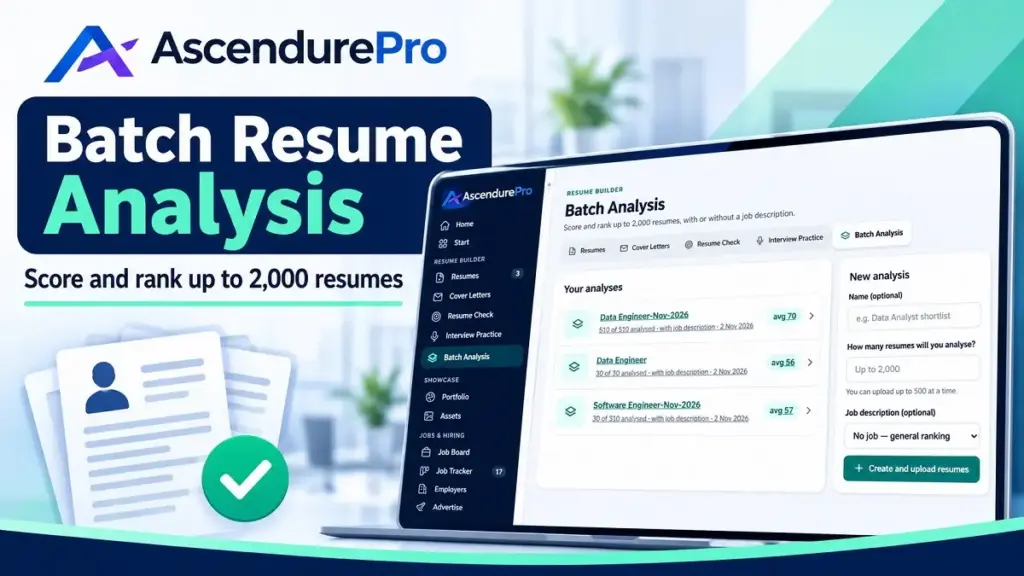
Score up to 2000 resumes in batch analysis
Analyze, grade, and rank up to 2000 resumes in 4 batches. Rent or get a Pro plan.
Why Use One Career Launchpad Instead of Separate Job Search Tools?
A job search involves several connected activities. Your resume needs to reflect the position you’re targeting. Your cover letter should explain why your experience fits that position. Interview preparation should address the employer’s requirements. Your application tracker should then help you monitor progress.
When these activities happen in separate applications, you spend time transferring information instead of improving your applications.
There is also a more fundamental problem. Employers increasingly use applicant tracking systems (ATS) to organise applications and help recruiters identify candidates who meet specific requirements.
According to Jobscan’s 2026 applicant tracking system usage report, 97.4% of Fortune 500 companies use an ATS. That represents 487 of the 500 companies.
Recruiters also rely on filters when reviewing large applicant pools. Jobscan’s survey of 384 recruiters found that 76.4% filtered candidates by skills first, according to its State of the Job Search report.
However, strict screening requirements can exclude qualified applicants. A Harvard Business School and Accenture study reported that 88% of surveyed employers agreed that qualified candidates were being screened out because they did not match specific job criteria. The findings were also discussed in this HR Dive report on applicant tracking systems.
Job seekers face their own challenges. In Jobscan’s survey of 442 job seekers, 44% reported receiving no interviews during the previous month. Another 26% identified the time required to tailor resumes for individual positions as a major difficulty.
These findings highlight three practical challenges:
- Application alignment: Your resume needs to communicate relevant qualifications, skills and experience in language that reflects the target position.
- Application management: You need to keep track of vacancies, deadlines, submitted applications and employer responses.
- Interview preparation: You need to demonstrate your suitability beyond what employers can establish from your application documents.
Launchpad addresses these activities through connected tools. You can create a resume, compare it with a job description, prepare a cover letter, practise interview questions and track applications without repeatedly entering the same information.
The following sections explain how each feature contributes to that process.
Ready to start? Build your first ATS resume on the Free plan and see your score. Create your free resume
Resume Builder: Five Tools That Start With Your Resume
Resume Builder is the foundation of Launchpad. It provides the information used by several other features, including cover letter generation, resume checks and interview preparation.
The objective is not simply to produce a document. It is to maintain a reliable master resume that you can adapt to different opportunities.
Free Listing
1. ATS Resumes
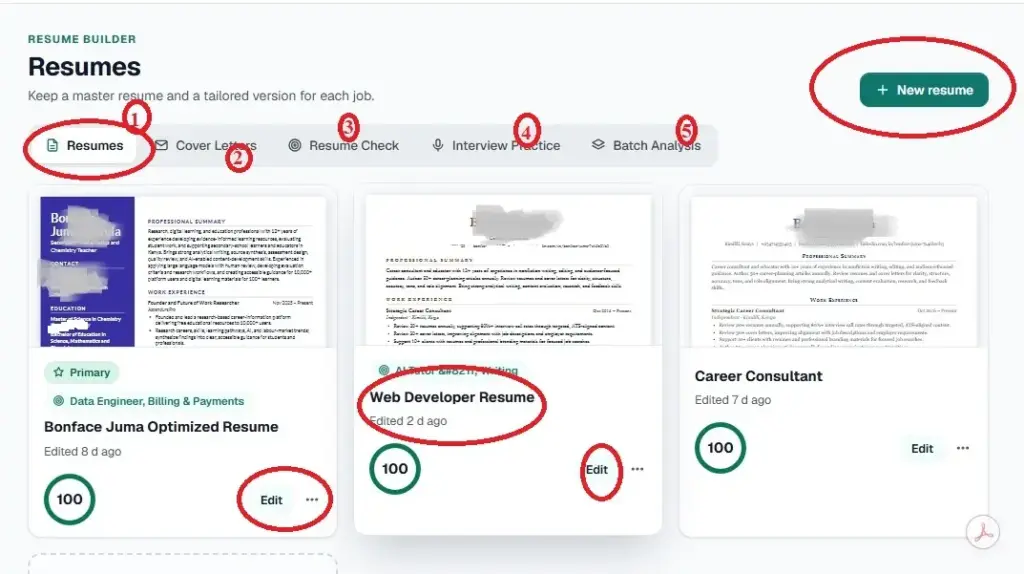
ATS Resumes lets you create and manage professional resumes using four starting methods:
- Upload an existing resume.
- Paste your resume text into the editor.
- Generate an initial draft using AI.
- Build a resume from scratch.
Once you’ve created a resume, you can edit its content, change the template, rename sections, and rearrange their order. You can rewrite individual sections manually or use AI assistance to improve the wording.
The editor also allows you to adjust fonts, font sizes and colours. You can assess your resume score, identify skills gaps and tailor the document to a specific job description.
When you’re satisfied with the result, download it as a PDF or Word document.
The three-dot menu beside each resume provides additional management options. You can duplicate a resume, set it as your primary document, download a Word copy or delete it.
Why resume formatting matters
A well-written resume can still encounter problems when an applicant tracking system cannot interpret its structure correctly.
Some ATS platforms struggle with complex layouts, particularly when information is arranged in tables, multiple columns or decorative elements. This can cause sections to appear in the wrong order or important details to be missed.
Launchpad templates use real text and standard resume section headings. Single-column layouts are generally the safer option for online applications. Two-column and mixed layouts can be useful for networking, direct email applications and printed resumes.
Jobscan explains these formatting considerations in its guide to resume tables, columns and ATS compatibility.
Why tailoring matters
A general resume rarely communicates the same level of relevance as one prepared for a particular position.
Jobscan analysed more than 2.5 million applications and found that resumes containing the target job title had interview rates 10.6 times higher. This is an observed association, not proof that adding a job title causes more interviews. Nevertheless, it demonstrates why application alignment deserves attention.
Launchpad allows you to compare your resume with a job description and identify areas that need improvement.
Standard and Pro subscribers also get Tailor to Industry. This feature compares your resume against sample ATS resumes covering 17 industries and more than 40 job titles.
Who benefits
This tool is useful for graduates, first-time applicants, experienced professionals and career changers. It is particularly valuable if you apply for different positions and need to maintain several versions of your resume.
How to access it
Open Resume Builder inside Launchpad.
Free accounts can maintain up to five resumes and access 10 templates. Standard unlocks all 50 designs and allows 100 new resumes per month. Pro removes the resume creation cap.
20% off on annual plans
Tailor your resume, get your resume analysis, create portfolio, become a career coach & more
2. ATS Cover Letters
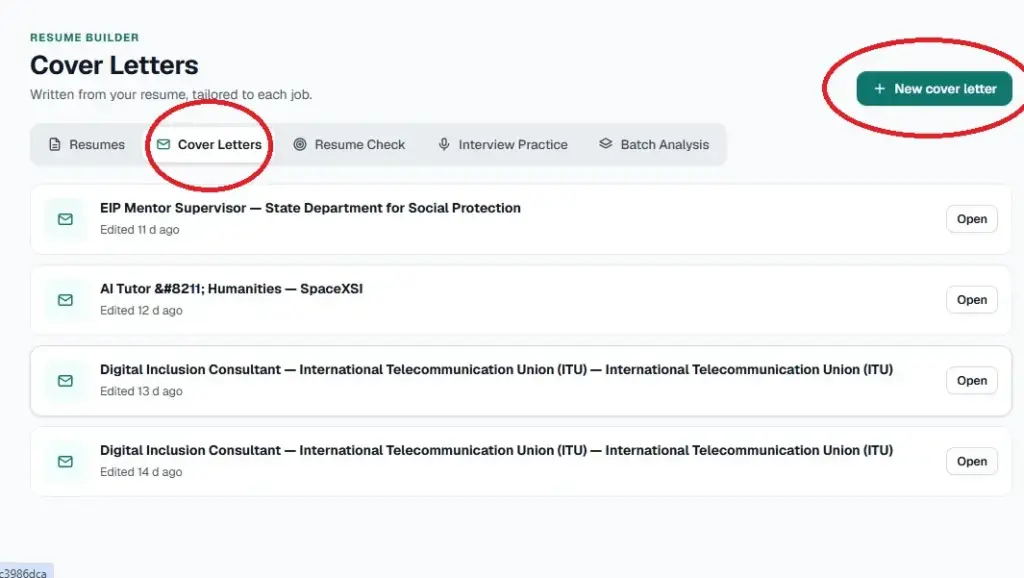
ATS Cover Letters generates a one-page cover letter using your resume and a target job description.
Start by selecting the resume you want to use. You can then choose a saved vacancy from your Job Tracker or paste a job description directly into the tool.
Add any information you want the letter to emphasise, such as a relevant achievement, transferable skill or professional experience. Select Write my letter to generate the initial draft.
You can also create a cover letter directly from the resume editor.
After generating the letter, you can change its design, improve the wording with AI or edit it manually. This gives you control over the final document rather than requiring you to accept the first generated version.
The feature includes 50 designs. Ten are available on the Free plan, while the remaining 40 are premium. Standard and Pro subscribers can access all 50.
Why cover letters still matter
The importance of cover letters varies by employer, industry and recruitment process. Some employers require them, while others treat them as optional supporting documents.
A Resume Genius survey found that 83% of hiring managers read cover letters always or frequently. Its findings are available in this survey on whether hiring managers read cover letters.
A ResumeGo field experiment involving 7,287 applications also found that tailored cover letters produced a 53% higher callback rate than applications without a cover letter. You can examine the ResumeGo cover letter research.
These findings do not mean every application needs a lengthy letter. They show that a relevant, well-written cover letter can provide additional context when an employer needs to understand your suitability.
Who benefits
Graduates, career changers and professionals applying for positions where their motivation, transferable experience or suitability may not be immediately obvious from their resumes.
How to access it
Open Cover Letters in Launchpad.
Free accounts receive five AI-generated letters. Standard allows 100 new letters per month, while Pro has no monthly letter creation cap.
3. Resume Check
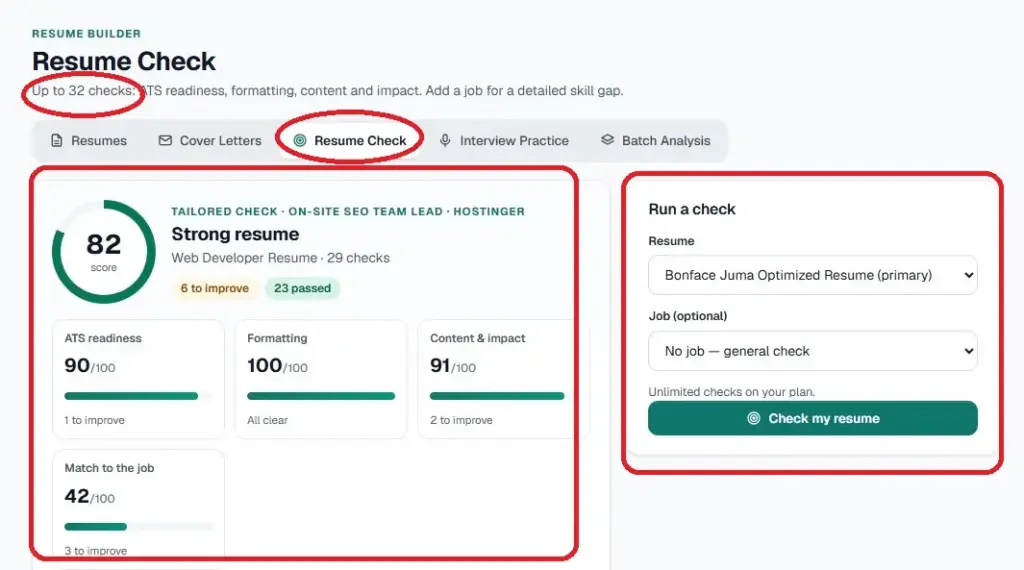
Resume Check evaluates your document using more than 25 checks covering ATS readiness, formatting and content quality.
Select a resume from your account and paste the job description you’re targeting. You can also leave the job description blank if you want a general assessment.
Click Check my resume to start the evaluation.
When you provide a job description, the tool examines how closely your resume aligns with the position. It compares elements such as your job title, hard skills, qualifications and professional experience.
The results help you identify areas that need attention before submitting an application.
Why check your resume before applying?
A resume can contain relevant experience but still fail to communicate it effectively. Important skills may be missing, achievements may be poorly presented, or the document may have formatting problems.
A general review can identify structural and content weaknesses. A job-specific review goes further by showing whether your application reflects the requirements of a particular vacancy.
The distinction matters. A resume that performs well for one position may be less suitable for another.
Who benefits
Anyone preparing an application, particularly job seekers who have submitted several applications without receiving interview invitations.
It is also useful for professionals who have not updated their resumes recently and want to identify weaknesses before starting a new search.
How to access it
Free accounts receive an overall score and the five most important recommended fixes. The allowance is three checks during the first month, followed by one check per month.
Standard and Pro subscribers can see all recommended fixes and perform unlimited re-checks.
A quick manual test
Copy your resume into a plain-text editor. Examine whether the headings, dates, job titles and bullet points remain in the correct order.
If columns merge, headings become misplaced or information appears in unexpected locations, an ATS may encounter similar interpretation problems.
A personal page that shows your work
A personal page that shows your work. Share one link with employers. 12 polished templates to choose from. You just need a Standard plan to get started.
4. Interview Prep
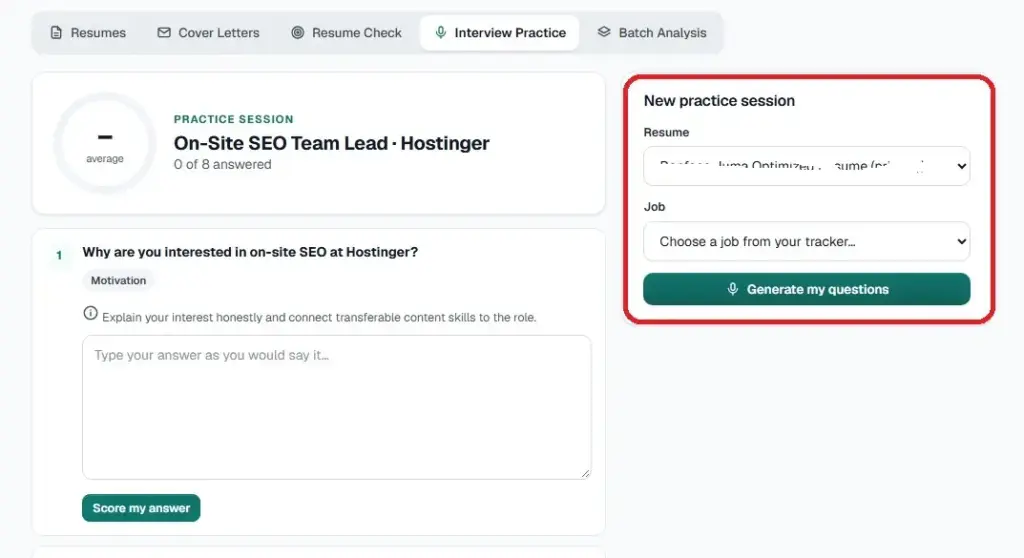
Interview Prep helps you prepare for a specific position using your resume and the corresponding job description.
Select a resume and choose a saved vacancy from your Job Tracker. Alternatively, paste the job description directly into the tool.
Click Generate my questions to produce interview questions relevant to the position.
You then answer each question. The AI evaluates your response, provides a score and suggests a stronger version.
This gives you an opportunity to examine how clearly you communicate your experience and whether your answers address the employer’s requirements.
Why structured practice helps
Interview preparation is more effective when it reflects the actual responsibilities and competencies required by the position.
A 2022 meta-analysis examining personnel selection methods identified structured interviews as one of the strongest predictors of job performance, with a validity estimate of .42.
Structured interviews use planned, job-related questions and consistent evaluation criteria. Practising against the actual job description helps you prepare for the types of questions that may arise.
A 2025 preprint examined AI-driven mock technical interviews involving 20 computer science students. Eighty per cent considered the AI mock interviews realistic, while 60% reported that the absence of a human evaluator reduced their anxiety.
The study was small and qualitative, so its findings should be treated as preliminary rather than conclusive evidence.
You can read the research on AI mock interviews and the 2022 study on structured interview validity.
Who benefits
Graduates with limited interview experience, career changers preparing to enter a new industry and professionals who have already received interview invitations.
The tool can also help experienced candidates organise their examples and communicate achievements more clearly.
For additional options, see our roundup of interview preparation tools.
How to access it
Interview Practice is included in Standard and Pro.
5. Resume Batch Analysis
Resume Batch Analysis is designed for organisations that need to evaluate multiple applications against a single job description.
Instead of reviewing each resume individually, you can upload ZIP folders containing candidate resumes and process up to 500 resumes per batch.
The tool can analyse and rank up to 2,000 resumes against one job description.
The results include:
- A ranked list of candidates.
- A summary of skills gaps.
- Comparative assessment results.
- A downloadable report.
This helps recruiters and HR teams organise large applicant pools and identify candidates whose qualifications align with the position.
For a practical walkthrough, see our resume batch analyzer guide.
Who benefits
Recruiters, HR departments, university career services, recruitment agencies and bootcamps that handle substantial numbers of applications.
Application volume is a real recruitment challenge. Jobscan has reported more than 1,400 applications for a single visual designer vacancy.
When hundreds of candidates apply for one position, manual screening can consume considerable time. Batch analysis provides a way to organise the initial review process.
However, automated rankings should support human evaluation, not replace it. Recruiters should verify qualifications, review relevant experience and consider context before making selection decisions.
How to access it
Pro includes Resume Batch Analysis.
Free and Standard users can rent the feature for five days. Pricing depends on the number of runs:
- $20 for one run covering up to 500 resumes.
- $35 for four runs covering up to 2,000 resumes.
In my test, uploading 500 resumes took nine minutes.
Organisations that need additional seats or higher usage limits can contact the AscendurePro team about a Custom plan.
Showcase: Portfolio and Assets
A resume communicates your qualifications, responsibilities and achievements. A portfolio provides supporting evidence of what you can actually produce.
For professionals whose work can be demonstrated through projects, designs, publications, campaigns or other deliverables, this distinction is important.
Launchpad’s Showcase area combines a personal portfolio with an asset library.
6. Portfolio
Portfolio allows you to create a personal web page with a permanent shareable link.
You can populate the initial portfolio using information from your resume, then add individual projects to demonstrate your work.
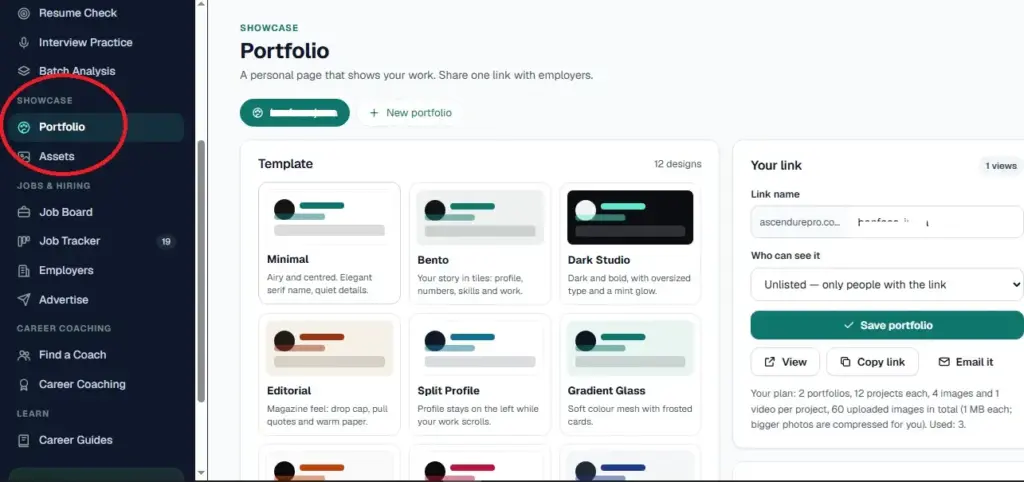
Each project can include images and a video link. Supported video sources include YouTube, Vimeo and Loom.
The available portfolio limits depend on your subscription:
| Feature | Standard | Pro |
|---|---|---|
| Portfolios | 1 | 2 |
| Designs | 10 | 12 |
| Projects | 6 | 12 |
| Images per project | 2 | 4 |
| Maximum image size | 1 MB | 1 MB |
You also control who can access your portfolio through three visibility settings:
- Public: Anyone, including search engines, can access the portfolio.
- Unlisted: Only people with the portfolio link can access it.
- Private: The portfolio remains visible only to you.
Why portfolios matter
A resume describes your work, but a portfolio allows employers to examine examples of it.
This is particularly relevant in recruitment processes that place greater emphasis on demonstrated competencies rather than academic qualifications alone.
The same 2022 personnel selection meta-analysis reported a validity estimate of .33 for work sample tests. These assessments provide employers with evidence of how candidates perform tasks related to a job.
Our guide to skills-based hiring trends explains why demonstrating relevant capabilities can strengthen your application.
Who benefits
Designers, software developers, writers, digital marketers, consultants and graduates with practical projects or other work samples.
It is also useful for professionals who want to share selected achievements without sending large collections of attachments.
How to access it
Portfolio requires a Standard or Pro subscription.
7. Assets
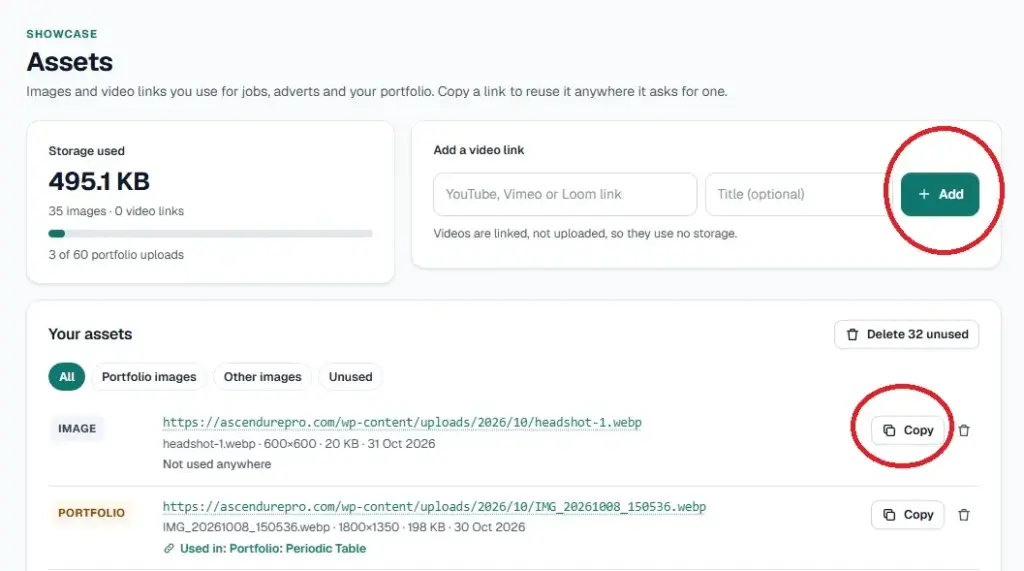
Assets is a central library for managing images and video links used across Launchpad.
Instead of uploading the same media repeatedly, you can store an asset once, copy its link and reuse it where needed.
The library allows you to add, find and delete files. You can use stored assets in portfolios, job postings and advertisements.
For example, an employer can store a company logo and reuse it when creating job advertisements. A professional can manage project images used across portfolio pages.
Who benefits
Portfolio owners, employers, recruiters and anyone who regularly uses images or video links within Launchpad.
How to access it
Open Assets in the Showcase area. It appears in the plan comparison for Free, Standard and Pro.
Jobs and Hiring: Four Tools for Job Seekers and Employers
The Jobs and Hiring section serves both sides of the recruitment process.
Job seekers can discover opportunities, save vacancies and monitor applications. Employers can register companies, publish vacancies and advertise opportunities.
The shared environment connects job discovery with the tools used to prepare applications.
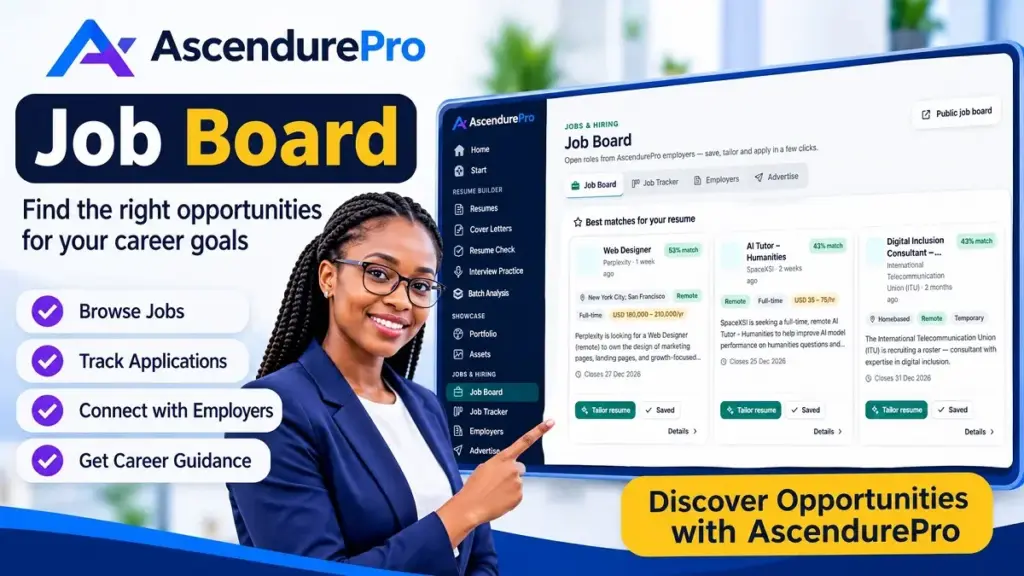
8. Job Board
The Job Board displays active vacancies published by registered employers and the AscendurePro Careers Team.
During onboarding, you can select up to three countries and indicate your preferred job types. These preferences help align the opportunities you see with your career goals.
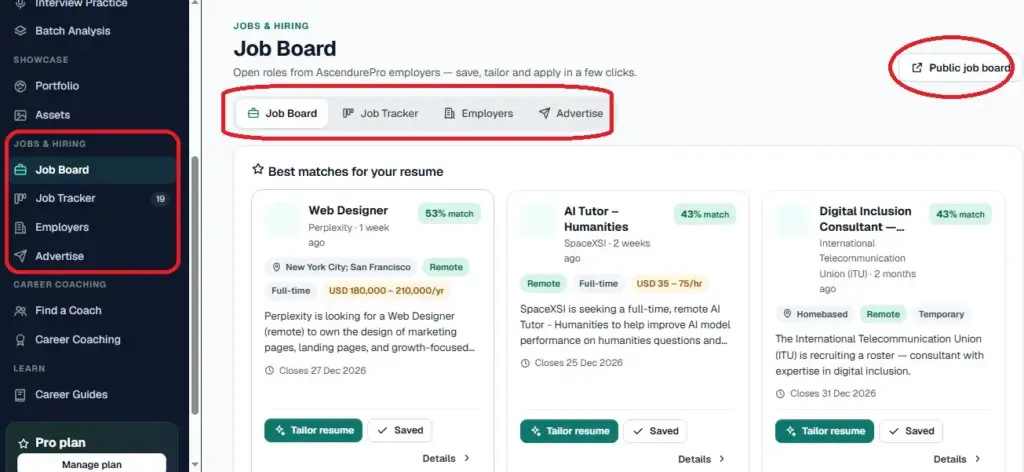
Standard and Pro subscribers also receive email job alerts for suitable opportunities in their selected countries or remote positions.
You can review vacancies, save relevant opportunities and use them as the starting point for your application preparation.
Why job verification matters
Job seekers need to distinguish genuine recruitment opportunities from misleading advertisements and employment scams.
The Federal Trade Commission reported a substantial increase in reported job and employment agency scams between 2020 and 2024. Reports tripled, while reported losses increased from $90 million to $501 million.
The FTC’s reporting on fraud provides important context in its 2025 fraud losses announcement.
On Launchpad, employer-submitted vacancies undergo a review before appearing on the public job board.
This review is an additional screening step, not a guarantee that every employer or vacancy is risk-free. Job seekers should still verify company information and exercise caution when responding to recruitment requests.
You should also avoid limiting your search to publicly advertised vacancies. Our guide on how to find high-paying hidden jobs online explains other ways to identify employment opportunities.
Who benefits
Active job seekers, recent graduates, professionals exploring new opportunities and people looking for remote work.
How to access it
Open the Job Board inside Launchpad. Saved jobs appear first, making it easier to revisit opportunities you have already identified.
You can also browse the public AscendurePro job board.
9. Job Tracker
Job Tracker helps you organise applications through a five-stage board:
- Saved.
- Applied.
- Interviewing.
- Offer.
- Not selected.
To add an opportunity, enter its job title, company, location, application link and description. Then select Add to tracker.
As your application progresses, move the job card to the relevant stage.
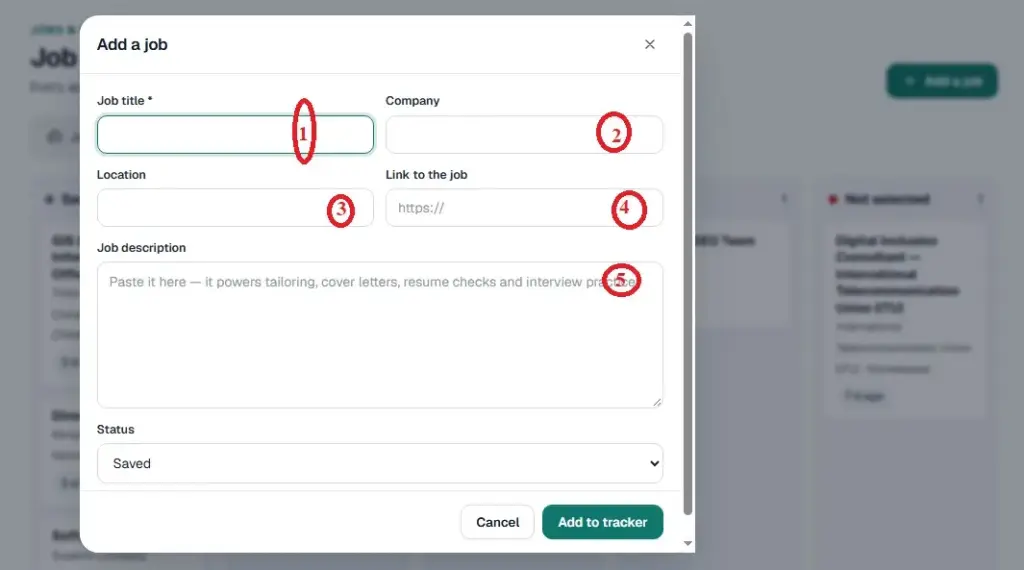
The tracker also connects with other Launchpad features. Saved job information can be used when tailoring resumes, generating cover letters and preparing interview questions.
This means you do not have to repeatedly search for the same vacancy or copy its description into different tools.
Why application tracking matters
Job searches can extend over several months. Without a reliable record, it becomes difficult to remember which positions you applied for, when you submitted each application and whether an employer responded.
Approximately 32% of Jobscan’s surveyed job seekers had been searching for more than six months.
Our research on how long it takes to find a job after college examines graduate job search timelines across 20 countries.
An organised tracker helps you maintain visibility throughout that process.
It can also help you identify patterns. For example, you may discover that certain types of positions generate more interviews than others or that you need to improve your follow-up process.
Mass application tools promise to simplify job searching, but speed should not come at the expense of application quality. Read our LazyApply review before relying on automated applications.
Who benefits
Anyone submitting multiple applications, particularly graduates and professionals managing opportunities across different companies, industries or countries.
How to access it
Job Tracker is included in the Free plan.
10. Employers
The Employers feature allows businesses and recruitment teams to register their organisations and publish job opportunities.
After registering a company, an employer can prepare a vacancy description and submit it for review.
AI assistance can help draft the job description and provide a quality score. This gives employers an opportunity to improve the clarity and completeness of their advertisements before publication.
Once submitted, the employer dashboard displays the status of each vacancy:
- Live.
- In review.
- Expired.
Approved vacancies are published on the public job board, where candidates can discover and apply for them.
The process is designed to help employers reach candidates who are already using Launchpad to prepare resumes and manage their job searches.
Who benefits
Small businesses, HR departments, recruitment teams and employers who want to attract candidates with relevant resumes and supporting application documents.
How to access it
Employer access is included with paid plans.
Start through Post a job. You can begin publishing vacancies after your company registration is approved.
11. Advertise
Advertise provides paid promotional placements for people and organisations seeking additional visibility.
Job seekers can promote themselves to employers, while businesses can increase the visibility of vacancies they are trying to fill. All advertisements undergo a review before publication.
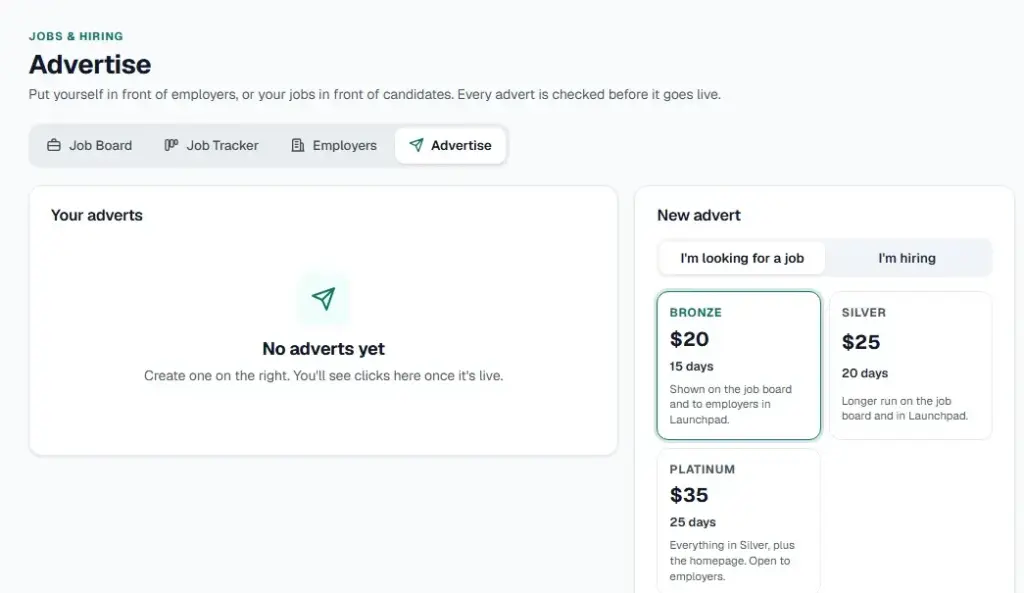
The packages are available as paid add-ons across all subscription plans.
| Package | Price | Duration | Placement |
|---|---|---|---|
| Bronze | $20 | 15 days | Job board and employer visibility within Launchpad |
| Silver | $25 | 20 days | Longer promotional period on the job board and within Launchpad |
| Platinum | $35 | 25 days | Silver placements plus homepage visibility |
Who benefits
Professionals who want additional exposure to employers and businesses recruiting for specialised or difficult-to-fill positions.
Employers can select Platinum when they want the additional homepage placement.
How to access it
Open Advertise inside Launchpad and select the package that suits your promotional needs.
Found a role you want? Save it to your tracker, then tailor your resume to it. Browse live jobs
Career Coaching: Human Guidance Inside Launchpad
AI tools can help organise information, improve documents and generate practice questions. However, some career decisions require professional judgement and an understanding of individual circumstances.
You may need help deciding between career paths, evaluating an employment offer, repositioning your experience or preparing for a career change.
Launchpad includes access to human career support through its coaching features.
12. Find a Coach
Find a Coach connects users with three types of career professionals:
- Career Mentors.
- Coaches.
- Experts.
Career Mentors are available free of charge. Coaches and Experts provide paid services through a single-fee arrangement.
When you engage a paid professional, your payment is held until you confirm that the agreed work has been completed.
Conversations are private and encrypted.
This arrangement provides a structured way to seek professional assistance without treating every career question as a software problem.
What the research says
Mentoring can provide career-related benefits through guidance, professional support and access to experience that an individual may not otherwise have.
A 2004 meta-analysis examining career benefits associated with mentoring found generally positive outcomes, although the effect sizes for objective career outcomes were relatively small.
You can review the original research on career benefits associated with mentoring.
It is important to approach coaching realistically. A mentor or coach can help you evaluate options, improve your strategy and make more informed decisions. They cannot guarantee a job offer, promotion or particular career outcome.
Who benefits
Career changers, mid-career professionals, graduates and anyone who needs an informed perspective on a resume, job search or career decision.
If you are uncertain about your next move, our guide to identifying your strongest career options provides a useful starting point before a coaching session.
How to access it
Open Find a Coach.
Coach booking is available on every subscription, including Free.
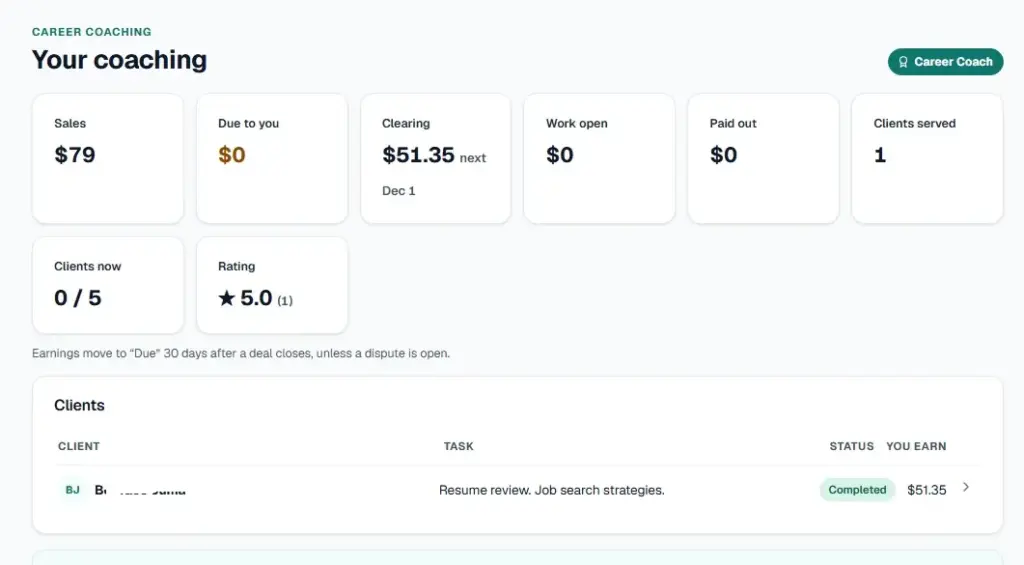
13. Become a Coach
Become a Coach gives experienced professionals an opportunity to offer career guidance through Launchpad.
Standard and Pro members can apply to join the coaching community.
The application process involves a review of your professional background, followed by a short online assessment. Successful applicants receive a Career Mentor badge.
The platform provides a progression pathway:
- Career Mentor.
- Coach.
- Expert.
After gaining experience supporting clients as a mentor, qualified professionals can progress to higher service levels.
The revenue-sharing structure also differs by level:
- Coaches retain 65% of each paid engagement.
- Experts retain 70% of each paid engagement.
This creates an opportunity for experienced professionals to earn from their knowledge while helping other people navigate career decisions.
Who benefits
Recruiters, hiring managers, HR professionals, experienced practitioners and senior professionals who enjoy mentoring and guiding others.
It may also appeal to people who want to extend their professional activities beyond their primary employment.
How to access it
Open Become a Coach inside Launchpad.
Want a second opinion? Career mentors are free on every plan. Find a mentor
Learn: Career Guides, eBooks and Courses
Career development requires more than preparing application documents. You also need to understand employment trends, develop relevant skills and make informed decisions about your professional direction.
The Learn section provides resources to support that process.
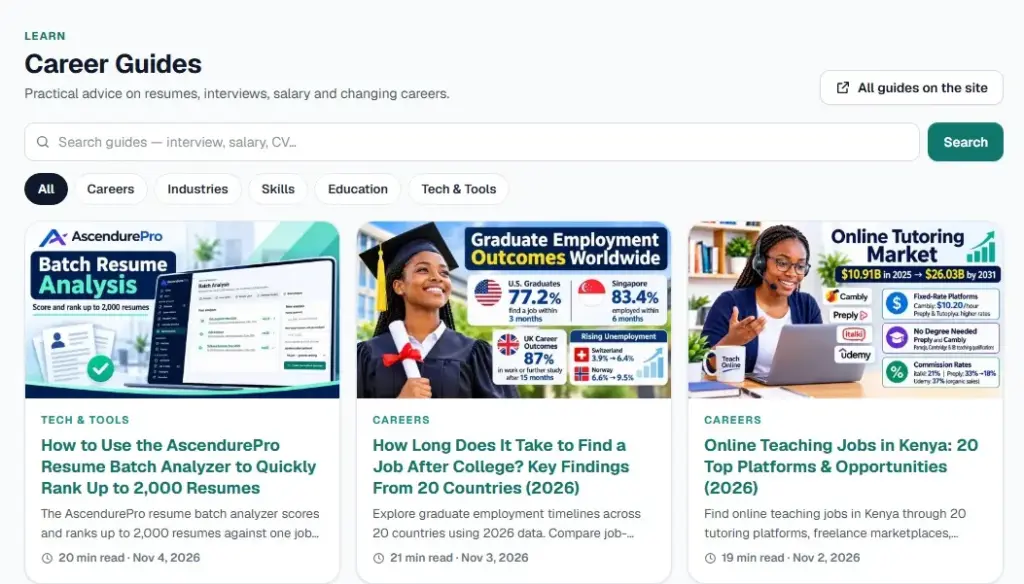
14. Career Guides
Career Guides provides practical information on topics such as:
- Resume writing and optimisation.
- Job search strategies.
- Interview preparation.
- Salary research.
- Career planning and transitions.
The library combines research with practical recommendations that readers can apply to their own career activities.
Rather than presenting information as theory alone, the guides aim to help readers understand a problem and identify the steps they can take to address it.
Who benefits
Graduates, job seekers, working professionals and career changers who want to improve their knowledge before purchasing additional services.
How to access it
Browse the AscendurePro Career Guides library. It is open to everyone.
15. eBooks
The eBooks section provides downloadable resources covering specific career topics.
Each publication focuses on a defined subject and presents information in a structured format that readers can save and revisit.
Unlike browsing individual online articles, an eBook provides a consolidated resource that can be used offline.
Who benefits
Readers who prefer structured learning materials, downloadable references and detailed guidance on particular career topics.
How to access it
Browse the eBooks available through Launchpad. Purchased publications become available for download after payment.
16. Courses
Courses are part of the planned learning offering within Launchpad.
The section is intended to provide a more structured approach to career and professional development through organised learning materials.
Courses are coming soon. Visit the Learn section for updates on availability and launch announcements.
Who benefits
Professionals, graduates and career changers who prefer guided learning rather than relying exclusively on individual articles and downloadable resources.
How to access it
Check the Learn area inside Launchpad for course announcements.
Which AscendurePro Launchpad Plan Fits You?
Launchpad offers Free, Standard, Pro and Custom subscription options. The appropriate plan depends on how frequently you use the tools and the level of functionality you need.
| Plan | Price | Main features |
|---|---|---|
| Free | $0 | Resume Builder, live resume score, 10 templates, matching cover letters, limited Resume Check, Job Board, Job Tracker and coach booking |
| Standard | $20/month | Everything in Free, all 50 designs, AI tailoring, full Resume Check, Interview Practice, one portfolio, job alerts, employer access and coach applications |
| Pro | $50/month | Everything in Standard, unlimited resumes and letters, Resume Batch Analysis, two portfolios, highest AI allowance and priority support |
| Custom | Contact us | Additional seats, team-sized AI usage allowances, and invoice or card billing |
Annual billing saves 20%. You can review the full Launchpad pricing comparison before selecting a subscription.
When should you choose Free?
Free is a practical starting point if you are beginning your job search or want to test the platform before committing to a subscription.
You can create resumes, access 10 templates, generate up to five AI cover letters, check your resume within the available allowance, browse vacancies and track applications.
You can also book a Career Mentor without upgrading.
For someone applying to a limited number of positions, these features provide a useful starting point.
When should you choose Standard?
Standard is suitable if you apply regularly and need more comprehensive application support.
It unlocks all 50 designs, AI-powered resume tailoring, full resume checks and interview practice. You also receive a portfolio, job alerts and employer access.
The additional features become particularly useful when you are applying for different positions and need to adapt your application materials frequently.
When should you choose Pro?
Pro is designed for heavier usage and users who need the platform’s advanced capabilities.
It removes the monthly resume and cover letter creation caps, provides two portfolios and includes batch analysis of up to 2,000 resumes.
This makes it relevant to recruitment professionals, HR teams, career services and individuals managing extensive application activities.
When should you consider Custom?
Custom is intended for organisations that need additional seats, higher or team-sized AI usage allowances, and more flexible billing arrangements.
Contact AscendurePro to discuss your requirements and obtain a suitable arrangement.
A Seven-Step Workflow for Getting More From Launchpad
Having access to multiple tools does not automatically improve your job search. The benefits depend on how effectively you use them together.
The following workflow connects the main features into a repeatable application process.
Step 1: Build your master resume.
Start by uploading an existing resume, pasting your content or creating a new document.
Use Resume Builder to organise your employment history, qualifications, skills and achievements. Choose a straightforward one-column template for online applications.
Keep this document as your primary resume rather than creating unrelated versions without a consistent source.
Step 2: Identify and save a target job.
Browse the Job Board and identify positions that match your qualifications, experience and career interests.
You can also add vacancies discovered outside Launchpad. Save each opportunity in Job Tracker so that its description and other details remain available.
Step 3: Tailor your resume.
Select the target job and compare its requirements with your resume.
Review the skills gaps and identify relevant experience that needs better representation.
Include missing skills only when you genuinely possess them. Match the job title where it accurately describes your experience and professional background.
The objective is to communicate relevance, not to insert keywords indiscriminately or exaggerate your qualifications.
Step 4: Run a Resume Check.
Submit your tailored resume for evaluation using the same job description.
Review the score and recommended fixes. Pay particular attention to formatting, missing qualifications, skills alignment and unclear descriptions of your achievements.
Make the necessary changes before proceeding.
Step 5: Generate a tailored cover letter.
Use your updated resume and saved job description to generate a cover letter.
Review the draft carefully. Make sure it explains your interest in the position, highlights relevant experience and sounds natural.
AI-generated content should provide a starting point, not replace your judgement or personal voice.
Step 6: Practise for the interview.
Use Interview Prep to generate questions based on the target vacancy.
Answer each question and examine the feedback. Improve your responses by using specific examples from your professional or academic experience.
Where possible, structure your answers around the situation, your responsibility, the actions you took and the results.
Step 7: Apply and track the outcome.
Submit your application through the employer’s preferred channel.
Move the corresponding job card to Applied. If you receive an interview invitation, update its status and use the interview preparation feature again.
Include your portfolio link where relevant, particularly when the employer needs examples of your work.
Repeat steps two to seven for each new opportunity. Keep your primary resume as the master copy and create tailored versions as needed.
Conclusion: Bring Your Job Search Activities Together
A successful job search requires more than a collection of disconnected tools. You need a consistent way to prepare application documents, identify suitable opportunities, demonstrate your capabilities, practise interviews and monitor progress.
AscendurePro Launchpad brings these activities together through 16 features covering resume creation, cover letters, resume checks, interview preparation, batch analysis, portfolios, job discovery, employer services, career coaching and professional learning.
You do not need to purchase the most expensive plan to get started.
Begin with Free and build a strong master resume. Use the available tools to prepare and track your first applications. Upgrade to Standard when you need AI tailoring, comprehensive resume checks, interview practice and a portfolio.
Choose Pro if you need unlimited document creation, multiple portfolios or batch analysis for recruitment activities.
For employers and recruitment teams, the platform also provides access to job posting, advertising and candidate assessment capabilities.
Ultimately, the tools are there to support your decisions and improve how you approach the job search. They cannot replace relevant experience, honest applications, thoughtful preparation or professional judgement.
Start with the AscendurePro Launchpad and build a more organised approach to finding your next career opportunity.
FAQs on AscendurePro Launchpad Features
What is AscendurePro Launchpad?
AscendurePro Launchpad is an integrated career workspace that combines resume creation, cover letter generation, resume checks, interview preparation, job discovery and application tracking.
It also provides portfolio development, employer services, career coaching and learning resources. Users can access different features depending on their subscription plan.
Is AscendurePro Launchpad free?
Yes. Launchpad has a Free plan costing $0, and no payment card is required to get started.
The plan includes a resume builder with 10 templates, matching cover letters, a limited resume check, the job board, job tracking and access to career mentors.
Users who need additional features can upgrade to Standard or Pro.
Are AscendurePro resume templates ATS-friendly?
Launchpad templates use real text, standard section headings and bullet lists rather than relying on images of text.
Single-column layouts are generally the safer option for online applications because some applicant tracking systems have difficulty interpreting complex tables and columns.
However, ATS compatibility also depends on the software used by the employer and the quality of the resume content. No template can guarantee that every ATS will interpret a document perfectly.
Do I need a Pro subscription for Resume Batch Analysis?
No. Pro includes Resume Batch Analysis, but Free and Standard users can also rent the feature for five days.
The rental options cost $20 for one run covering up to 500 resumes or $35 for four runs covering up to 2,000 resumes.
Can employers post jobs on Launchpad?
Yes. Employers can register their companies, prepare job descriptions and submit vacancies for publication.
AI assistance is available for drafting descriptions and assessing post quality. Vacancies undergo a review before appearing on the public job board.
Employer access is included in paid subscription plans.
How does paying a career coach work?
Career Mentors are available free of charge.
Coaches and Experts charge a single fee for their services. Launchpad holds the payment until you confirm that the agreed work has been completed.
This arrangement provides a structured payment process for paid coaching engagements.
Who can see my Launchpad portfolio?
You control your portfolio’s visibility.
Public portfolios can be accessed by anyone, including search engines. Unlisted portfolios are accessible to people who have the link. Private portfolios remain visible only to you.
How many resumes can I create on Launchpad?
Free users can maintain up to five resumes. Standard allows 100 new resumes per month, while Pro removes the monthly creation cap.
Does Launchpad provide interview practice?
Yes. Interview Prep generates questions using your resume and a target job description. You can answer each question and receive AI-generated feedback, including a score and a suggested stronger response.
Interview Practice is available on Standard and Pro.
Can I use Launchpad to create a professional portfolio?
Yes. The Portfolio feature lets you create a personal web page, add projects, upload images and include video links from YouTube, Vimeo or Loom.
Standard includes one portfolio, while Pro includes two.
References
- Allen, T. D., Eby, L. T., Poteet, M. L., Lentz, E., & Lima, L. (2004). Career benefits associated with mentoring for protégés: A meta-analysis. Journal of Applied Psychology, 89(1), 127–136.
- Federal Trade Commission. (2025, March 10). New FTC data show a big jump in reported losses to fraud to $12.5 billion in 2024.
- Gomez, N., Batham, S. S., Volonte, M., & Do, T. D. (2025). Virtual interviewers, real results: Exploring AI-driven mock technical interviews on student readiness and confidence. arXiv:2506.16542.
- HR Dive. (2021). Report: Applicant tracking systems may exclude whole segments of candidates.
- Jobscan. (2025, February 25). The state of the job search in 2025.
- Purcell, K. (2026, August 20). 2026 applicant tracking system (ATS) usage report: Key shifts and strategies for job seekers. Jobscan.
- Purcell, K. (2026, September 24). Why ATS tables and columns ruin your resume (and what to do instead). Jobscan.
- Resume Genius. (n.d.). Do hiring managers read cover letters?.
- ResumeGo. (n.d.). Cover letters: Just how important are they?.
- Sackett, P. R., Zhang, C., Berry, C. M., & Lievens, F. (2022). Revisiting meta-analytic estimates of validity in personnel selection: Addressing systematic overcorrection for restriction of range. Journal of Applied Psychology, 107(11), 2040–2068.
Join Us
Get clear roadmaps, in-demand skills insights, and proven strategies to help you move into high-growth, future-proof careers — no fluff.