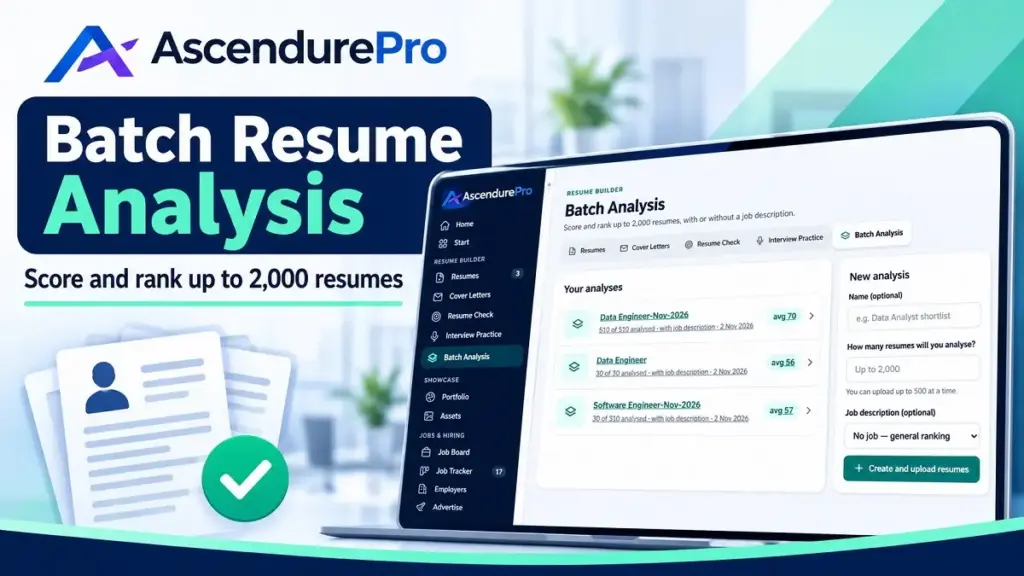
The AscendurePro Resume Batch Analyzer scores and ranks up to 2,000 resumes against a job description. Upload ZIP folders containing up to 500 resumes per run. Get candidate rankings, skills-gap insights and downloadable reports.
A single job opening can attract hundreds of applications. Reviewing every resume manually takes time that recruitment teams could spend interviewing qualified candidates.
The AscendurePro Resume Batch Analyzer helps recruiters handle this workload. It extracts candidate information, compares resumes with job requirements and organizes applicants by their assessment scores.
I tested the tool using 510 resumes across two uploads. Processing the first 500 took exactly nine minutes. The results included candidate rankings, average and median scores, recurring skills gaps and common resume issues.
This guide explains how the tool works, how much it costs, how to prepare your files and how to interpret the results. It also covers scoring limitations, recruitment fairness and candidate data protection. Explore all AscendurePro Launchpad features.
Key Takeaways
- Analyze up to 2,000 resumes in one batch analysis.
- Process up to 500 resumes per run using ZIP folders.
- Upload PDF, Word and TXT documents.
- Compare candidates against a job description or conduct general resume ranking.
- Review candidate scores, match ratings, strengths and improvement areas.
- Identify recurring skills gaps and common resume problems.
- Download results in PDF, CSV or Word format.
- Rent batch analysis for five days from $20 or access it through the Pro plan.
- Use automated rankings to support screening, not replace human hiring decisions.
Contents
Why Bulk Resume Analysis Is Now a Necessity
Recruitment teams face a growing challenge: more applications per opening and greater pressure to identify suitable candidates quickly.
Greenhouse’s 2026 Hire Standard recruitment benchmarks analyzed data from more than 6,000 companies and 640 million applications between 2022 and 2025.
Its findings show that:
- Applications per job increased from 116 in 2022 to 244 in 2025.
- Annual applications processed per recruiter increased from 1,610 to 4,890.
- Average recruiters per organization declined from 10.43 to 4.62.
Ashby’s 2026 recruitment research analyzed more than 100 million applications and 200,000 jobs.
It found that applications per hire tripled between 2021 and 2025. Roles received more than 300 applications per hire on average.
These figures highlight the pressure on recruitment teams. They must review larger applicant pools without allowing screening quality to decline.
Why Traditional Resume Screening Becomes Difficult
Manual screening creates several operational challenges:
- Time-consuming reviews: Recruiters spend hours opening, reading and comparing individual resumes.
- Inconsistent assessments: Different reviewers may interpret the same qualifications differently.
- Difficult candidate comparisons: Tracking skills, experience and qualifications across hundreds of documents becomes cumbersome.
- Limited reporting: Identifying recurring skills gaps requires additional spreadsheet work.
- Screening fatigue: Repetitive reviews can lead to overlooked qualifications and inconsistent decisions.
Research from Harvard Business School highlights another concern.
Automated recruitment filters can exclude qualified candidates when employers rely on rigid requirements rather than relevant skills.
The answer is not simply to automate every hiring decision. It is to use technology to organize applications and support more consistent human assessments.
That is where bulk resume analysis becomes useful.
What the AscendurePro Resume Batch Analyzer Does
The AscendurePro Resume Batch Analyzer is an AI-powered bulk resume screening tool built into the Resume Builder in Launchpad.
It processes multiple resumes together rather than requiring recruiters to analyze each document individually.
You upload ZIP folders containing candidate resumes. The analyzer extracts information from each document and evaluates candidates.
You can provide a job description to assess candidate suitability against specific requirements. Alternatively, you can run a general analysis without a job description.
Each analyzed resume receives a score, match rating and assessment comments.
The results help you identify:
- Candidates with stronger alignment to the role.
- Relevant skills and experience.
- Qualifications that may need further verification.
- Skills gaps across the applicant pool.
- Common resume weaknesses.
- Candidates who deserve closer examination.
The tool also generates a downloadable report containing the assessment results.
Batch Analysis Capacity and Supported File Types
The analyzer supports the following limits:
| Feature | Capacity |
|---|---|
| Resumes per run | Up to 500 |
| Runs per full analysis | Up to 4 |
| Maximum resumes | 2,000 |
| Accepted formats | PDF, Word, TXT |
| Upload method | ZIP folders |
| Rental access | 5 days |
| Report formats | PDF, CSV, Word |
Each run handles a maximum of 500 resumes. A complete four-run analysis can therefore accommodate up to 2,000 resumes.
For example, an organization screening 1,200 applicants can divide its documents into three runs: 500, 500 and 200 resumes.
How the Analyzer Assesses Candidates
The analyzer produces several assessment outputs.
1. Candidate scores
Each resume receives a numerical score that helps organize the applicant pool.
2. Match ratings
Candidates receive a match rating that provides additional context for interpreting their results.
3. Assessment comments
The results include observations about candidate strengths and areas requiring improvement.
4. Skills-gap insights
The analyzer identifies skills that frequently appear missing across the applicant pool.
5. Resume quality observations
It highlights recurring issues such as incomplete contact information, unclear employment dates and unquantified achievements.
Understanding the scoring methodology
A numerical score should not be interpreted as a complete measure of a candidate’s professional ability.
The score is an assessment output, not proof that someone will perform well in a particular role. Recruiters should examine the underlying comments and verify relevant qualifications against the original resume.
The published product documentation does not disclose the complete scoring formula or individual factor weights. Therefore, do not assume that every skill, qualification or experience requirement contributes equally to the final score.
For important hiring decisions, use the assessment alongside structured interviews, qualification checks and other relevant evidence.
Resume Batch Analyzer Pricing: Rent or Subscribe
AscendurePro offers two ways to access batch analysis: a one-time rental or a monthly Pro subscription.
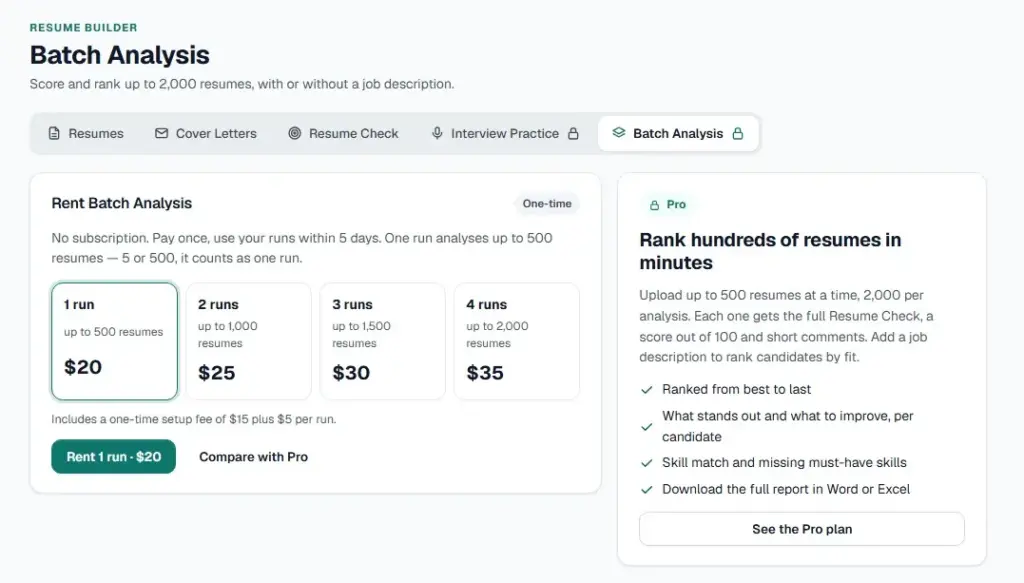
Option 1: Rent Batch Analysis
Renting is suitable for organizations that conduct occasional recruitment exercises.
You pay once and receive five days to use the purchased runs. No monthly subscription is required.
| Runs | Maximum resumes | Price | Cost per resume* |
|---|---|---|---|
| 1 | 500 | $20 | $0.040 |
| 2 | 1,000 | $25 | $0.025 |
| 3 | 1,500 | $30 | $0.020 |
| 4 | 2,000 | $35 | $0.0175 |
Cost per resume assumes you use the full capacity of each package.
For example, screening 1,200 applicants requires three runs at $30. The fourth run is unnecessary.
Rent Batch Analysis through AscendurePro
Ready to rank your first batch? Rent batch analysis from $20 and use your runs within 5 days. No subscription needed.
Rent Batch Analysis →
Option 2: Get Batch Analysis with Pro
The Pro plan costs $50 per month or $480 per year.
It includes Batch Analysis, with capacity to rank up to 2,000 resumes across four runs.
Other Pro benefits include:
- Unlimited resumes and cover letters.
- Premium resume and cover letter designs.
- Advanced AI assistance.
- Two portfolio pages.
- The highest monthly AI allowance.
- Priority support.
Compare AscendurePro pricing plans
Which Option Should You Choose?
| Your situation | Recommended option |
|---|---|
| One recruitment exercise | Rent |
| Occasional screening | Rent |
| Monthly recruitment activities | Pro |
| Frequent resume analysis | Pro |
| University or institutional recruitment | Custom |
| Larger teams requiring tailored arrangements | Custom |
A four-run rental costs $35, while Pro costs $50 monthly.
For a single hiring round, renting is more economical. For recurring recruitment, Pro offers better overall value because it also includes other career-building features.
Organizations with larger teams or institutional requirements can contact AscendurePro to discuss a Custom arrangement.
Plan Your Resume Batch Before Uploading
A little preparation can reduce unnecessary processing costs and improve the quality of your results.
1. Count Your Resumes and Calculate Runs
Each run accommodates up to 500 resumes.
Determine your total number of files before purchasing a rental package or starting an analysis.
For example:
| Number of resumes | Runs required |
|---|---|
| 350 | 1 |
| 500 | 1 |
| 750 | 2 |
| 1,000 | 2 |
| 1,200 | 3 |
| 1,500 | 3 |
| 2,000 | 4 |
Avoid splitting a batch unnecessarily. Remove duplicate files and check that each folder contains the correct documents.
Unused capacity is not automatically transferred into another run.
2. Prepare a Clear Job Description
The quality of your job description matters.
When you provide a job description, the analyzer uses it as the reference for assessing candidate suitability.
A vague description can make the resulting rankings less useful.
Before uploading resumes:
- Define the essential qualifications.
- Separate mandatory skills from preferred skills.
- Identify the technical tools and methods required.
- Describe the responsibilities of the position.
- Include relevant experience requirements.
- Avoid unnecessary qualifications that do not affect job performance.
Harvard Business School’s research on hidden workers and automated recruitment highlights the importance of using inclusive, skills-focused screening criteria.
If you do not have a job description, you can still conduct general resume analysis. You can also select a job saved in your AscendurePro job tracker.
Step-by-Step: How to Use the AscendurePro Resume Batch Analyzer
Follow these steps to analyze and rank your applicant pool.
Step 1: Prepare Your Resume ZIP Folders
Collect the resumes you want to analyze.
Place them inside ZIP folders, ensuring that each folder contains no more than 500 resumes.
The accepted document formats are:
- Microsoft Word
- TXT
For example, an organization with 1,200 resumes can prepare three ZIP folders:
- Folder 1: 500 resumes.
- Folder 2: 500 resumes.
- Folder 3: 200 resumes.
Check your folders for duplicate documents and unsupported file types before uploading.
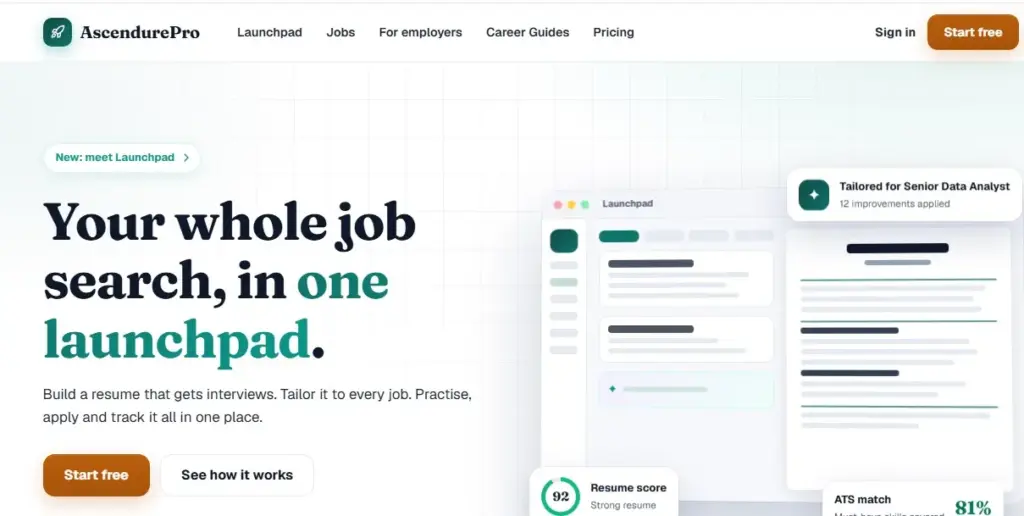
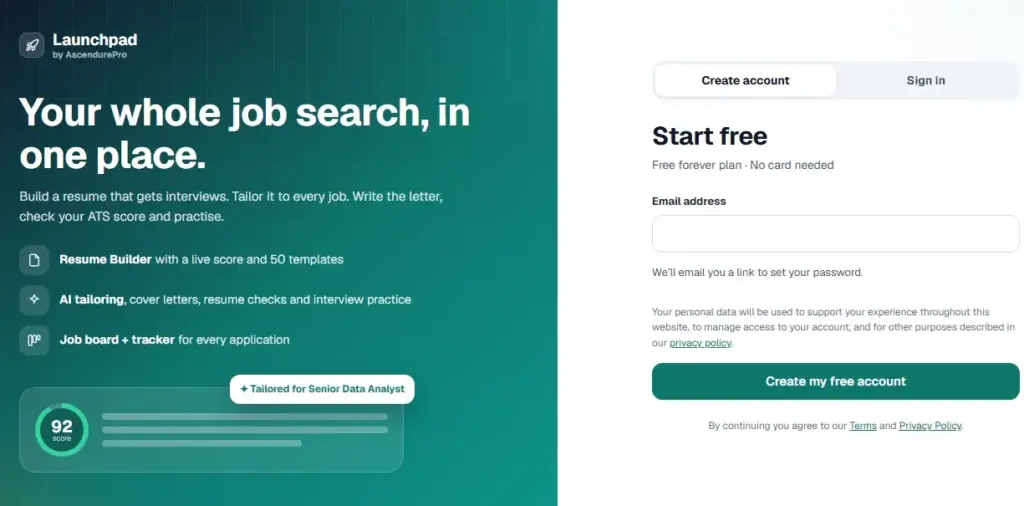
Step 2: Open AscendurePro
Visit AscendurePro using your preferred browser.
Select Start Free or Sign In, depending on whether you already have an account.
Step 3: Create an Account or Sign In
New users can create an account using the free registration option.
Existing users can sign in with their account credentials.
The Free plan does not include Batch Analysis, but you can register without a payment card and explore the available career tools.
Step 4: Purchase a Rental or Upgrade to Pro
Batch Analysis is available through a rental or the Pro subscription. Choose the option that matches your expected screening volume.
If you already have Pro, proceed to the next step. Otherwise, purchase the appropriate rental package or upgrade your account.
Rentals provide five days of access, while Pro includes Batch Analysis as part of its monthly or annual subscription.
Screen candidates every month? The Pro plan includes batch analysis, unlimited resumes and cover letters, and priority support.
Compare Pro and Standard →
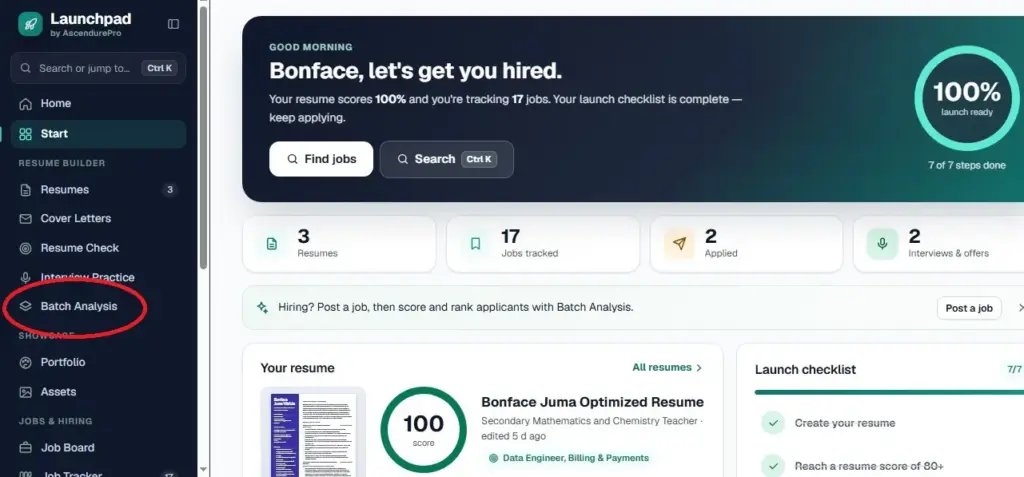
Step 5: Open Batch Analysis
After accessing your Launchpad account:
- Open the Resume Builder.
- Locate the Batch Analysis option.
- Select it to open the batch analysis dashboard.
You can now create a new screening exercise.
Step 6: Name Your Batch
Enter a descriptive name for your analysis.
The name helps you identify different recruitment exercises in your dashboard.
For example:
- Data Analyst Shortlist 2026.
- Finance Officer Recruitment.
- Graduate Trainee Applications.
- Software Engineer Screening.
Choose a name that identifies the position or recruitment exercise.
A clear name helps when you run several batches in the same week.
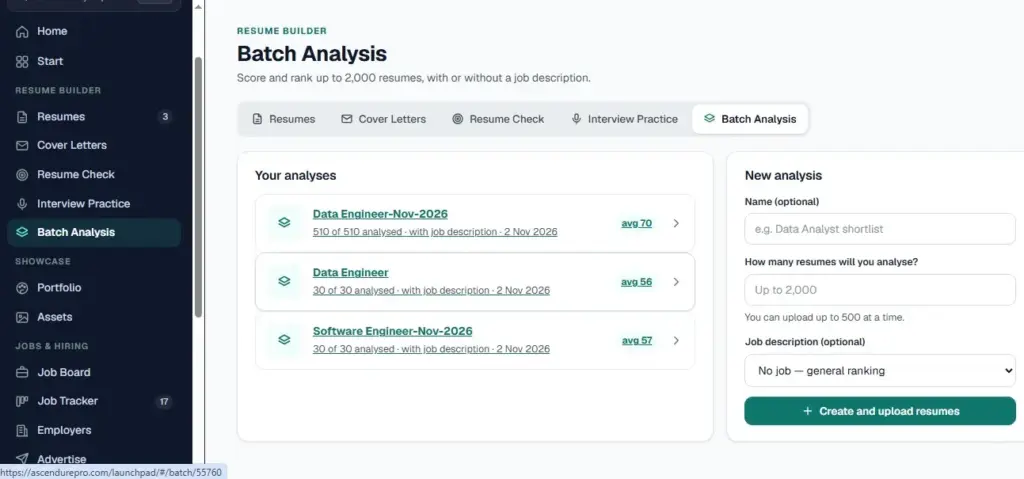
Step 7: Enter the Number of Resumes
Specify the total number of resumes you intend to analyze.
The maximum supported capacity is 2,000 resumes.
Enter an accurate number so that the analysis corresponds to your purchased runs or subscription capacity.
Count the files in your ZIP folders before proceeding.
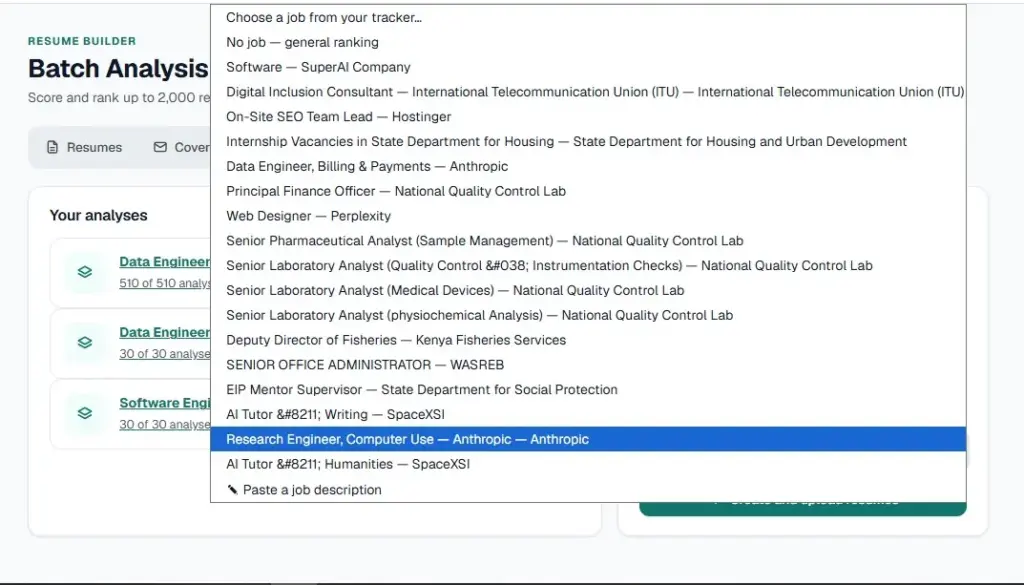
Step 8: Add a Job Description
The analyzer provides three options.
Option 1: General resume analysis
Select this option when you want to analyze resumes without targeting a particular vacancy.
The tool will conduct general resume ranking.
Option 2: Paste a job description
Provide the job title, company information and job description.
This allows the analyzer to compare candidates against the requirements of a specific position.
Option 3: Select a saved job
Choose an existing vacancy from your AscendurePro job tracker.
This saves you from entering the job description again.
After selecting your preferred option, click Create and upload resumes.
Step 9: Upload Your ZIP Folders
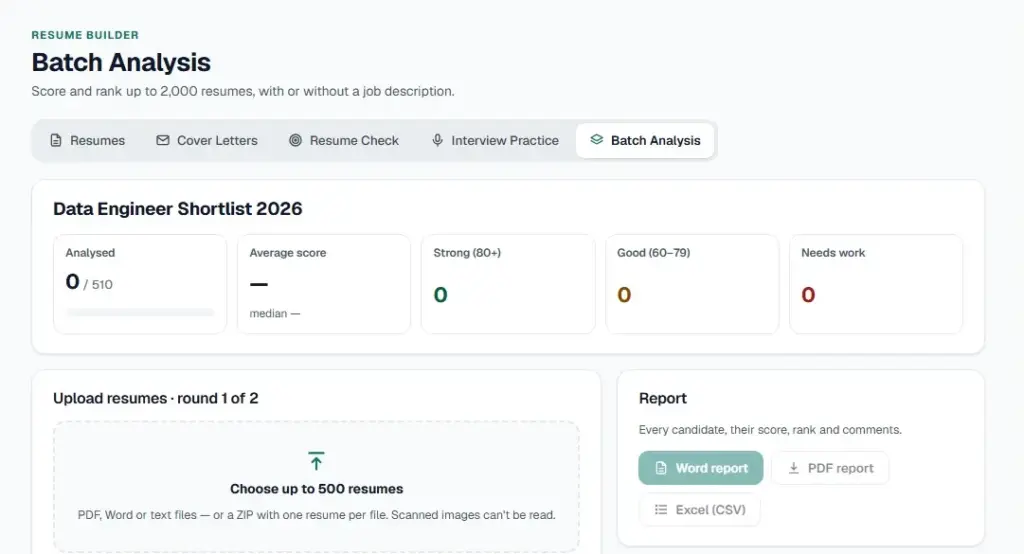
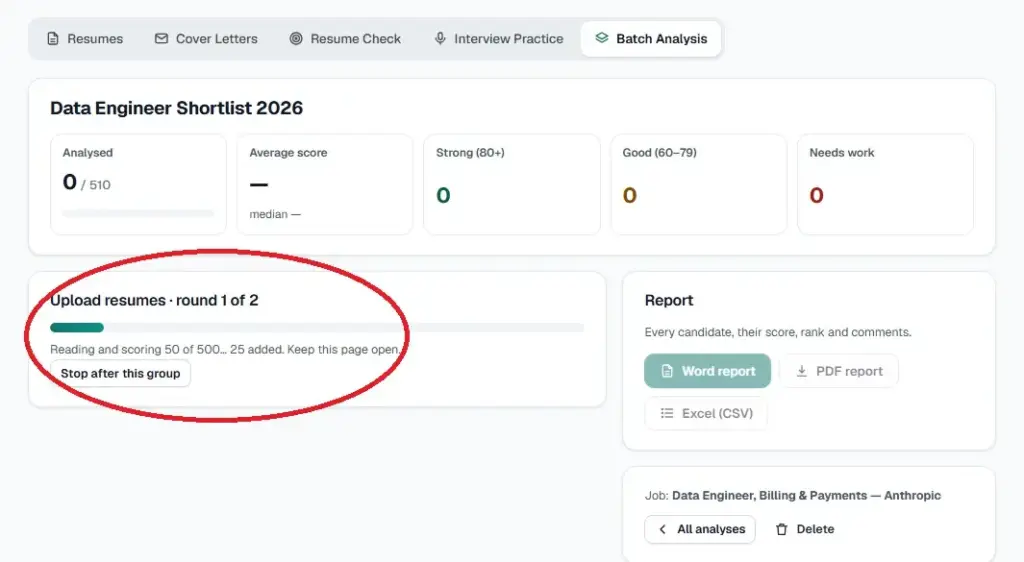
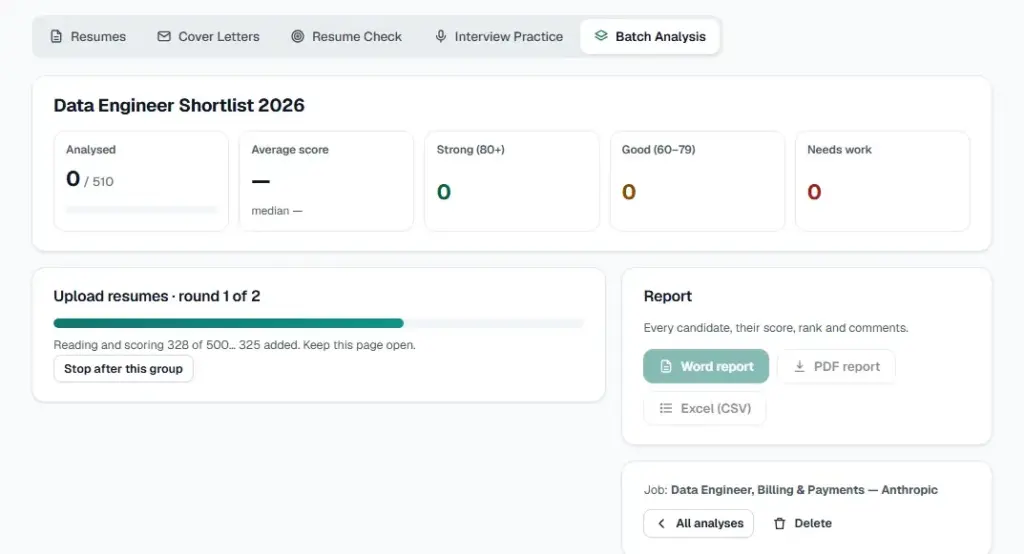
Upload your first ZIP folder containing up to 500 resumes. The analyzer begins reading and assessing the documents.
For larger applicant pools, upload the remaining folders as the previous runs are completed.
My performance test
I tested the analyzer using 510 resumes. The first upload contained 500 resumes, while the second contained 10.
The first 500 resumes took exactly nine minutes to process.
At the same observed processing rate, 2,000 resumes would require approximately 36 minutes of processing across four runs.
This is an observed result from my test, not a guaranteed processing time. Actual performance may vary with document complexity, file sizes and system conditions.
Step 10: Review the Analysis Dashboard
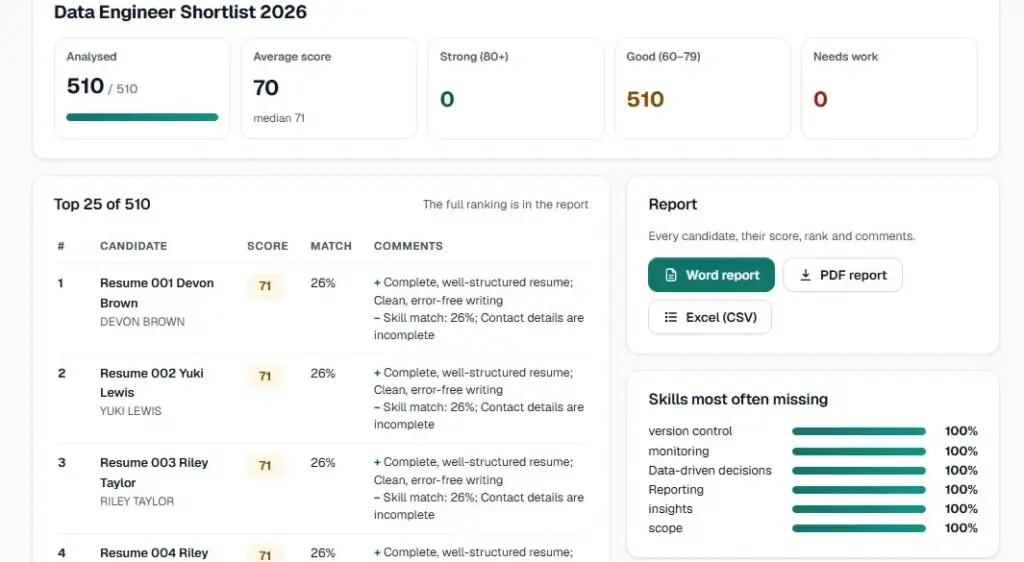
After processing, the dashboard presents a summary of your applicant pool.
You can review:
- Total resumes analyzed.
- Average candidate score.
- Median candidate score.
- Candidate score distribution.
- Top 25 candidates.
- Frequently missing skills.
- Common resume issues.
This gives recruiters an overview before they begin examining individual candidates.
Step 11: Download or Print Your Results
Once you have reviewed the results, download the report.
Available formats include:
- CSV
- Word
The report organizes applicants by their assessment scores and includes relevant candidate information, match ratings, experience details, strengths and improvement areas.
You can use the exported information for further review, internal reporting and recruitment documentation.
Step 12: Delete or Retain Your Batch
After completing your screening exercise, decide whether to retain the batch in your Launchpad dashboard or delete it.
If you no longer need the analysis, use the available delete option.
Keep only the records required for legitimate recruitment, documentation and compliance purposes.
If you require confirmation of permanent deletion, including any applicable backups or third-party processing systems, contact AscendurePro before uploading sensitive applicant information.
What Your Resume Batch Analysis Results Show
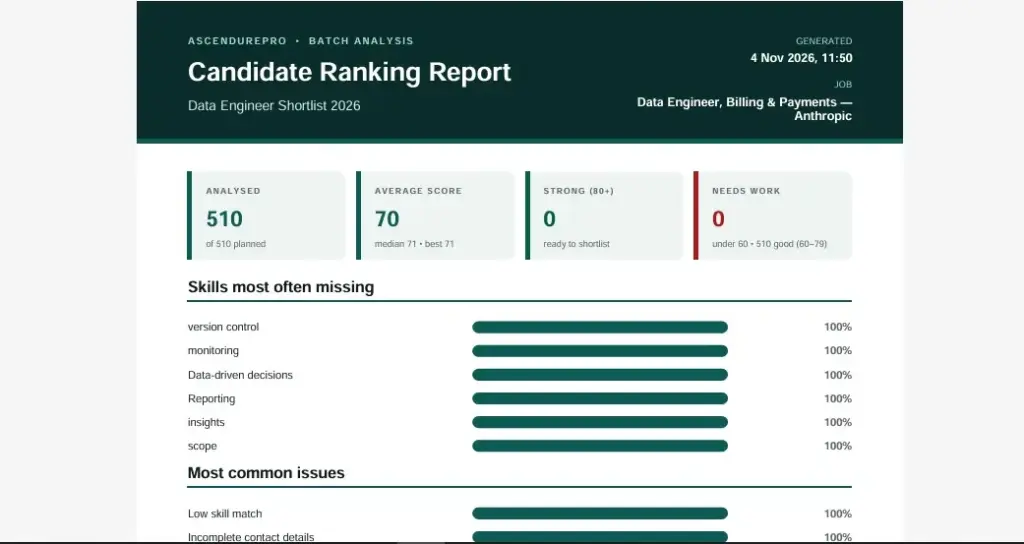
I analyzed 510 resumes to examine the results produced by the tool.
Here is the summary returned by my test.
| Metric | Result |
|---|---|
| Resumes analyzed | 510 of 510 |
| Average score | 70 |
| Median score | 71 |
| Strong (80+) | 0 |
| Good (60–79) | 510 |
| Needs work | 0 |
The results provide several useful insights.
1. Candidate Score Distribution
The score distribution groups candidates into three categories:
- Strong: Scores of 80 and above.
- Good: Scores between 60 and 79.
- Needs work: Scores below 60.
In my test, all 510 resumes fell within the Good category.
This does not mean that all candidates were equally qualified. Their individual scores and rankings still differed.
When candidates cluster within the same score band, examine their relative rankings and assessment comments.
Do not use a score band as an automatic qualification or rejection threshold.
2. The Top 25 Candidates Table
The analyzer identifies the 25 highest-ranked candidates. However, a the full report ranks all candidates screened.
3. Skills Most Often Missing
The skills-gap summary identifies capabilities that frequently appear missing across the analyzed resumes.
In my test, the recurring gaps included:
- Version control.
- Monitoring.
- Data-driven decision-making.
- Reporting.
- Insights.
- Scope.
These findings can help recruiters understand the strengths and limitations of their applicant pool.
They can also reveal potential problems with the job description.
For example, if most applicants lack a particular technical skill, consider whether:
- The skill was clearly specified in the vacancy.
- The requirement is genuinely essential.
- Qualified candidates may describe the skill differently.
- The skill could be developed through training.
A skills gap does not automatically make someone unsuitable for a role.

Score up to 2000 resumes in batch analysis
Analyze, grade, and rank up to 2000 resumes in 4 batches. Rent or get a Pro plan.
4. Most Common Resume Issues
The test also identified four recurring problems:
- Low skill match.
- Incomplete contact details.
- Unclear or missing employment dates.
- Achievements without measurable results.
These observations can help recruitment teams identify issues requiring further verification.
For example, incomplete employment dates should prompt clarification rather than automatic rejection.
Similarly, an applicant who does not quantify achievements may still have relevant experience.
The assessment comments should guide further examination, not replace it.
Understanding the Scoring Methodology and Its Limitations
Automated resume screening is most useful when recruiters understand what the results can and cannot establish.
A score is a summary assessment. It does not provide a complete picture of someone’s potential, professional judgment, interpersonal abilities or future performance.
The analyzer provides scores, match ratings and assessment comments. However, the full scoring formula and factor weights are not publicly documented.
For that reason, recruiters should avoid assuming that a particular score represents a validated probability of job performance.
How to Interpret Similar Candidate Scores
When candidates receive similar scores:
- Compare their relevant experience.
- Examine evidence of essential skills.
- Review the assessment comments.
- Check qualifications against the original documents.
- Use structured interviews or practical assessments where appropriate.
Where two candidates appear equally qualified, additional evidence can help distinguish their suitability.
Why Human Verification Remains Necessary
Automated resume analysis can miss context.
A candidate may have relevant experience that is described using different terminology. Another may demonstrate strong transferable skills without matching every keyword in the job description.
Recruiters should therefore examine candidates beyond the top 25 when appropriate.
The goal is to make the initial screening process more manageable without narrowing the applicant pool unfairly.
Use Bulk Resume Analysis Fairly and Safely
Efficiency should not come at the expense of fairness, privacy or responsible recruitment.
1. Keep Human Review in the Hiring Process
AI-generated candidate rankings should support recruitment decisions, not make them independently.
A University of Washington study examined how language models ranked applicants when researchers varied names associated with different racial and gender groups.
The study identified significant biases in the models tested.
Its underlying research, Gender, Race, and Intersectional Bias in Resume Screening via Language Model Retrieval, demonstrates why automated ranking requires careful oversight.
The study did not test AscendurePro’s proprietary analyzer. Its findings should not be interpreted as evidence that this particular product produces the same results.
However, they demonstrate a broader risk that organizations should consider when deploying AI in recruitment.
Adopt these practices:
- Review a sample of candidates outside the top 25.
- Verify qualifications against original resumes.
- Avoid using demographic characteristics as screening criteria.
- Document objective reasons for shortlisting or rejection.
- Review whether screening criteria disadvantage particular groups.
- Allow appropriate human review of unusual or disputed results.
2. Understand the Rules in Your Hiring Jurisdiction
Recruitment data and automated screening are subject to legal and regulatory requirements.
European Union
The EU AI Act identifies certain AI systems used for recruitment and candidate selection as high-risk.
Following the AI Omnibus, the relevant Annex III high-risk obligations are scheduled to apply from 2 December 2027.
The European Commission’s AI Act guidance provides the current implementation timeline.
You can also review the legal analysis from Ogletree and Mondaq.
Kenya
The Kenya Data Protection Act, 2019 establishes requirements for collecting, processing, storing and protecting personal data.
Recruitment organizations should consider their obligations as data controllers or processors, depending on their role.
Registration requirements, lawful processing, data-subject rights and applicable exemptions should be assessed under the Act and relevant regulations.
Organizations should consult the Office of the Data Protection Commissioner for guidance.
Requirements in other jurisdictions may differ. Organizations recruiting internationally should establish which laws apply to their operations and applicants.
3. Protect Candidate Information
Resumes contain personal and professional information.
Before uploading candidate documents, establish that your organization has an appropriate legal basis and authority to process them.
AscendurePro’s Privacy Policy describes the collection and use of personal information and the involvement of service providers.
However, recruiters handling large applicant pools should also obtain clear answers to product-specific questions, including:
- How long are uploaded resumes retained?
- Are uploaded documents used to train AI models?
- Which third-party providers process candidate information?
- What security and access controls protect uploaded documents?
- What happens to backups after a batch is deleted?
- How can an organization request deletion of candidate data?
For sensitive recruitment exercises, obtain clarification from AscendurePro before uploading candidate files.
4. Delete Candidate Data When It Is No Longer Needed
Avoid retaining unnecessary applicant information.
Establish a retention schedule based on your organization’s recruitment policies and applicable data protection requirements.
Delete completed batches when they are no longer required, subject to legitimate record-keeping obligations.
Practical Tips for Getting Better Results
The quality of your results depends on preparation and how you interpret the assessment.
1. Finalize the Job Description Before Uploading
Agree on essential requirements with the hiring manager before starting the analysis.
Avoid changing the criteria halfway through a recruitment exercise.
This helps maintain consistency across the applicant pool.
2. Investigate Repeated Skills Gaps
If many applicants lack the same skill, examine the job description and the available talent pool.
The gap could indicate a genuine shortage of qualified candidates or an unnecessarily restrictive requirement.
Use the findings to improve future recruitment exercises.
3. Combine Automated Ranking with Structured Interviews
Use the analyzer to organize the first stage of screening.
Then assess shortlisted candidates through consistent interviews, technical assessments and reference checks where appropriate.
This creates a more complete picture of candidate suitability.
4. Use the Results for Skills Development
The skills-gap report can also benefit universities, bootcamps and career services departments.
For example, an institution can analyze a graduating cohort to identify common skills deficiencies.
Career advisors can then use these findings to guide training, curriculum development and employment preparation.
5. Choose the Right Access Plan
Do not purchase more processing capacity than you need.
For a single recruitment exercise, rental packages provide a straightforward option.
For recurring recruitment, the Pro subscription offers Batch Analysis alongside other career tools.
Institutions and larger organizations can discuss tailored arrangements through the AscendurePro contact page.
Who Should Use the AscendurePro Resume Batch Analyzer?
The tool has several potential applications beyond conventional corporate recruitment.
| User group | Potential application |
|---|---|
| Recruitment agencies | Screen large applicant pools for client vacancies |
| Corporate HR teams | Organize applications across multiple recruitment exercises |
| Small and medium-sized employers | Reduce repetitive initial screening work |
| Universities | Assess graduate readiness and recurring skills gaps |
| Bootcamps | Evaluate learner resumes and identify training needs |
| Career services teams | Support cohort-level career assessments |
| Independent recruiters | Compare applicants more efficiently |
Its value depends on the size of the applicant pool and the need for consistent, organized assessment.
Organizations screening only a handful of applicants may not need batch processing. Those handling hundreds of resumes may find it more useful.
AscendurePro Resume Batch Analyzer vs. Traditional Resume Screening
How does bulk resume analysis compare with reviewing applications manually?
| Screening activity | Traditional approach | AscendurePro Batch Analyzer |
|---|---|---|
| Document handling | Open resumes individually | Upload ZIP folders |
| Initial assessment | Read and evaluate each resume | Automated candidate assessment |
| Candidate comparison | Manual comparison | Scores and match ratings |
| Candidate ranking | Create a shortlist manually | Ranked candidate results |
| Skills gaps | Review and compare documents | Batch-level skills-gap summary |
| Common resume issues | Identify manually | Automated issue summary |
| Reporting | Compile spreadsheets and documents | Downloadable reports |
| Final hiring decision | Human review | Human review remains necessary |
The main advantage is organization and processing efficiency.
The analyzer helps recruiters prioritize their attention. It does not eliminate the need to examine original documents or verify candidate suitability.
Conclusion: Screen More Resumes Without Losing Sight of Candidate Quality
Recruitment teams increasingly face large applicant pools and limited time for initial screening.
The AscendurePro Resume Batch Analyzer provides a practical way to organize this workload.
It can process up to 500 resumes per run and rank up to 2,000 resumes in a complete batch analysis.
My test of 510 resumes demonstrated the workflow, with the first 500 processed in nine minutes. The results included candidate rankings, score distributions, recurring skills gaps and common resume issues.
For occasional recruitment, rental packages start at $20. For recurring screening, the Pro plan includes Batch Analysis at $50 per month.
The best results come from combining clear job descriptions, well-prepared resume folders and careful human review.
Ready to analyze your first batch?
Compare Batch Analysis rental and Pro options.
For larger recruitment teams, universities and bootcamps, contact AscendurePro to discuss a Custom arrangement.
FAQs: Resume Batch Analyzer
1. How many resumes can the AscendurePro Resume Batch Analyzer process?
The analyzer processes up to 500 resumes per run. A complete batch analysis can accommodate up to 2,000 resumes across four runs.
20% off on annual plans
Tailor your resume, get your resume analysis, create portfolio, become a career coach & more
2. Is there a free resume batch analyzer?
Batch Analysis is not included in the Free plan. You can rent it from $20 or access it through the Pro plan.
The Free plan includes individual Resume Check functionality.
3. Which file formats does the analyzer accept?
The analyzer accepts PDF, Microsoft Word and TXT resumes. Place the documents inside ZIP folders containing no more than 500 resumes each.
4. How long does batch resume analysis take?
In my test, processing 500 resumes took exactly nine minutes.
Processing time may vary depending on file sizes, document complexity and system conditions.
5. How much does bulk resume analysis cost?
Rental packages cost:
- $20 for up to 500 resumes.
- $25 for up to 1,000 resumes.
- $30 for up to 1,500 resumes.
- $35 for up to 2,000 resumes.
Alternatively, the Pro plan costs $50 monthly or $480 annually and includes Batch Analysis.
See the current AscendurePro pricing plans.
6. Can I analyze resumes without a job description?
Yes. Select the general analysis option to rank resumes without specifying a particular vacancy.
You can also paste a job description or select a saved job from your job tracker.
7. Does the analyzer automatically select the best candidate?
No. It ranks resumes and provides assessment information to support the initial screening process.
Recruiters must verify qualifications, examine original documents and make the final hiring decisions.
8. Can I download the batch analysis results?
Yes. You can download the results in PDF, CSV or Word format.
The reports include candidate rankings and relevant assessment information.
9. Can I use the analyzer for university or bootcamp assessments?
Yes. Universities, bootcamps and career services teams can use batch analysis to examine student or graduate resumes.
The skills-gap insights can help identify common development needs and inform training programs.
10. Can I use the analyzer for recurring recruitment?
Yes. The Pro subscription includes Batch Analysis and supports up to 2,000 resumes per complete analysis.
Organizations with additional team or institutional requirements can contact AscendurePro about a Custom arrangement.
11. Does the analyzer guarantee unbiased candidate rankings?
No automated ranking system should be assumed to be free from bias.
Recruiters should examine assessment outputs, review candidates outside the top rankings and apply consistent, job-related evaluation criteria.
12. Can I delete completed batch analyses?
Yes. You can delete a completed batch from your Launchpad dashboard or retain it for later reference.
For confirmation of permanent deletion and applicable retention periods, contact AscendurePro.
References
AscendurePro. (2026). Pricing plans. https://ascendurepro.com/pricing/
Ashby. (2026, May 7). New data from Ashby reveals surge in applications, rising selectivity, and shifting recruiter workloads. PR Newswire. https://www.prnewswire.com/news-releases/new-data-from-ashby-reveals-surge-in-applications-rising-selectivity-and-shifting-recruiter-workloads-302765846.html
Fuller, J. B. (2021, November 5). How to tap the talent automated HR platforms miss. Harvard Business School Working Knowledge. https://www.library.hbs.edu/working-knowledge/how-to-tap-the-talent-automated-hr-platforms-miss
Greenhouse. (2026). The Hire Standard: Recruiting benchmarks. https://greenhouse.com/recruiting-benchmarks
Mondaq. (2026, July). The AI Act after the Digital Omnibus: Simplified rules, delayed deadlines, but can compliance wait? https://www.mondaq.com/corporate-governance/1825372/the-ai-act-after-the-digital-omnibus-simplified-rules-delayed-deadlinesbut-can-compliance-wait
Ogletree Deakins. (n.d.). EU nears approval of agreement to delay rules for AI use in employment decisions. https://ogletree.com/insights-resources/blog-posts/eu-nears-approval-of-agreement-to-delay-rules-for-ai-use-in-employment-decisions/
Republic of Kenya. (2019). The Data Protection Act, No. 24 of 2019 (Kenya Gazette Supplement No. 181). Office of the Data Protection Commissioner. https://www.odpc.go.ke/wp-content/uploads/2024/02/TheDataProtectionAct__No24of2019.pdf
Rödl & Partner. (2024, August 9). The Kenya Data Protection Act 2019 and General Data Protection Regulation: What you need to know. https://roedl.com/insights/kenya-general-data-protection-act-regulation-comparison
University of Washington. (2024, October 31). AI tools show biases in ranking job applicants’ names according to perceived race and gender. https://www.washington.edu/news/2024/10/31/ai-bias-resume-screening-race-gender/
Wilson, K., & Caliskan, A. (2024). Gender, race, and intersectional bias in resume screening via language model retrieval. arXiv. https://www.arxiv.org/pdf/2407.20371

This is really fascinating, You’re a very professional blogger.
I have joined your rss feed and stay up for in search of extra of your magnificent post.
Also, I have shared your web site in my social networks